


Participant
May 12, 2020
Question

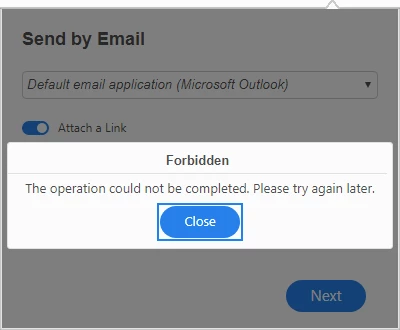
When trying to send a file by Email within Adobe acrbat standard DC - Forbidden error shows
  • May 12, 2020
  • 1 reply
  • 2474 views
 

When trying to send a pdf using the mail button within Adobe Acrobat Standard DC, this message shows.


If you sign out of the Adobe account, and sign back in, the function starts working again, however, after a few days it stops working.


is there a way to fix this permanently?

This topic has been closed for replies.

1 reply

Amal.
Community Manager
Community Manager
May 12, 2020

Hi Argenta


We are sorry for the trouble. As described you are getting the forbidden error when trying to send a file by email.


What is the version of the Adobe Acrobat Standard DC you are using? To check the version go to Help > About Adobe Acrobat Standard DC


A new version of Adobe Acrobat/Reader DC is now available, version 20.009.20063 please try to update the application. Go to Help > Check for updates and reboot the computer and check.

If it still doesn't work


Let us know how it goes


Regards

Amal

ArgentaAuthor
Participant
May 13, 2020
  • I am already on the latest version 20.009.20063
Amal.
Community Manager
Community Manager
May 13, 2020

Hi there


Thank you for sharing the version details.


Is this a behavior with a particular PDF file or with all the PDFs you try to share? Please try with a different PDF file and check. Also, try to turn off the option for 'Attach a link' as shown in the screenshot below and see if you still get the error.


You may also try to send the file via document cloud (https://documentcloud.adobe.com/link/home/) and see if that works for you.


Let us know how it goes


Regards

Amal