Exit
  • Global community
    • Language:
      • Deutsch
      • English
      • Español
      • Français
      • Português
  • 日本語コミュニティ
  • 한국 커뮤니티
0

Where does Tracker get reviewer metadata?

New Here ,
Apr 30, 2020 Apr 30, 2020

I am using Adobe Acrobat to do an online review (using our company server) of a PDF document. When I add a reviewer's email (to invite them to review the document) it later shows up in Tracker, which is where I can see the reviewer's name and job title. In some cases, the reviewer emails and job titles are shown in Tracker, in other cases the reviewer email is there in Tracker, but there's no other information, such as the job title or even their name (or alias) shown for those reviewers.

My question is, where does Tracker get this reviewer name and job title information? How do I get all of this information to show up for all reviewers.


BTW, I currently use Microsoft Outlook's Address book to select Contacts as reviewers. I have checked to make sure that all of the contacts that I use have a Name and Job Title listed. In some cases, the job title is there in Tracker, but it's slightly different than what's set in the contact.


Can anyone help me untangle this issue?
 

Thank you for your help and support. : )
469
Translate
Report
Community guidelines
Be kind and respectful, give credit to the original source of content, and search for duplicates before posting. Learn more
community guidelines
1 ACCEPTED SOLUTION
Community Expert ,
May 01, 2020 May 01, 2020
LATEST

Hi,


This is an integration between Adobe Acrobat and Micrososft.


In the case of MS Windows the "Contacts" default address book is found in this folder: C:\Users\currentUser\Contacts


That is a User account folder in its current directory and it is not a systemwide folder.


I am stressing this because the list of contacts will vary significantly amongst different user acccounts.


More importantly,  if you don't get in the habit of importing or  updating this folder frequently, whatever contacts  you have  updated in the Outlook's address book may have more current data than what you get in that Contacts Address Book..


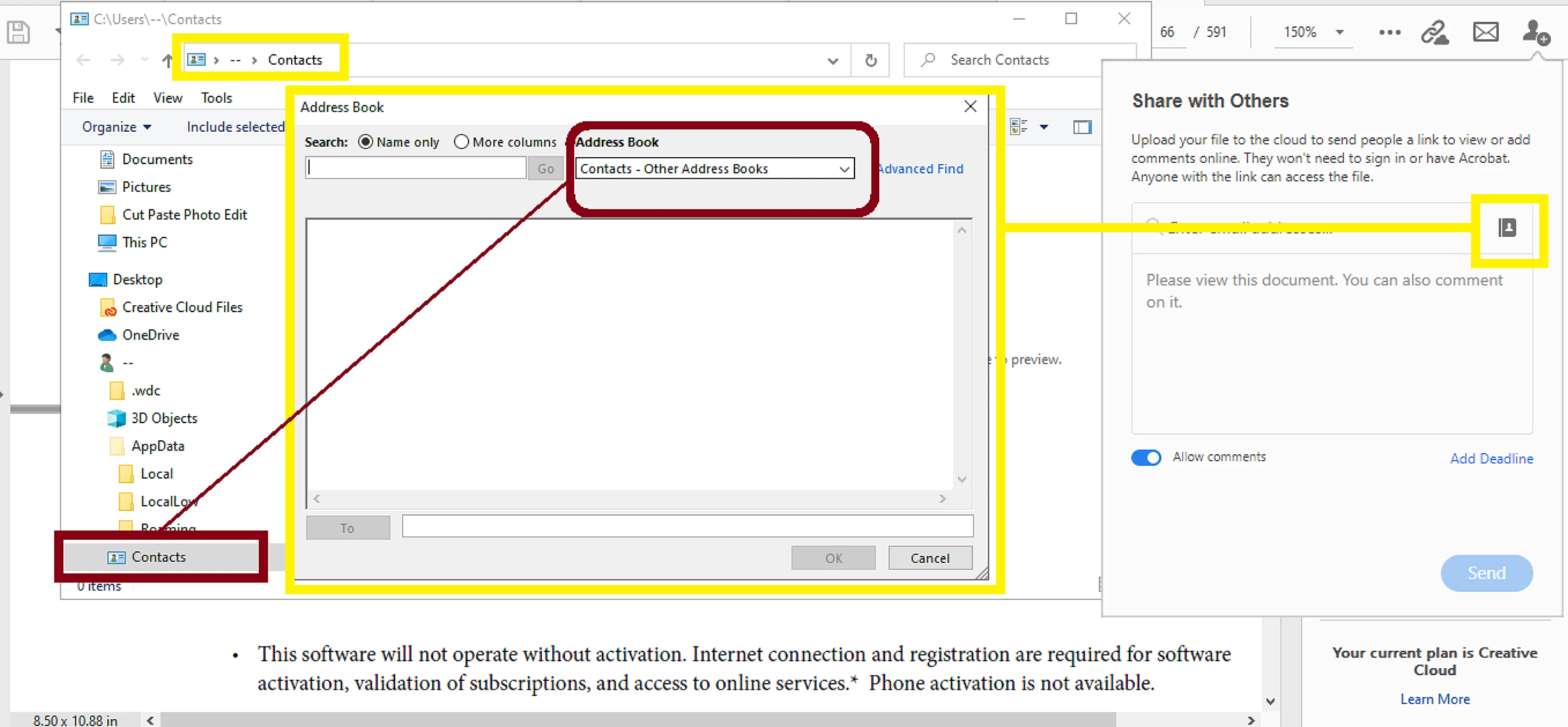
Below is a slide that I prepared for you. It illustrates how to use the address book import feature  in Acrobat but notice  how it associates the current address book to the "Contacts" folder in MS Windows  by default.


contacts.png


Notice the dropdown menu above in the slide where it says "Address Book". The default is always "Contacts" in Windows. But clicking in that dropdown menu allows you to select another  address book. Is this how you're doing it to switch to your Outlook Address Book?


A very quick and simple solution is to import your Outlook Address book to the Contacts folder so you avoid the hassle of manually switching  address books every time you need to use the tracker.


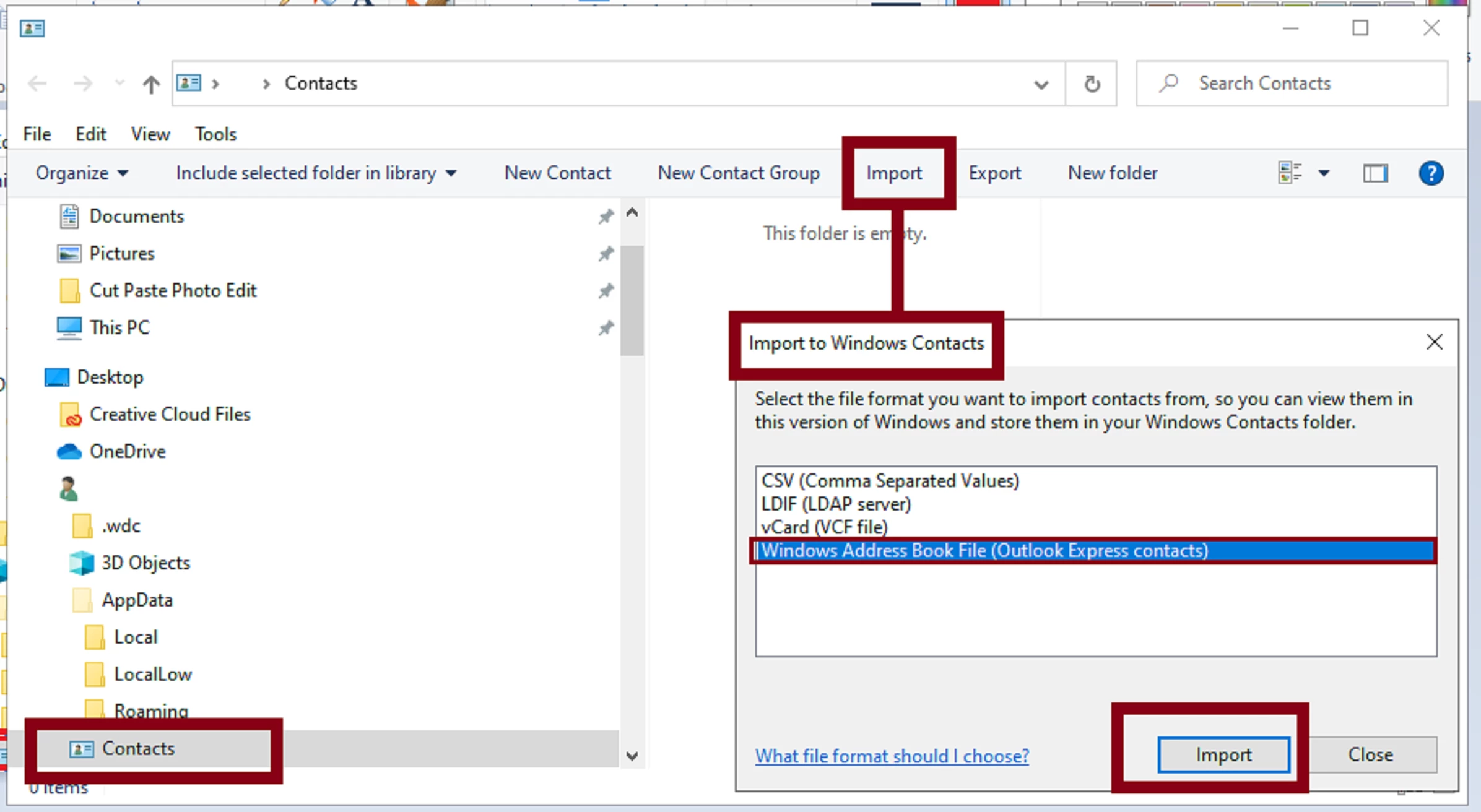
You can access the Contacts folder very quickly by right-clicking with your mouse on the  MS Windows logo in the task bar, and then select "Run" from the context menu. Then type in the pop up dialogue box "contacts" and click OK. It will open up next in your File Explorer. See next slide below:


contacts2.png

View solution in original post

Translate
Report
Community guidelines
Be kind and respectful, give credit to the original source of content, and search for duplicates before posting. Learn more
community guidelines
Community Expert ,
May 01, 2020 May 01, 2020
LATEST

Hi,


This is an integration between Adobe Acrobat and Micrososft.


In the case of MS Windows the "Contacts" default address book is found in this folder: C:\Users\currentUser\Contacts


That is a User account folder in its current directory and it is not a systemwide folder.


I am stressing this because the list of contacts will vary significantly amongst different user acccounts.


More importantly,  if you don't get in the habit of importing or  updating this folder frequently, whatever contacts  you have  updated in the Outlook's address book may have more current data than what you get in that Contacts Address Book..


Below is a slide that I prepared for you. It illustrates how to use the address book import feature  in Acrobat but notice  how it associates the current address book to the "Contacts" folder in MS Windows  by default.


contacts.png


Notice the dropdown menu above in the slide where it says "Address Book". The default is always "Contacts" in Windows. But clicking in that dropdown menu allows you to select another  address book. Is this how you're doing it to switch to your Outlook Address Book?


A very quick and simple solution is to import your Outlook Address book to the Contacts folder so you avoid the hassle of manually switching  address books every time you need to use the tracker.


You can access the Contacts folder very quickly by right-clicking with your mouse on the  MS Windows logo in the task bar, and then select "Run" from the context menu. Then type in the pop up dialogue box "contacts" and click OK. It will open up next in your File Explorer. See next slide below:


contacts2.png

Translate
Report
Community guidelines
Be kind and respectful, give credit to the original source of content, and search for duplicates before posting. Learn more
community guidelines