


Participating Frequently
July 28, 2017
Answered

Why am I getting an error message when trying to combine files into one PDF file?

  • July 28, 2017
  • 11 replies
  • 181044 views

When I select multiple PDF files and try to combine them into one document, I get a message that "Adobe Acrobat has encountered and unidentified error" and no file is being created. This problem has only recently started as I have been able to merged documents in the past.
Correct answer Pablo3307757882fo

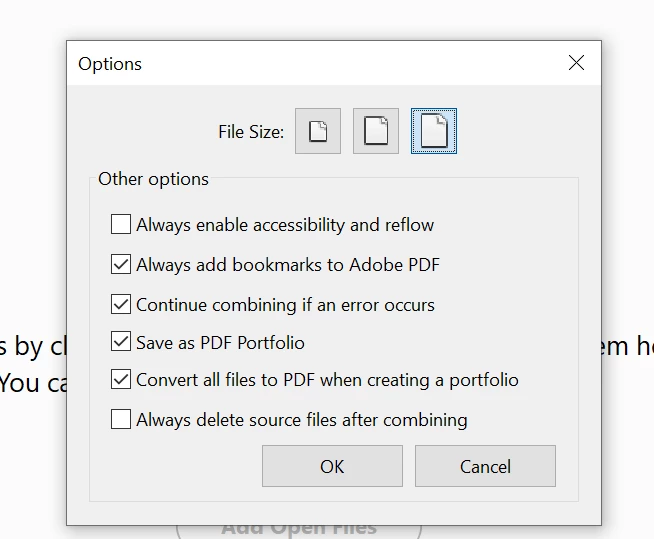
ONE QUICK EASY SOLUTION HERE, THANKS ME LATER


Sekect the following in Options


11 replies

try67
Community Expert
Community Expert
July 29, 2017

Acrobat version? OS version?

LBExjAuthor
Participating Frequently
July 31, 2017

Acrobat DC ... I'm using the Creative Cloud.

Participant
October 4, 2017

The problem was not software related.

The files I was trying to merge into a single PDF file were stored in a shared folder on an internal server. These files would not merged into a single PDF. Our working files have always been stored on a server, but only recently have started being a problem merging into a single PDF.

When I copy these files back to the the computer I am using, they merged just fine using Acrobat DC.

Thanks for your help ...

Les


I'm running into a similar problem and believe I have narrowed it down to the length of the file path.  It is not maxing out the OS file path length.  193 character file path will bomb, yet a file in the same location very similar file name except slight shorter, approximately 160 characters, will load combine without error.  Is your issue possibly length of file path?