


Participating Frequently
July 28, 2017
Answered

Why am I getting an error message when trying to combine files into one PDF file?

  • July 28, 2017
  • 11 replies
  • 181044 views

When I select multiple PDF files and try to combine them into one document, I get a message that "Adobe Acrobat has encountered and unidentified error" and no file is being created. This problem has only recently started as I have been able to merged documents in the past.
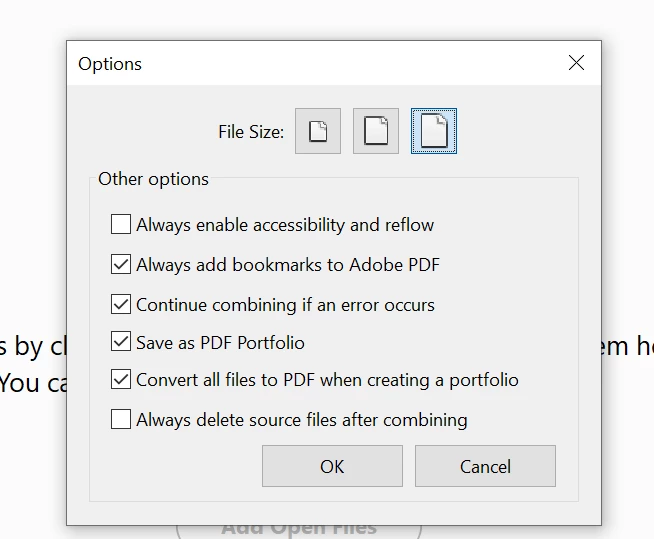
Correct answer Pablo3307757882fo

ONE QUICK EASY SOLUTION HERE, THANKS ME LATER


Sekect the following in Options


11 replies

try67
Community Expert
Community Expert
July 29, 2017

Acrobat version? OS version?

LBExjAuthor
Participating Frequently
July 31, 2017

Acrobat DC ... I'm using the Creative Cloud.

AnandSri
Community Manager
Community Manager
June 5, 2018

I just bought Adobe Acrobat and installed it on my Mac. I tried to combine files and I got an error message


Hello Markb,

We apologize for the inconvenience caused, as per the description above, you are not able to combine PDF files on Mac machine using Acrobat Pro DC, is that correct?

I have checked the records with your current Adobe ID(email) which you have used to sign-in on Adobe forums and found that the subscription of Acrobat Pro DC is canceled and inactive.

You can also check the details of your plan through Adobe.com>Manage Account>Plans and Products, or you can also refer to the Adobe article Manage your Creative Cloud membership

This is the reason you are getting the error message while combining any PDF files as you don't have any active subscription/license if Acrobat. To access the services, you have to subscribe to Acrobat license/subscription.

For plans and pricing, you can refer to Plans and pricing | Adobe Acrobat DC You can also contact Adobe support for the plans and pricing and to place a new order Contact Customer Care

Feel free to update this discussion for any further assistance.

Regards,

Anand Sri.