


Participating Frequently
May 23, 2017
Question

Why won't my signature image show?

  • May 23, 2017
  • 1 reply
  • 5192 views

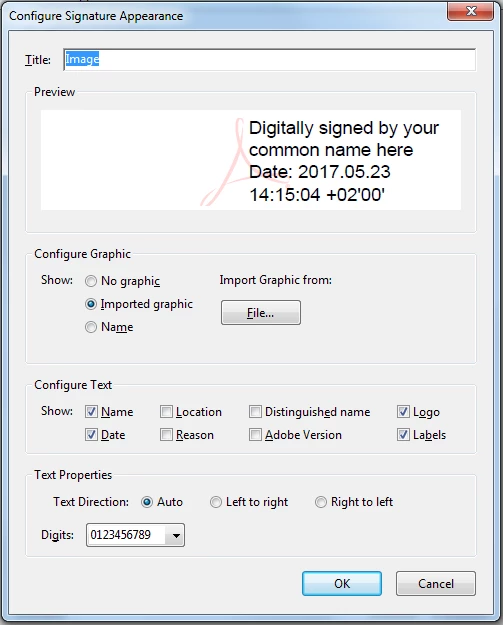
In Acrobat Reader DC I'm trying to setup a Digital ID with an image of a handwritten signature. I have a png and a jpg image of said signature which I want to import. When I go to Tool->Preferences->Signatures->Creation and Appearance->More I can find the method to make a signature just fine. The same goes for making a Digital ID certificate. However, when I try to add the image nothing but the additional text is shown in the preview, nor when I add the signature to the document. Please see the image below.

Anyone know what's going on?
This topic has been closed for replies.

1 reply

Bernd Alheit
Community Expert
Community Expert
May 24, 2017

Convert the image to a PDF file and import the PDF file.

Participant
June 11, 2020

This used to work to import image files such as png, jpeg has somethign changed?

Participant
January 6, 2022

Is the background still transparent with a .pdf image?


Unfortunately, you can only make a page sized pdf file, so your signature is a tiny thing at the top of your signature window. I agree, this is dumb especially since it works with the Fill and Sign option. There you can import a PNG or JPG.