

Answered
windows application error memory could not be read
When I open or print a pdf file, I receive the following error message:
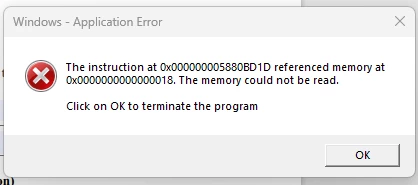

When I open or print a pdf file, I receive the following error message:
Hello @Melissa5DDE!
I hope you are doing well, and we apologize for the delayed response and the trouble.
Please ensure you have the latest version of Acrobat installed on the machine: 25.001.20432 Planned update, Mar 11, 2025. Check for any pending updates from the Menu > help > check for updates, install the updates, restart the app and the machine, and check. For more information, see this: https://adobe.ly/4bGls6u.
If the issue persists, please try the suggestions and let us know how it goes:
Open Acrobat and navigate to Preferences > Security (Enhanced). Uncheck the "Run in AppContainer" option, then restart Acrobat.
If the issue persists, try running the app in Compatibility Mode:
Thanks,
Anand Sri.
Already have an account? Login
Enter your E-mail address. We'll send you an e-mail with instructions to reset your password.
 AdChoices