


adminu31318584
New Participant
July 18, 2024
Answered

Windows Application Error Referenced Memory could not be written

  • July 18, 2024
  • 37 replies
  • 291668 views

Hello,


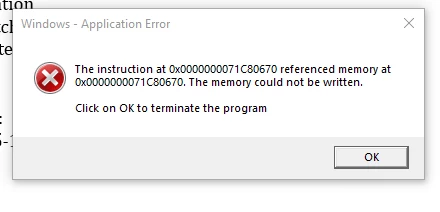
I am having an issue with Adobe Acrobat Standard license when opening all PDF's. When I open the PDF's, I get the error in the attached image. I have tried uninstalling and reinstalling Adobe twice, updating Windows, rolling back the version of Adobe to DC June 2024 (24.002.20857) from DC Jul 2024 (24.002.20933), SFC, DISM, checked compatibility settings on .exe of the app, turned off protection mode in Adobe. Nothing seems to pop up in event viewer or Process monitor. Mind you, clicking OK on this pop-up does not close the application and does allow the PDF to be edited normally. Any help would be much appreciated.


The error if you can't see the picture is:


Windows - Application Error

The instruction at 0x0000000071C80670 referenced memory at 0x0000000071C80670. The memory could not be written. Click on OK to terminate the program.
Correct answer adminu31318584

This issue got fixed over a remote session with an Adobe support Tech. The fix was uninstalling Adobe Acrobat, deleting all folders/directories named "Adobe" on Local drive (Program Files, PF x86, Common Files, etc...), then finally using the "Adobe Cleanup Tool" (this step isn't too important if you deleted everything). After that, you should be able to reinstall it and the pop-up will no longer appear. 

37 replies

New Participant
August 13, 2024

So ive tried all the possible listed solutions and work arounds. The program just won't stay open for more then 6 seconds. I have the windows error pop up show when i run adobe as an admin otherwise it will just close after 6 seconds. Using compatibility mode also doesnt help and i even added the optional updates for july and august. I can't even debug it since it closes to fast and im not able to generate a crash report any way.


Community Manager
August 13, 2024

Hi @Proto_65

Sorry for the troubled experience, and we appreciate your patience.
We know this issue, and the product engineering team is working on it. Please help us gather the logs from your machine: https://helpx.adobe.com/acrobat/kb/acrobat-diagnostics.html. Please make sure Procmon is selected. You can upload logs using this tool and share your Unique log ID with us. 

~Tariq

New Participant
August 5, 2024

I installed the patch 24.002.2096x Optional update, July 24, 2024 and no change. Still having issues, Windows 10 64 bit.

S_S
Community Manager
Community Manager
August 6, 2024

@grafixman1 Sorry for your experience! 


Would you mind trying out the steps mentioned by @AcroGuest111 and let us know if they work for you for the time being?


We are working on it, and the fix should be live soon.


-Souvik

New Participant
August 5, 2024

I've been getting the same error, using Adobe Acrobat Standard. I downloaded the latest update (July 24, 2024), and the issue persisted.


There were some posts about this issue from over 5 years ago, and the solution offered then (updated slightly) fixed it for me. It's much easier that uninstalling / reinstalling the app:


1. Find your Adobe Acrobat program.

2. Right Click --> Properties.

3. Select Compatability tab.

4. Click on Run Compatability Troubleshooter.

5. Select Try Recommended Settings.


That's it. Hope it works for you.

New Participant
January 3, 2025

This older solution fixed the issue for me without having to go through the trouble of using the first solution suggested by Adobe. Thanks AccroGuest111

Participating Frequently
August 2, 2024

Complete uninstall and reinstall does fix it but takes too long.

Quick workaround fixed it for me was setting acrobat to compatibility mode win7. Again... this is a workaround at best. Not a solution.


Participating Frequently
August 2, 2024

I have done a clean install and also installed it clean in a VM.


The issue did not resolve for me - surprised the clean VM also presented the issue.

adminu31318584
New Participant
August 2, 2024

Which installer did you use? I used AcrobatDCUpd2300820533.msp - This was the reinstalled version that seemed to fix the issue.

Participating Frequently
July 26, 2024

Adone just posted this update, 9 days after the one that gave some of us grief.  It appears to have resolved the issue for me!


24.002.2096x Optional update, July 24, 2024

Known Participant
July 26, 2024

They must of been feeling FOMO with Crowdstrike!

New Participant
July 25, 2024

Same issue here. My user is going to wait until the next update to see if it corrects.

Participating Frequently
July 26, 2024

I noticed they just dropped an update - 9 days after the previous one.. maybe it's to fix our issue :


24.002.2096x Optional update, July 24, 2024

New Participant
July 22, 2024

Same issue here exactly.  All of my Windows Acrobat (DC) users are receiving this message since last week.

adminu31318584
adminu31318584AuthorCorrect answer
New Participant
July 22, 2024

This issue got fixed over a remote session with an Adobe support Tech. The fix was uninstalling Adobe Acrobat, deleting all folders/directories named "Adobe" on Local drive (Program Files, PF x86, Common Files, etc...), then finally using the "Adobe Cleanup Tool" (this step isn't too important if you deleted everything). After that, you should be able to reinstall it and the pop-up will no longer appear. 

New Participant
July 8, 2025

I uninstalled Adobe reinstalled Adobe still have the issue 7-7-2025.  When will there be a fix for this issue?


Still having this issue on version 25.001.20531

" the instruction at 0x00007FFF4B94D24D referenced memory at 0x0000000000000018. The memory could not be read."