


adminu31318584
New Participant
July 18, 2024
Answered

Windows Application Error Referenced Memory could not be written

  • July 18, 2024
  • 37 replies
  • 291668 views

Hello,


I am having an issue with Adobe Acrobat Standard license when opening all PDF's. When I open the PDF's, I get the error in the attached image. I have tried uninstalling and reinstalling Adobe twice, updating Windows, rolling back the version of Adobe to DC June 2024 (24.002.20857) from DC Jul 2024 (24.002.20933), SFC, DISM, checked compatibility settings on .exe of the app, turned off protection mode in Adobe. Nothing seems to pop up in event viewer or Process monitor. Mind you, clicking OK on this pop-up does not close the application and does allow the PDF to be edited normally. Any help would be much appreciated.


The error if you can't see the picture is:


Windows - Application Error

The instruction at 0x0000000071C80670 referenced memory at 0x0000000071C80670. The memory could not be written. Click on OK to terminate the program.
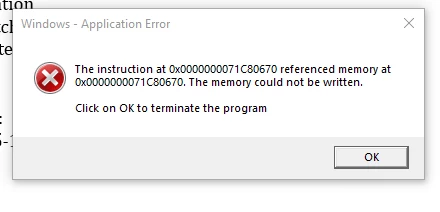
Correct answer adminu31318584

This issue got fixed over a remote session with an Adobe support Tech. The fix was uninstalling Adobe Acrobat, deleting all folders/directories named "Adobe" on Local drive (Program Files, PF x86, Common Files, etc...), then finally using the "Adobe Cleanup Tool" (this step isn't too important if you deleted everything). After that, you should be able to reinstall it and the pop-up will no longer appear. 

37 replies

New Participant
July 22, 2025

Disabling New Acrobat and uninstall/reinstall, cleanup has not worked. The only thing that has worked is running Adobe in Windows 8 compatability mode. It makes the window look a bit off if using dark theme, but it works for now as a band-aid. I am only seeing this issue on W11 machines. Hopefully Adobe comes up with a permanent fix here soon.

New Participant
July 17, 2025

Same problem here, started right after a Windows 11 upgrade for a user.

New Participant
July 17, 2025

Hey Adobe please get it together!! It's very annoying when I have this box pop up 50+ times a day

New Participant
July 16, 2025

Same issue.  Started last week.  


New Participant
June 2, 2025

Is there a resolution for this yet? Been having this problem on one device about a month ago, and now I got a brand new laptop and the same issue right from the start.

New Participant
July 14, 2025

Not sure if you are receiving this error from opening any PDF file, or only if you open PDF attachments from the new outlook, but if it is giving you this error when opening PDF attachments from new Outlook, try installing the 32 bit version of Adobe acrobat instead of the 64 bit version, which is standard. 


By installing the 32 bit Adobe Acrobat version, we were able to resolve this for our users when opening attachments from the New Outlook on Windows 11 machines. Download the 32 bit version from this adobe page. https://helpx.adobe.com/acrobat/kb/acrobat-dc-downloads.html

New Participant
July 16, 2025

This worked!!!  Thank you so much for the suggestion!!

New Participant
March 27, 2025

Hey guys,

I'm a helpdesk technician and a bunch of my users just started experiencing this. I was able to resolve the issue by disabling new acrobat.

New Participant
March 28, 2025
How did you do that? Any details would be very helpful
New Participant
March 28, 2025

matto47661321
New Participant
March 26, 2025

I just ran into this issue with a user using the 25.x.x version on a new Windows 11 laptop.  I tried the Compatibility Troubleshooter and it errored out.  Just for fun I set it to Windows 8 compatibility and the error is gone. 

New Participant
March 27, 2025
Where did you find this option?
New Participant
March 31, 2025

Find adobe application > right click > properties > compatibility tab > compatibility mode > select checkbox and make sure Windows 8 is selected. 

New Participant
March 13, 2025

Getting the same error it is March 2025, no fix from ADOBE? 

New Participant
March 18, 2025

I also have multiple users getting this error when opening Adobe.  They are able to click ok and still use the application however.


New Participant
February 27, 2025

We're still seeing this across our organization as well. It's interesting to say the least that this problem has existed at least since July 2024 and still isn't fixed.

New Participant
February 14, 2025

I've got two uses who have the same error code coming up.  I tried a Windows reset on the one user and this is what they are still getting a few days later. Version 24.005.20399 64 bit 


 Any assitance would be helpful. I seen a few different solutions some seem to work and some don't. Just looking to see if there are any additional temporary work arounds of if there are other solutions out there or even an update from Adobe to correct this.

New Participant
January 10, 2025

We had this issue back in August 2024, and update 2024.003.20112 in September resolved the issue.  The issue has returned again just a few days ago.  We are on version 2024.005.20320

Do you have an ETA when the next release will contain this fix?  

New Participant
January 14, 2025

Replying becuase we've started to get users with this same error. Hopefully a fix comes about soon.