


Known Participant
February 17, 2017
Question

Windows Cryptographic Service Error 1400 In Adobe Reader DC When Using Signing Certificate

  • February 17, 2017
  • 1 reply
  • 8528 views

Hi

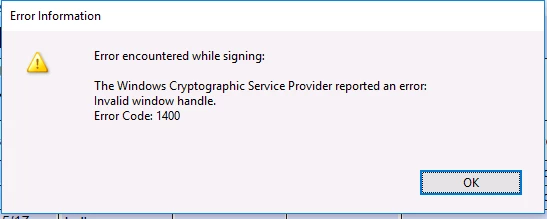
Our organization utilizes smart cards for authentication.  The smart cards contain SHA256 certificates that can be used for digital signing with Adobe Acrobat/Reader.  We have encountered a number of instances recently where users receive the following error when attempting to use a certificate on the smart card to digitally sign a PDF document.

Windows Cryptographic Service Provider reported an error: Invalid Window Handle.  Error Code: 1400

While we are still in the process of investigating the issue, we have not been able to identify any underlying cause or commonality such as a particular document exhibiting the issue.  It does seems like the issue is resolved by restarting the workstation, but we're not 100% on that yet as we have not tried restarting in every case.  Any insight on this issue would be greatly appreciated.

Thanks

Josh
This topic has been closed for replies.

1 reply

Adorobat
Community Manager
Community Manager
February 18, 2017

Hi joshbilsky,

Could you please confirm the version of Acrobat/Reader installed on the machine?

Which Windows Operating System running on the machine-7/8/10?

Known Participant
February 22, 2017

Hi, we're using Reader DC Classic 2015.006.30279 on Windows 10 Anniversary 10.0.14393.  The problem happens intermittently so it's difficult to isolate the cause.  When the problem occurs, the user is prompted to enter the smart card PIN as normal but the 1400 error is returned and the document is not signed.  Also, we're not using any 3rd party smart card middleware like ActivClient, just the built-in Windows middleware.

Thanks

Josh

Adorobat
Community Manager
Community Manager
February 23, 2017

Hi joshbilsky,

Could you please try installing the update from the following link and see if that works?

15.006.30280 Optional update— Acrobat and Adobe Reader Release Notes