

Answered
Windows desktop files not displaying
Windows desktop files and folders do not display properly in Acrobat. Sometimes some of them show up, but most of the time most do not. Anyone else experience this issue and if so know of a solution?

Windows desktop files and folders do not display properly in Acrobat. Sometimes some of them show up, but most of the time most do not. Anyone else experience this issue and if so know of a solution?
Hi MorganWW,
Sorry for the delay in response.
I hope you already have found an answer to your question. If you open Acrobat and try to open a file in Acrobat, on the lower right corner there is a drop drown allows you to filter between PDF files or all files. Please try toggling between the options and let us know if that helps.
Also, launch Acrobat>Edit>Preferences check the highlighted preferences are un-checked from preferences.
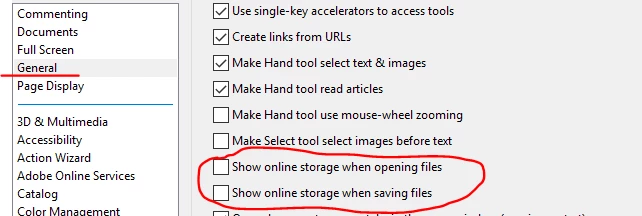
-Tariq Dar
Already have an account? Login
Enter your E-mail address. We'll send you an e-mail with instructions to reset your password.
 AdChoices