


mariam33911673
New Participant
February 12, 2020
Answered

Word is running into problems with pdfmaker.officeaddin add in.

  • February 12, 2020
  • 3 replies
  • 18791 views

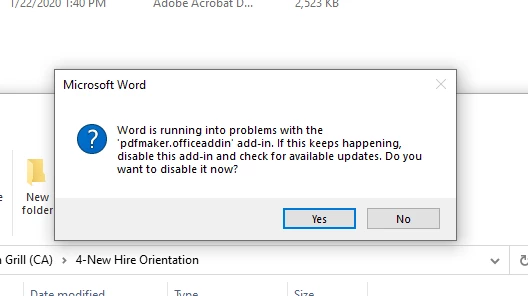
Word is running into problems with the 'pdfmaker.officeaddin' add-in. If this keeps happening, disable this add-in and check for available updates. Do you want to disable it now? <-this This is the error I keep getting when I mail merge from Word to adobe pdf using the add-in feature. Please help resolve the error
This topic has been closed for replies.
Correct answer JR Boulay

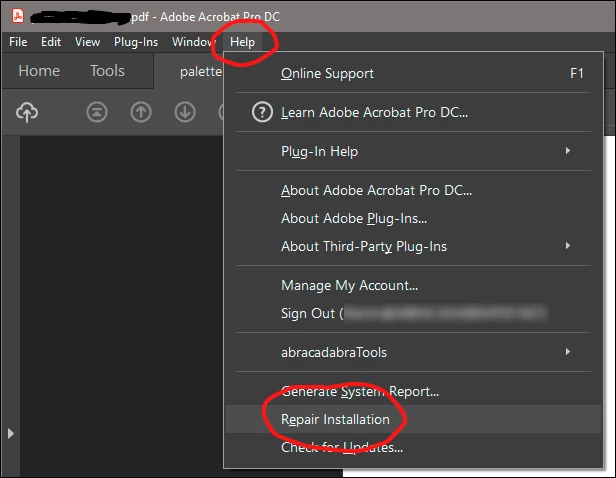
See capture:


3 replies

JR Boulay
JR BoulayCorrect answer
Community Expert
February 13, 2020

See capture:


Acrobate du PDF, InDesigner et Photoshopographe
Bevi Chagnon - PubCom.com
Brainiac
February 13, 2020

JR's advice above should correct the problem.

But sometimes we've found that it is an incompatability between Word and the Adobe PDF Maker plugin, especially when one program is updated but not the other.

Updating both software programs solves the problem. (Since Adobe PDF Maker is installed with your copy of Acrobat Standard/Pro, then updating Acrobat itself will also update PDF Maker.)


|&nbsp;&nbsp;&nbsp;&nbsp;Bevi Chagnon &nbsp;&nbsp;|&nbsp;&nbsp;Designer, Trainer, &amp; Technologist for Accessible Documents ||&nbsp;&nbsp;&nbsp;&nbsp;PubCom |&nbsp;&nbsp;&nbsp;&nbsp;Classes &amp; Books for Accessible InDesign, PDFs &amp; MS Office |
New Participant
February 23, 2024

Upgrades to both apps, repair installations, wiped of app and fresh installs, etc. Nothing has worked for me. If you happen to have any other suggestions, it would be greatly-appreciated.

Inspiring
February 13, 2020

This is somthing you better ask Microsoft. It is clearly a Office add-in, has noting to do with Acrobat.

try67
Community Expert
February 13, 2020

Not true. The PDFMaker plugin is a part of Adobe Acrobat.

try67
Community Expert
February 13, 2020

What's your version of Acrobat, Office and OS?

New Participant
August 12, 2022

My version of adobe is 20.3 30381.10381 and my version of Word is 2207.  The 'repair installation' fix didn't work on my machine.  It's only one word doc that this isn't working on.