


Known Participant
October 7, 2024
Question

Workaround needed for "Print" Action limitation in Action Wizard

  • October 7, 2024
  • 2 replies
  • 1250 views

Hello,


I need a workaround for the "Print" Action limitation which does not allow me to "Specify settings". 
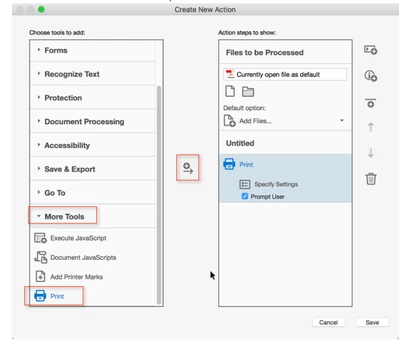
Instead, when I click on the "Specify Settings", it says it will default to what my printer is set to:
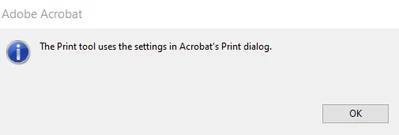
 

This is not helpful to me b/c I have over 100+ users who use this action wizard to process their files and I cannot tell them what setting to have. Plus, they would have to do this everytime which would be annoying. It would be great if the action wizard automatically sets the setting (File >Print and then select "Adobe PDF" for the Printers). This is the setting I would want it to resort to when a user uses my action wizard. Is there a work around for this? Note, I need it to save the pdf only in this manner: File >Print and then select "Adobe PDF" for the Printers. Can a javascript be written for this?


Thanks.

Sue


This topic has been closed for replies.

2 replies

suemo22Author
Known Participant
October 7, 2024

Very good question. I thought it would be confusing if I explained why. I am finding that if I don't re-save the pdf's as in this manner: File >Print and then select "Adobe PDF" for the Printers before running them through my automatic labeling action wizard, the headers and footers get removed. The only way I found I could avoid this was to re-save them as pdf's  File >Print and then select "Adobe PDF" for the Printers. Hence, I thought the best thing to do is to always re-save all of my pdf's before runnign them through my labeler action wizard.


I will try the javascript and get back to you. Thank you.


Sue

PDF Automation Station
Community Expert
Community Expert
October 7, 2024

What is the purpose of processing PDF files and printing them as PDFs?  Your answer will help me provide a solution.  Instead of Print for the action use Execute JavaScript and then use the following script:

var pp=this.getPrintParams();
pp.printerName="Adobe PDF";

pp.interactive=pp.constants.interactionLevel.silent;
this.print(pp);


Make sure you have the following settings in your Adobe PDF printer:


try67
Community Expert
Community Expert
October 7, 2024

This won't work as a silent process. You will be prompted to enter the file name for each file. There's no way around that.

try67
Community Expert
Community Expert
October 7, 2024

Yes it works.  I tested it.  You have to set your Adobe Printer preferences to select a default folder for the output and uncheck "View Adobe PDF results".


What file name is used for each file?