
Qed_HDI
Participating Frequently
October 2, 2023
Question

Working in Acrobat pro have a fillable PDF where I want one field set to auto populate

  • October 2, 2023
  • 1 reply
  • 905 views

I have a fillable PDF where there is a column where I want to be able to auto populate sequentially the rest of the boxes in that field set based on the first field entry.
This topic has been closed for replies.

1 reply

Thom Parker
Community Expert
Community Expert
October 2, 2023

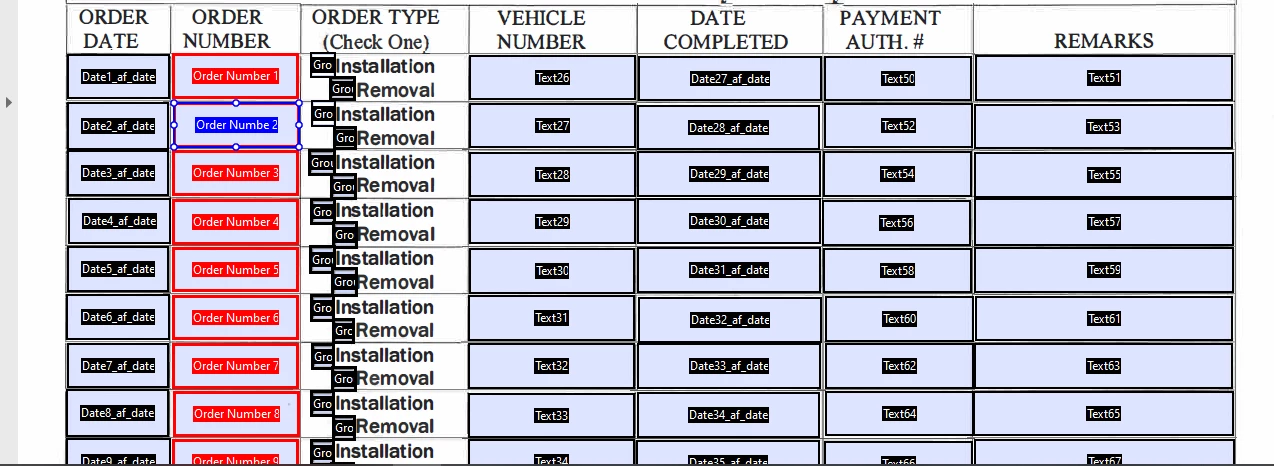
Yes, this is possible with a script. From the image I'm assuming that the Order Number column is the one you want automatically populated?  Will the user always be starting on the first line, or can the auto numbering start at any line?  Does the user enter the order number? or is it automatically set from some other source?


Thom Parker - Software Developer at PDFScriptingUse the Acrobat JavaScript Reference early and often
Qed_HDI
Qed_HDIAuthor
Participating Frequently
October 3, 2023

Would someone be able to show me an example of a incremental couter script? I have tried a few things that I found on the internet and I am wondering if it's just my implementation that is failing me.

Qed_HDI
Qed_HDIAuthor
Participating Frequently
October 3, 2023

The best approach is to use a Validate script on the "OrderNumber 1" field. Then make all the other OrderNumber fields read only. 


// Custom Validate script
if(Number.isInteger(Number(event.value))
{
   var nInc = Number(event.value);
   for(var i=2;i<=nRows;i++)
   {
       this.getField("OrderNumber " + i).value = ++nInc;
   } 
}
else
{
   event.value = "";
   app.alert("Entered Value must be an Integer");
}


Getting an error about bad syntax missing a ) after condition 3 at line 4....