


Participating Frequently
December 23, 2019
Question

3D Unicode character display problem

  • December 23, 2019
  • 1 reply
  • 1770 views

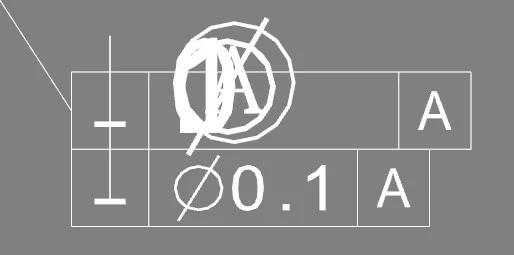
I'm having 3D character display problem in Acrobat Reader with symbol U+24B6.

When this character appears, all the text containing it is misplaced and has bad size.

The problem only occurs in Acrobat Reader, with Acrobat Pro the text is displayed correctly :

In Acrobat Reader :
In Acrobat Pro
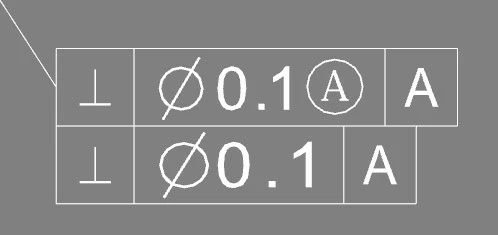
I'm using the same version for Reader and Pro (2019.021.20061)

What worries me is the difference of behaviour between Acrobat Pro and Acrobat Reader. This is problematic.

You can also notice different display for Unicode Character 'UP TACK' (U+22A5)

I dropped the pdf file I produced here : https://we.tl/t-7lCm7K4nHA

Please help.

Thanks

This topic has been closed for replies.

1 reply

Amal.
Community Manager
Community Manager
December 27, 2019

Hi Guillaumel


We are sorry for the trouble. As described above you are experiencing an issue with 3D Unicode character display.


Checking the document properties of the PDF file you have shared we are not able to see the PDF producer of the file.


We need some more information for a better understanding:


Have you created the PDF file or have you got the file from a different user? If you have created the file, was it created using a different application? Please share the steps you did to create the file?


We are here for help, Just need more information.


Regards

Amal


Participating Frequently
January 7, 2020

Hello Amal,


I've created this pdf file using our internal PRC based PDF Writer.

I guess something is wrong with what we write, but I have no solution to find out what.


Since Adobe Acrobat is the reference reader for 3D PDF, is there any tool to check the conformity of what we produce?
Have you got any hints for me or any recommended practices?


Thanks in advance

Guillaume

Participating Frequently
January 13, 2020

Hi Guillaume,


Thanks for sharing the details. Please make sure that all the fonts are embedded in the  PDF writer you are using to create the PDF.


For more details please use the steps provided in the help article (https://helpx.adobe.com/acrobat/using/pdf-fonts.html)


Let us know how it goes


Regards

Amal


Hello,

I've tried to embed a ttf font inside pdf and the to use it in the PRC, but it is still not used by PRC except if it is available on the computer.

From my understanding of PRC specification, it is possible to use a font which is available on the computer. If this font is not available, a default font can be specified otherwise MyriadPro will be used.

In the file I sent I call only Arial font in PRC (which by the way is not supposed to handle technical characters such as '⊥' or '⌀', but it does!)

My concern is why is it displayed differently between Acrobat Reader and Acrobat Pro? Does that mean that I produce something wrong or is it a bug in Acrobat Reader?

Is there any available tool that could help me if there is something wrong with the 3D PDF file I produce?


Regards

Guillaume