


Participating Frequently
September 18, 2023
Answered

Acrobat reader quick print not working

  • September 18, 2023
  • 19 replies
  • 31358 views

Hi Adobe,


I have been trying to get the quick printing function working again on Adobe Acrobat Reader. I have installed any updates, and still no change. Reinstalled the application and reset the printer within Windows. None of this has worked. After a long afternoon of troubleshooting, I have found the problem.


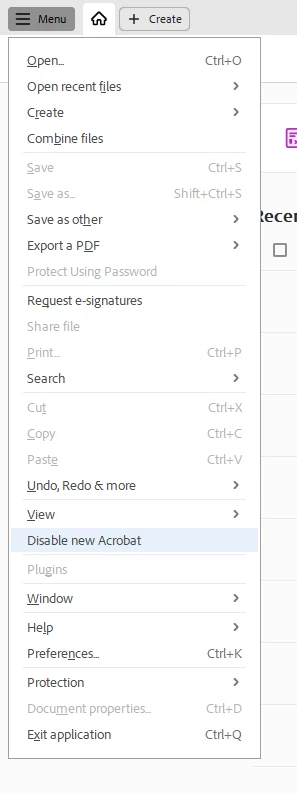
It has to do with running the latest version of Acrobat. If you click on the menu and scroll down until it says, turn off the latest version of Adobe Acrobat. Restart the application, and your problems will be resolved.


I hope this helps someone who is having the same problem.


Josh 
 

Correct answer abhisi

Hi Josh,


We have fixed this issue in the latest version (2023.006.20360) of Acrobat or Reader. Please upgrade Acrobat or Reader to the latest version by following the below steps:


Click on the MENU button in the top left corner > Help > Check for Updates.

Please confirm if the issue is fixed or not at your end after checking the issue on the latest version of Acrobat.


Thanks,
Abhishek Ranjan Singh

19 replies

New Participant
January 22, 2024

When I try to quick print, it says "The document could not be printed" and "There are no pages selected to print." Can anyone help?

New Participant
December 10, 2023
Screenshot_20231211-013154.png
abhisiCorrect answer
Adobe Employee
October 26, 2023

Hi Josh,


We have fixed this issue in the latest version (2023.006.20360) of Acrobat or Reader. Please upgrade Acrobat or Reader to the latest version by following the below steps:


Click on the MENU button in the top left corner > Help > Check for Updates.

Please confirm if the issue is fixed or not at your end after checking the issue on the latest version of Acrobat.


Thanks,
Abhishek Ranjan Singh

Participating Frequently
October 26, 2023

Hi Abhishek,

I have just tested it on a computer with this problem. I am pleased to say it works!

Thank you for all your help on this.

Many thanks,

Josh

Adobe Employee
October 26, 2023

Hi Josh,


Great to know that 🙂


Thank you so much for helping us find the root cause of the problem and sharing the logs multiple times.

It means a lot 🙂 🙂


Thanks,

Abhishek Ranjan Singh


New Participant
October 24, 2023

wow, i have been messing with this for a while now and this worked. thank yuou so much.


New Participant
October 19, 2023

Kudos Josh! Thanks for this remedy. You're a life saver. 

I do not understand how Adobe released the new version without testing the quick print functionality.

New Participant
October 17, 2023

Thank you so much for posting this! 

New Participant
October 12, 2023

Thank you!!

New Participant
October 11, 2023

Thank you for posting this, I was having the same issue and it is now fixed. I hope it stays fixed.

Adobe Employee
September 27, 2023
Hi Joshua27140953w9bi,
 
Thanks for reporting this to us.
 
I have tried the same workflow and issue is not reproducible at my end.
 
Could you please provide the following information:
 
1) Has the problem started happening recently, or has it been going on for a while.
2) What's the version of Acrobat Reader you are using. You can check it by clicking on  
(HELP) TOP LEFT CORNER > ADOBE ACROBAT READER 
 
3) Is it happening with every PDF files and some set of PDF files. Please share any one of them.
4) It will be great if you can provide a video of the issue that’s happening at your end.
5) Is the issue happening every time, or is it happening intermittently. 
 
Thanks,
Abhishek Ranjan Singh
Participating Frequently
September 28, 2023

Hi Abhishek Ranjan Singh,


The issue started recently for all PDF files.


I have attached a video showing the problem and a screenshot of the version of Adobe Acrobat. You can't see the printer in the video, but if it printed, you would hear it because it is right next to me.


Many thanks,


Josh  


Adobe Employee
September 28, 2023

Hi Josh,


Thank you for the quick reply. I have tried the same workflow, but the issue is
not reproducible at my end.


Could you please share some more information to debug the issue further.

1. Please share the PDF that you have used in the video.
2. What's the behaviour when you are quick-printing any PDF that is available on your system.
Please follow the below steps:

Do not open the PDF in Acrobat. Just right-click on any PDF icon and then click on print to check whether it is getting printed or not.
Please share the observation at your end.


3. Is protected mode enabled or not? You can check by following the below steps.

Open Preferences (CTRL + K) > Security (Enhanced) > Enabled Protected Mode at Startup


4. Which printer are you using at your end, and how did you add that printer to your system.
5. Is your printer selected as the default printer or not. Please confirm.


Thanks,
Abhishek Ranjan Singh


New Participant
September 27, 2023

THANK YOU JOSH!!!! Your solution worked!