


Known Participant
March 13, 2024
Answered

Adobe Acrobat Reader Update Failed Error 130200

  • March 13, 2024
  • 9 replies
  • 22959 views

Currently I have Adobe Acrobat Reader Continuous Release Version 2023.008.20555, 64-bit.

Starting last February my updates failed with Error 130200. This is not only one computer, but all computers that I take care of.

Last February I downloaded the update and ran it manually. That worked.

Now I see that there is a new update available when I check for updates. When I click Download and Install I immediately get this message:
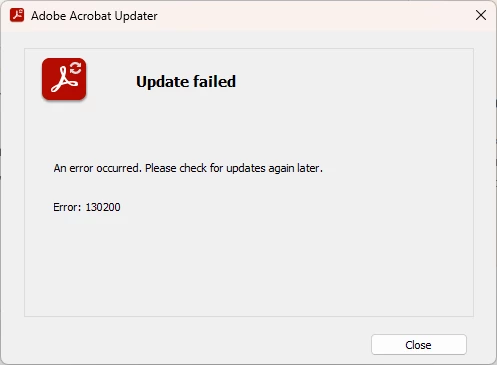
This is happening on both Windows 10 and Windows 11.


This topic has been closed for replies.
Correct answer Amal.

Hi there


Hope you are doing well and thanks for trying out the suggestion.


I have raised this issue with the engineering team and they have purged the file again, would you mind trying to update the application from the help menu > check for updates and see if its working as expected. 


Let us know if you experience the issue again.


~Amal

9 replies

Participating Frequently
March 29, 2024

Update today March 28, 2024, installed successfully.  Thank you ABAMBO. Using Acro Cleaner between uninstall and reinstall must have been the answer.

https://www.adobe.com/devnet-docs/acrobatetk/tools/Labs/cleaner.html


FuzzyJohnAuthor
Known Participant
March 30, 2024

Not really. Adobe actually fixed the problem. I was able to update from Help | Check for updates without uninstalling, cleaner and reinstalling.

Thank you LeoUpdaterX (with whom I worked outside this thread) to pass my findings to Adobe. Thank you to Amal too.

Participating Frequently
March 30, 2024

Thank you FuzzyJohn for interceding. I'm glad it's finally fixed. 

Cheers....

New Participant
March 25, 2024

I was receiving this same error on a Windows 10 system. When I went to check the updates page manually I noticed that I was two optional and one planned update behind. My system was runing 20533. I downloaded the next update in the sequence and it updated to 20555. Next I updated viah the adobe reader Help/Check for Updates and it updated successfully to 20615.  In my case manually updating to the next patch in sequence solved my problem.


https://www.adobe.com/devnet-docs/acrobatetk/tools/ReleaseNotesDC/index.html

Amal.
Community Manager
Amal.Community ManagerCorrect answer
Community Manager
March 26, 2024

Hi there


Hope you are doing well and thanks for trying out the suggestion.


I have raised this issue with the engineering team and they have purged the file again, would you mind trying to update the application from the help menu > check for updates and see if its working as expected. 


Let us know if you experience the issue again.


~Amal

Participating Frequently
March 26, 2024

Good afternoon

I'm very happy to see that Adobe is finally involved. I have rec'd failures to the 3 most recent updates, only curing the problem by uninstalling and reinstalling the Reader each time.

Hope you can get this error 130200 fixed.

Thank you...

New Participant
March 25, 2024

Getting the same error, on two different laptops, running Windows 11, as of 25Mar/24. Unable to launch certain documents. Checking for Updates, from within the Application also does not work. Get the same error, whether trying to run update from within the app, or directly trying to download, from the Adobe site. Currently Running Adobe Reader Version 2024.001.20604 64-bit 

cgececi
New Participant
March 23, 2024

Don't stress, Adobe is testing our patience.😁

Amal.
Community Manager
Community Manager
March 25, 2024

Hi there,


Please try to install the patch manually from the link: https://www.adobe.com/devnet-docs/acrobatetk/tools/ReleaseNotesDC/index.html and see if that works.


Let us know how it goes.


~Amal

FuzzyJohnAuthor
Known Participant
March 25, 2024

Hey Amal, in the case of error 130200, installing the patch manually works. After that the updater can check for updates normally as long as there are no other updates. If a new update is available, the updater will fail again with error 130200.

It looks to me like the issue revolves around the ArmManifest3.msi file being downloaded with a length of 0 bytes at the beginning of the update process from https://armmf.adobe.com/arm-manifests/win/ArmManifest3.msi. I tried to manually download this on different computers, including a Windows 7 virtual machine and my Samsung Galaxy S24 Ultra phone from that URL and in all cases I end up with a ArmManifest3.msi file 0 bytes long.

New Participant
March 22, 2024

Same issue here for the last two days.  Have Adobe Acrobat Standard.  Updater keeps saying it failed "cannot establish a connection."

FuzzyJohnAuthor
Known Participant
March 21, 2024

Another update, another failure.

I found that in folder C:\Users\<username>\AppData\Local\Adobe\ARM\S, the file named ArmManifest2.msi has a length of 0 bytes and it is time stamped 2/12/2024 6:13 AM. I believe this file should not be 0 bytes in length. I also have no idea where this file is coming from. I remaned this file and tried to update again, which of course failed. I found that a new ArmManifest3.msi file was created, also with a length of 0 bytes, and... strangely... same time stamp as the file I renamed. I did the renaming of this file with the Updater Service stopped.

Update: I just realized that the ArmManifest3.msi file on all computers that I handle, besides having a length of 0 bytes, they all have the same time stamp. Where is this file coming from?

Participating Frequently
March 18, 2024

I have had the last 2 Reader updates fail. I serached the internet for a solution and dicovered that if I simply Uninstall the Reader, reboot my system, then dowmload and install Reader again, then I'm up to date. After the install, I check for updates to note that none are now available. 


This solution has worked to resolve both recent update failures.


Abambo
Braniac
March 18, 2024

That's exactly what I would suggest. You could run AcroCleaner between uninstall and reinstall. It may help to eliminate the cause of the repeated update failure. 


https://www.adobe.com/devnet-docs/acrobatetk/tools/Labs/cleaner.html


ABAMBO | Hard- and Software Engineer | Photographer
FuzzyJohnAuthor
Known Participant
March 18, 2024

I would take that with a grain of salt. Keep in mind that when you install Adobe Reader you will get the latest version, hence you have no updates during which the failure will/might happen.

New Participant
March 15, 2024

Same here, has anyone found a solution or work around? Im unable to download PDF files for my DJI Osmo Pocket 3 Mic


Participating Frequently
March 15, 2024

Can you please enable Updater verbose logging and provide log file?

  1. Set iLogLevel DWORD registry value to 1 in HKEY_LOCAL_MACHINE\SOFTWARE\WOW6432Node\Adobe\Adobe ARM\1.0\ARM
  2.  Make sure AdobeARM.exe process is not running (Use Task Manager)
  3.  Check for Updates from application Help menu, start update installation..
  4.  If you encounter error again, collect and send me (private message or upload somewhere and provide link) AdobeARM.log file from User Temp folder.
FuzzyJohnAuthor
Known Participant
March 16, 2024

AdobeARM.log file sent to you via PM.

Known Participant
March 14, 2024

Same thing here!