


Participating Frequently
July 1, 2021
Question

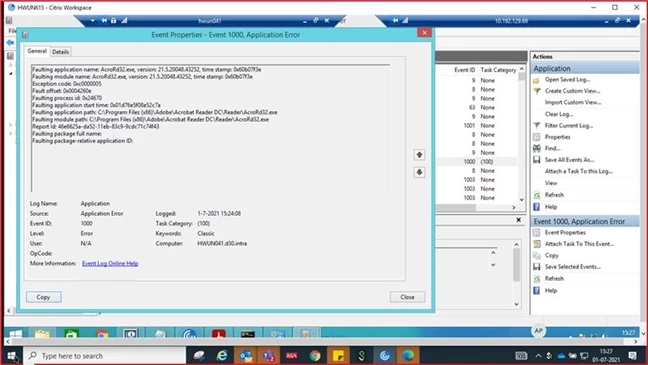
Adobe Reader DC Crashing with event Exception code: 0xc0000005 Fault offset: 0x0004260e

  • July 1, 2021
  • 2 replies
  • 25881 views

Log Name: Application
Source: Application Error
Date: 1-7-2021 15:24:08
Event ID: 1000
Task Category: (100)
Level: Error
Keywords: Classic
User: N/A
Computer: HWUN041.d30.intra
Description:
Faulting application name: AcroRd32.exe, version: 21.5.20048.43252, time stamp: 0x60b07f3e
Faulting module name: AcroRd32.exe, version: 21.5.20048.43252, time stamp: 0x60b07f3e
Exception code: 0xc0000005
Fault offset: 0x0004260e
Faulting process id: 0x24670
Faulting application start time: 0x01d76e5f08e52c7a
Faulting application path: C:\Program Files (x86)\Adobe\Acrobat Reader DC\Reader\AcroRd32.exe
Faulting module path: C:\Program Files (x86)\Adobe\Acrobat Reader DC\Reader\AcroRd32.exe
Report Id: 46e6625a-da52-11eb-83c9-9cdc71c74f43
 

Action taken:

Reinstalled with the latest version.

Tried various crash-based articles from Adobe & Google.

Workaround:

Reverted back to Adobe Reader 11 [old] version.


Please suggest the cause based on event logs.


2 replies

Participant
September 25, 2025

Still doing it in September 2025.


Maybe the devs should spend more time doing proper UAT before a PROD release, instead of adding Outlook plugins that you never asked for, are impossible to remove as they removed the "disable" option, and are just plainly annoying.


Typical bloatware path that most software companies go down, where the devs have to come up with new features that nobody wants so they keep their jobs.

Amal.
Community Manager
Community Manager
July 2, 2021

Hi Sajid


Hope you are doing well and sorry to hear that  the application is crashing with Exception code: 0xc0000005 and the only workaround is reverting to older version.


Would you mind sharing the workflow/steps you did that leads you to application crashing?


Please try to create a new test user profile with full admin rights in Windows and try using Acrobat Reader DC there and check.


If it still doesn't work, Please remove the application using the Acrobat Cleaner Tool - https://www.adobe.com/devnet-docs/acrobatetk/tools/Labs/cleaner.html , reboot the computer once and reinstall the application using the link - https://get.adobe.com/reader/enterprise/


Regards

Amal

Participating Frequently
August 2, 2021

Thank you for your response and time. 

We have checked and found that your proposed fix are not working even with the latest available Adobe reader DC version.

We have done Adobe S/W cleaup and also checked with elevated rights.

Could you please check and confirm what exactly the problem based on logs we shared.

We have few test machines where it is working without any problem, but some machines which are just getting hung.

Could you please also propose any further guidelines on this like pre-requisites etc.

Thanks.

Regards,

Sajid Ali

Participating Frequently
October 5, 2021

Hi Sajid,

While the engeneers are working very hard day and night to try and fix the issue with their latest update,

We found a solution in the mean time.

Download a previous version on the ftp.adobe.com ftp site

I took this one:

/pub/adobe/reader/win/AcrobatDC/2001320064


Then, download the update before your version from this website:

https://www.adobe.com/devnet-docs/acrobatetk/tools/ReleaseNotesDC/continuous/dccontinuousjuly2021.html#dccontinuousjulytwentytwentyone


I took AcroRdrDCUpd2100520058.msp


Then, install the old version, run the downloaded update, and follow this procedure here to disable automatic updates.

https://www.wintips.org/how-to-disable-automatic-update-in-adobe-reader-dc/


For us, this has fixed the issue, until Adobe gets their act together.

I wish support could provide actual solutions like I had to dig up for myself, wasting days of productivity instead of them providing this simple procedure as a work around.


Best regards.


Thank for the response.

We are not able to find and open the ftp site.


It says : redirecting to download.adobe.com and then error as below.

Not Found
The requested URL / was not found on this server.


Kindly suggest or share the alternate path.