


New Participant
August 16, 2024
Answered

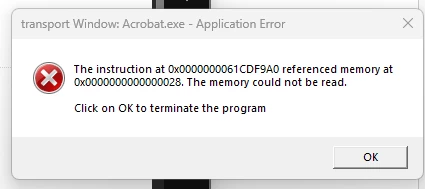
Adobe Reader - Memory could not be read 0x00000000......

  • August 16, 2024
  • 5 replies
  • 55300 views

I am getting an error, everytime I open a PDF or download one online. The file is still accessible and viewable but I keep getting an annoying error that won't go away despite deleting old adobe and reinstalling, also ive updated the security property settings and no fix.


Please help with this as it has been happening the past couple of days and it is very annoying, let me know if I can disable notifcaitons entirely


Correct answer default08ikzhbrrv3s

I found this on another Adobe Community Post and it worked for me today 3/28/25 ...


There were some posts about this issue from over 5 years ago, and the solution offered then (updated slightly) fixed it for me. It's much easier that uninstalling / reinstalling the app:


1. Find your Adobe Acrobat program.

2. Right Click --> Properties.

3. Select Compatability tab.

4. Click on Run Compatability Troubleshooter.

5. Select Try Recommended Settings.


That's it. Hope it works for you.

5 replies

New Participant
August 27, 2025

I have a similar problem, also with the new Outlook. 

S_S
Community Manager
Community Manager
August 28, 2025

Hi @Melodic_Ripple3189,


Hope you are doing well. Sorry for the trouble with using Acrobat.


We are aware of the issue, and the team is working on the fix.


I cannot commit to the exact timelines, but the issue is on top priority for now.


I request your kind understanding and patience while the team gets the fix live.


Regards,
Souvik.

New Participant
March 18, 2025

So Adobe are you ever going to fix this issue? The only way I got Adobe Acrobat Standard  2025.001.20432 (64Bit)  to work on a Windows 11 24h2 was to run Adobe Acrobat Standard in compatibility mode. Not a very secure option!! I am guessing Adobe does not care much about security!

JR Boulay
Adobe Expert
October 25, 2024

[MOVED TO THE ACROBAT READER DISCUSSIONS]

Acrobate du PDF, InDesigner et Photoshopographe
Community Manager
October 11, 2024

Hi @gravytrain31 @Mohammed26254782itdo


Sorry for the delayed response and troubled experience. This known issue was fixed in the September product update release. Ensure your application is updated with the latest update patch. To check for pending updates, launch Acrobat > Help > Check for Updates. 


If you’re still encountering this issue, I encourage you to share any additional details or steps that led to the problem. This will assist us in diagnosing and fixing the issue more effectively.


Thank you for your patience and understanding as we work to make things right.


~Tariq

New Participant
October 25, 2024

I checked for updates and there are none. I'm still getting the below error when opening from Outlook New.  I'm using Adobe Acrobat Pro, verson 2024.003.20180  64bit 


New Participant
January 6, 2025

Hi @Mohammed26254782itdo @Nikodem Korzeniewski @agentis,


Hope you are doing well. Sorry for the trouble. 


We have forwarded the log ID to the dev team for further investigation.

While the team looks into it, here are two suggestions you might want to try:

1. Go to Acrobat-> Preferences-> Security (Enhanced)-> uncheck the checkbox "Run in AppContainer"-> Restart Acrobat.


2. If the above doesn't work, try running the app in Compatibility Mode. To do so, right-click the app icon-> properties-> compatibility-> check the box saying "Run the app in Compatibility mode for"-> select Windows 8 in the dropdown-> Apply-> OK.


Let us know if this works.


-Souvik


This also worked for me, suggestion 1!

New Participant
September 17, 2024

I face the same issue specifically when opening the PDF from the new outlook