


New Participant
March 14, 2025
Answered

Adobe Reader not able to Attach PKCS#11 module on MAC

  • March 14, 2025
  • 2 replies
  • 6052 views

Have installed Adobe Reader on my MacBook Pro 2,3 GHz Dual-Core Intel Core i5, Ventura 13.7.4. Trying to add PKCS#11 Modules so I can sign legal document. Options for "Attach module", "Detach module" and "Refresh" are in light gray color and not operative. Tried to fix the problem with support of Certilia in Croatia, but they told me that this is Adobe issue on Mac OS with latest update and quit a lot of users having same issue for apx. last 50 days. Can You help?
Correct answer juan_5790

Hi juan_5790,


Thank you for reaching out, and sorry about the trouble caused.


We did not receive the information to investigate this behavior further. Could you please share the logs so we can investigate this behavior further? To collect the logs, download and run the Log Collector tool. Make sure to select all log options and attempt to reproduce the issue. After that, close the Log Collector tool; it will generate the logs with a log ID. Please share this log ID with us for further investigation.


Feel free to let us know if you need any help.


Thanks,

Meenakshi


Fun fact community. 


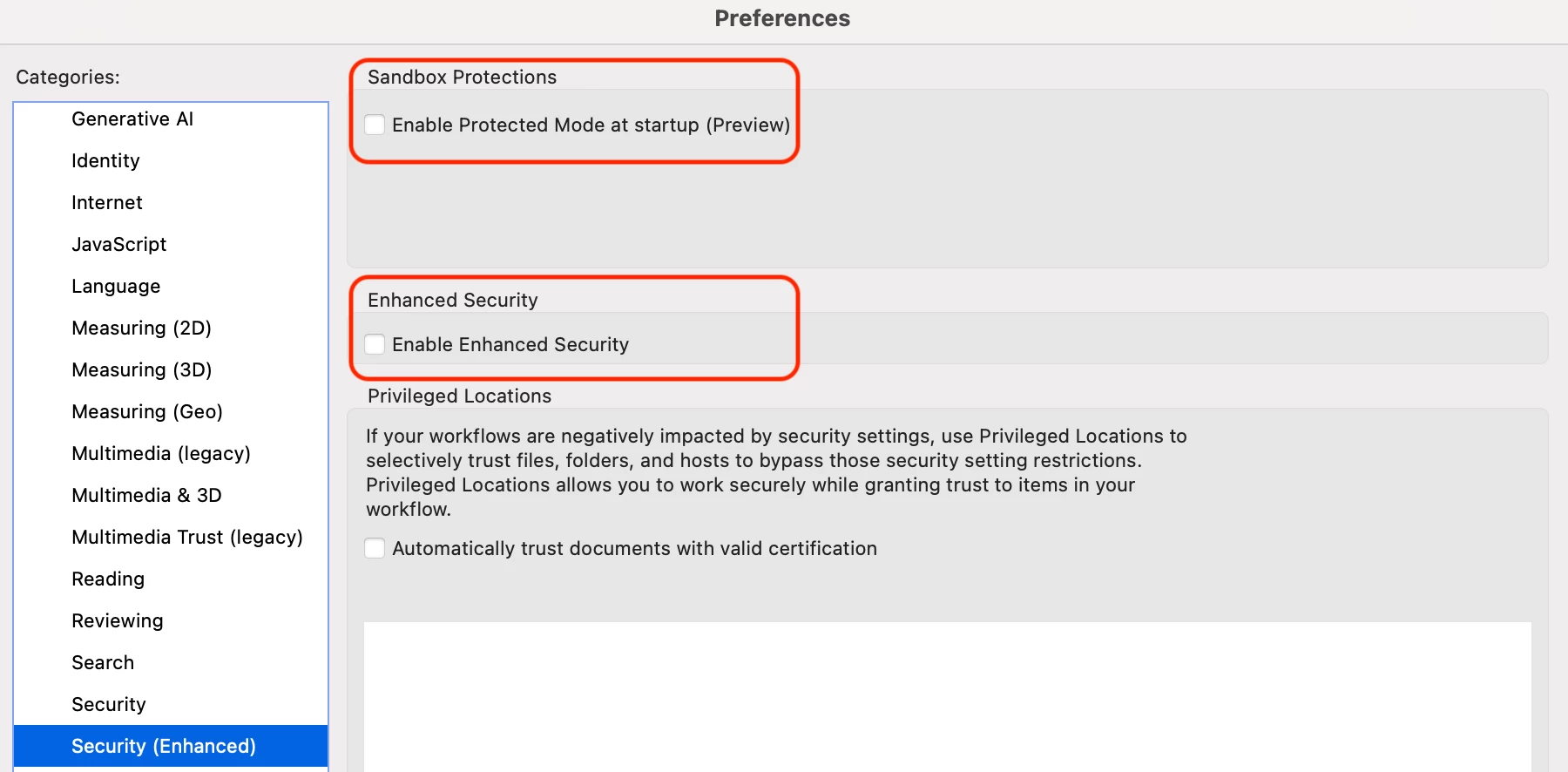
Problem got solved by unchecking the enhanced security protections. Once you unchecked those 2 protections, close and re-open adobe and that will do the trick.

Please see attached screenshot for reference. 

Can't understand how adobe team could not point us to the right direction. 


2 replies

JR Boulay
Community Expert
May 4, 2025

[MOVED TO THE ACROBAT READER DISCUSSIONS]

Acrobate du PDF, InDesigner et Photoshopographe
creative explorer
Community Expert
March 17, 2025

@ivana_4012 It appears you're encountering a known issue with Adobe Reader on macOS Ventura, specifically related to PKCS#11 module functionality. The problem, where "Attach module," "Detach module," and "Refresh" options are grayed out, has been reported by numerous users, particularly after recent updates. This issue seems to stem from compatibility problems between Adobe Reader and newer macOS versions, affecting the software's ability to properly interact with PKCS#11 modules used for digital signatures. A potential workaround that has helped some users is to run Adobe Acrobat reader using Rosetta. To do this, you can right click the Adobe Acrobat application, select get info, and check the box that says open using Rosetta. It is important to note that this could cause a slight decrease in the performance of the application.

m
New Participant
March 18, 2025

Thanks for tips, however not able to sort out issue as Adobe Acrobat on my MacBook doesn't have option open using Rosetta.


Meenakshi Negi
Community Manager
Community Manager
June 24, 2025

Attaching you the screen recording as well. When can we expect a closure on this?


Hi chandrachuda_2448,


Thank you for sharing the screen recording. Please share the Acrobat version number currently installed on the machine. 

We need the logs to investigate this behavior further. To collect the logs, download and run the Log Collector tool. Make sure to select all log options and attempt to reproduce the issue. After that, close the Log Collector tool; it will generate the logs along with a log ID. Please share this log ID with us for further investigation.


Feel free to let us know if you need any help.


Thanks,

Meenakshi