


New Participant
June 23, 2009
Answered

Adobe Reader Search problem

  • June 23, 2009
  • 13 replies
  • 47610 views

Since Adobe Reader 9 we have a problem with the "find" (search the content of pdf files). Sometimes it works fine and sometimes the search result highlights incorrect words.

We use now Adobe Reader 9.1.2 but had the same problem on 9.1.0. It seems that the count of results is correct, but not the highlightet word. The files have the PDF-version 1.4.

Do anyone know the problem or have an idea whats wrong?
    This topic has been closed for replies.
    Correct answer SIX_Daniel

    The Problem was not Adobe Reader!

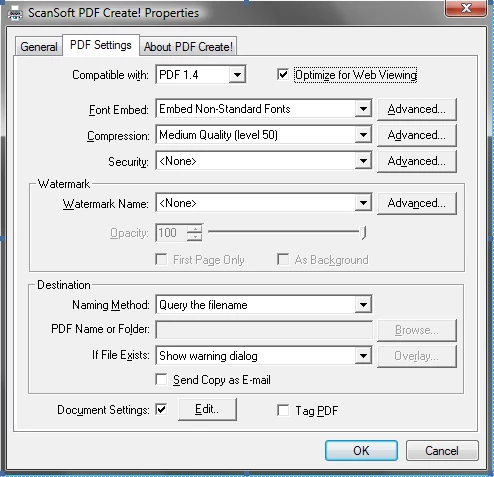
    We use ScanSoft PDF Create! to create the PDF files directly from Word 2007. In the tool settings we activated now the option "Optimize for Web Viewing". Now it works correctly with every testet document.

    But it still strange, that we didn't had the Problem with Adobe Reader 8.

    Many thanks for your support.

    13 replies

    New Participant
    September 22, 2018

    I am unable to search words or sentence in my pdf which I had downloaded from some websites it is scanned copy of some material but I can search in some files but not on every file their is message box comes that says the word is not present in file but it is present actually I had gone to the edit menu and click for preferences and ok The Purge cache content block but still I am unable to search the file I also installed the latest version it is Adobe Reader version 11.0.23 please help what to do

    New Participant
    August 9, 2018

    Open up the document in Adobe Acrobat,

    File > Save As other > Optimized PDF > (on the top left of the PDF Optimizer window you'll see )  SETTINGS > Click on the Mobile option.

    And save the pdf w/ the new settings.

    Open it up back up on Adobe Acrobat

    Should work then.

    Bernd Alheit
    Community Expert
    August 9, 2018

    This are bad instructions for user of Acrobat Reader.

    New Participant
    August 9, 2018

    It seems to have worked for me on all my files.

    Did this not work for you ?

    August 15, 2017

    Adobe Reader DC version 2017.012.20095 on Windows 10 (up to date).

    When I use the CTRL+F, I can find only the first occurence. Then Adobe Reader DC crash. Impossible to jump to the next occurence.

    Réinstall the software, emptied the quick search memory as suggested by some people here.

    Nothing seem to work

    Thanks

    August 15, 2017

    My name is Thierry Mansour and not Mosanto. How did this name come from ?

    Known Participant
    June 22, 2011

    I am having problem with text search in Adobe reader latest version 9.3.

    One pdf file generated through a pdf printer inside a word processing program and has around 100 pages. So there is no issue of having a scanned document which is not searchable.

    In this document, when I try to search the text inside the pdf file using Adobe Reader 9.0, it is working alright and it is recognising the text searched for.

    However, When the same pdf file is searched using Adobe Reader 9.3 and 9.4 etc it is not searching the text which is present at more than five places in the document.

    Please advise.

    New Participant
    June 22, 2011

    You may have been facing the same problem I had before.

    All worked fine after disabling fast find

    (Menu Edit -> Preferences -> Search. Deselect "Enable Fast Find")

    New Participant
    April 28, 2011

    You may solve the problem I believe on Adobe Reader level.

    I had this problem. I did: Menu Edit -> Preferences -> Search ->Purge Cache Contents in  "Fast Find" Section.

    You may also consider not using "Fast Find".

    The above helped for all the documents I had the problem with.

    New Participant
    April 28, 2011

    Thank you I will give it a try.

    New Participant
    November 18, 2010

    I was unable to use Find successfully on one .pdf document using Adobe Reader 9.4.1 but had success by viewing the .pdf document using Preview (v. 4.2) on my Mac.

    New Participant
    October 1, 2010

    Im having exactly the same problem.

    Is there any solution avaliable?

    New Participant
    October 12, 2010

    @espatzeb

    As you can read in my own reply, the problem was by the creating of the document. So I think there won't be a solution by Adobe for this problem. Try other options/applications to create the document.

    New Participant
    October 12, 2010

    The first questions is, why does Adobe 8 search work properly with all

    those documents?

    Second, the documents in question haven't bee generated by myself, but

    were official documents from Sun Microsystems / Oracle. So I have no

    chance to regenerate them.

    New Participant
    August 31, 2010

    Say, I have what I think is a related question.  In a PDF file, how can one tell whether the PDF is searchable or not?  Is there something in Document Properties that gives a clue?  Thanks!

    New Participant
    June 22, 2010

    Thanks for the explanation. I did not knew it was from that software.

    SIX_DanielAuthorCorrect answer
    New Participant
    July 2, 2009

    The Problem was not Adobe Reader!

    We use ScanSoft PDF Create! to create the PDF files directly from Word 2007. In the tool settings we activated now the option "Optimize for Web Viewing". Now it works correctly with every testet document.

    But it still strange, that we didn't had the Problem with Adobe Reader 8.

    Many thanks for your support.