


New Participant
September 16, 2019
Answered

ArialMT font missing

  • September 16, 2019
  • 16 replies
  • 228891 views

I have a customer that's on Adobe Acrobat Reader 2019.012.20040, with Windows 10 Pro x64 Version 1809, and when he tries to open a certain document, he gets the following error:


"Cannot find or create the font 'ArialMT'. Some characters may not display or print correctly."

So far, the user has uninstalled and reinstalled Adobe Acrobat Reader, his computer was wiped and re-imaged with a new Windows 10 baseline, we've added the ArialMT TrueType font file to Windows 10, and he's installed the DC Font Pack (my suggestion):


Adobe Acrobat Reader DC Font Pack (Continuous) - For Acrobat Reader DC version 19.x


But he's still getting the error.  Are there any suggestions as to resolve his issue?  Thanks.
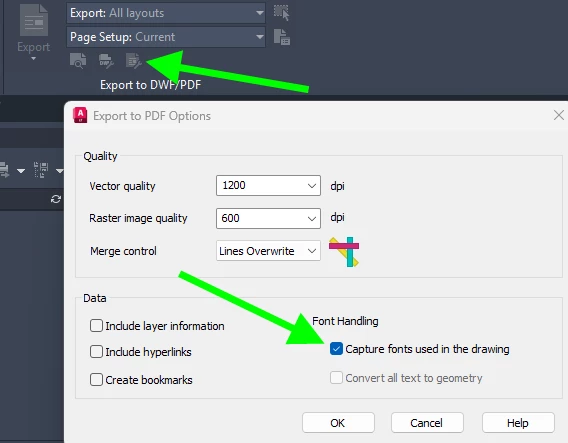
    Correct answer Randy-OptimumPCB

    This setting adjustment fixed the problem when exporting from AutoCad LT 2025.


    16 replies

    New Participant
    December 29, 2022

    From a professional user perspective this is a very serious issue and needs to be corrected immediately (which I do not see happening here).  dropped text is a potential disaster in a Construction Document, and the randomness of this error is unpredictable and hard to detect in a multipage file with many lines of text.

    That said.... we have two work-arounds we have been doing....

    1.  save your PDF to JPG(s) and then convert and re-assemble the pdf to get rid of the fonts.

    2.  Seems to happen consistently with arial font that has been kerned (expanded or condensed)  AUTOCAD dimstyle may automatically have condensed settings in the DIMSTYLE.  remove those.

    Amal.
    Community Manager
    Community Manager
    January 4, 2023

    Hi @Thomas274687321l4i 


    Sory for the delayed response. I have checked the file that you have shared and it is created via Autocad application. Please try to create the PDF via Adobe Acrobat application and see if that helps.


    Regards

    Amal


    Participating Frequently
    January 5, 2023

    @Amal. 

    Of course it is created in AutoCAD, it is pdf:s from AutoCAD that has this issue.

    And as I've mentioned before, we don't use Adobe Acrobat or even Adobe Reader. So WE  don't see or have the issue when we open the pdf:s in our office since we use PDfXChange. But the CLIENTS who are using Adobe Reader have this issue when opening our pdf:s in their office. For them it's a MAJOR ISSUE and it is Adobe that HAS TO SOLVE THIS so our clients sees the same in Adobe Reader as we see in PDfXChange! And it has to be solved NOW!

    Participating Frequently
    December 7, 2022

    Hi

    This looks like an old problem that still exists. I get the same error with ArialMT that is missing. Must be something in Adobe, are using Adobe Reader 2022.003.20282 with no updates available.

    So when will this be solved?

    Amal.
    Community Manager
    Community Manager
    December 7, 2022

    Hi @Thomas274687321l4i 


    We are sorry to hear that.


    Is this an issue with a particular PDF file or with all the PDFs? Would you mind sharing the PDF file in question so that we can check it on our end?


    Regards

    Amal

    Participating Frequently
    December 7, 2022

    Hi

    Here it is, I've also added snapshots of how the pdf looks when opened in AdobeReader and PdfXChange so that you can compare.

    New Participant
    September 16, 2022

    I wanted to get back to this topic. I did see that it was "resolved" via AutoCAD, but cannot be the final correct answer here. I receive these files by others and am not the original creator of this work. There needs to be a correction from the Adobe side so that these can be read and used either way. I am using Adobe Acrobat Pro DC and the program is up to date.

    Amal.
    Community Manager
    Community Manager
    September 19, 2022

    Hi @defaultk9zzsp769km5 


    We are sorry to hear that. Would you mind sharing a small video recording of the steps you are doing and the sample PDF file so that we can check it at our end? https://helpx.adobe.com/document-cloud/help/sharing-pdfs.html


    Regards

    Amal

    New Participant
    December 8, 2022

    The file attached shows what occurs when "ArialMT" error is displayed. Discussing with my producers of this document, they don't use that font when working in AutoDesk. I am unsure why this error appears from time to time on random deliverables I have received and the error is not easily reproduce with new work. If I ask the same producer to provide me a new assignment and similar in nature, its possible it may not have the error in the next submittal.


    I do feel Adobe is lacking on this one. I open this same file with Bluebeam Revu and experience no performance issues or errors of the like.

    New Participant
    March 23, 2022

    Three years later, same problem. New computer, new install. File from Bluebeam.


    Tried to repair and local fonts checked by default. Tried the open in read mode, no change. 

    Amal.
    Community Manager
    Community Manager
    March 24, 2022

    Hi there


    We are sorry to hear that.


    Would you mind sharing the version of the Acrobat DC you are using? To check the version goto Help > About Acrobat and make sure you have the recent version 22.1.20085 installed. Go to Help > Check for updates and reboot the computer once.


    Also, if it's an issue with a particular file, please share the file with us for testing https://helpx.adobe.com/document-cloud/help/sharing-pdfs.html


    Regards

    Amal

    New Participant
    March 26, 2021

    I have the problem as well.  I am using Microsoft Word to create PDFs.  I've been doing this for years, but when I upgraded to a new computer at the end of 2020, I started getting this error message.  I'm not desperate for a solution because everything seems to work, but it is annoying.  The files typically only use the SegoeUI font, but I still get the ArialMT message: Cannot find or create the font 'ArialMT'. Some characters may not display or print correctly.

    Dov Isaacs
    Brainiac
    March 26, 2021

    Exactly how are you “using Microsoft Word to create PDFs” – Microsoft's built-in “save as” specifying PDF as the file type, Acrobat's Save as Adobe PDF, something else?


    Without a sample file (you can attach one here), we have no way of diagnosing what you are seeing.


    - Dov Isaacs, former Adobe Principal Scientist (April 30, 1990 - May 30, 2021)
    New Participant
    June 15, 2021

    I have the same issue. Attachments sent to me wont open, say ARIALMT font is missing. I dont know what they used to create the PDF. This is so annoying. 

    Amal.
    Community Manager
    Community Manager
    September 16, 2019

    [Edited]


    Hi Steveh,


    Thanks for reaching out. As described above the user is getting the error "Cannot find or create the font 'ArialMT'. Some characters may not display or print correctly." is this a behaviour with a particular file or with any PDF file the user tries to open?


    Please make sure that the latest version 19.12.20040 is installed on the computer of the user. you may also refer to the link - https://www.adobe.com/devnet-docs/acrobatetk/tools/ReleaseNotesDC/index.html and check if that helps.


    [Email Removed by Moderator]


    Regards,

    Amal

    New Participant
    November 1, 2020

    Open Adobe Reader
    Go to Edit/Preferences/Internet
    Uncheck "Display in Read Mode by Default"

    Participating Frequently
    August 22, 2023

    Thank you default7eitziodgdm!  That solved the problem immediately.