


New Participant
February 18, 2021
Answered

Automatic counting of object on a pdf ?

  • February 18, 2021
  • 2 replies
  • 6435 views

Hi


I receive document which are made with Autocad.


For many reasons, the people who sent me these pdf don't want to send me the dwg file.


So i have to count object on  it manually for my work


But i'm wondering if there is a way to do it on adobe acrobat directly and  automaticly ?
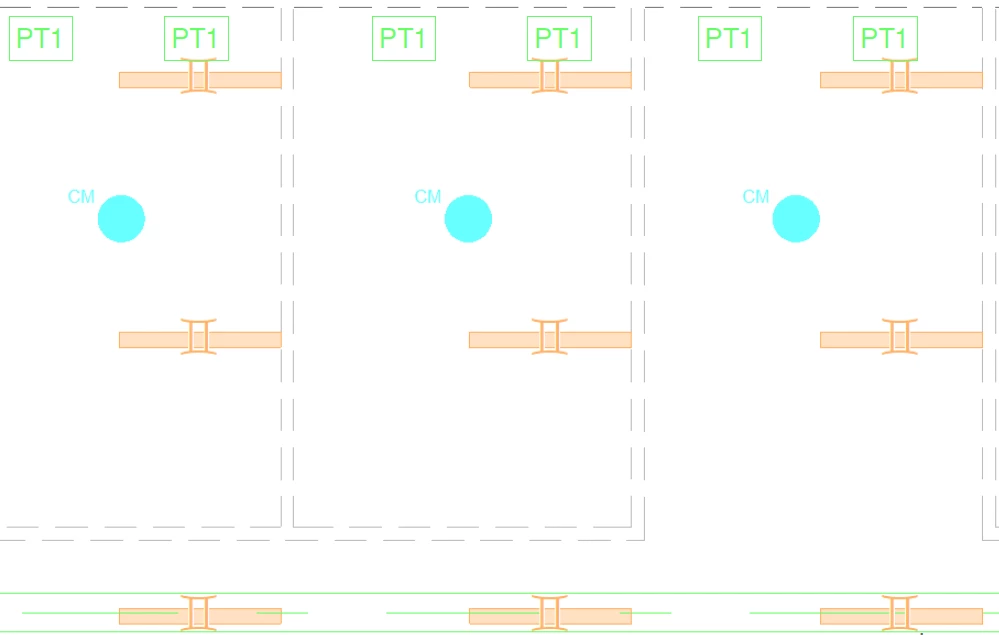


I give you an example here


There's  3 type of symbol on this picture, the orange one, the "PT1" one, and the blue one


Did there is a way to count them all automaticly per symbol's type? 


Thanks in advance.

Correct answer Meenakshi Negi

Hi Bonnie39004559anng,


Thank you for reaching out.


There is no default option in Acrobat for counting objects. However, as suggested in the above messages, you may use an add-in in Acrobat to help you count the object.

You may share your suggestion directly with the product team using the following help document: https://adobe.ly/3Am7GY8


Thanks,

Meenakshi

2 replies

New Participant
August 5, 2024

Curious if you ever found a way to do this. If so, could you point me in the right direction? Thank you so much!

Meenakshi Negi
Community Manager
Meenakshi NegiCommunity ManagerCorrect answer
Community Manager
August 6, 2024

Hi Bonnie39004559anng,


Thank you for reaching out.


There is no default option in Acrobat for counting objects. However, as suggested in the above messages, you may use an add-in in Acrobat to help you count the object.

You may share your suggestion directly with the product team using the following help document: https://adobe.ly/3Am7GY8


Thanks,

Meenakshi

Bernd Alheit
Community Expert
February 18, 2021

May be possible when you create a plugin for Adobe Acrobat.

Rc5C8BAuthor
New Participant
February 18, 2021

Thanks you for your reply


"When you create a plugin for adobe acrobat"


you mean it doesn't exist and i need to create it ? or maybe one exist ?

Bernd Alheit
Community Expert
February 18, 2021

You must create one for this special case.