


longhorn steer
Participating Frequently
June 19, 2019
Answered

automatic update requires system restart, pdfs in use cannot be saved. work lost.

  • June 19, 2019
  • 2 replies
  • 3126 views

it updates my reader automatically, which is great.

but then i am not able to save pdfs that i'm working with,

so all notes/comments are lost.

there is no warning of the update.

having a warning of, say, a few hours, would preserve work

and be fair to users.

does anyone have advice-workarounds-agreement-disagreement ?

i appreciate what adobe does to enable folks to read online links,

especially regarding congressional correspondence, but in "the heat

of battle" saving first sometimes doesn't happen, while notes and

cross-references get added - then lost - upon auto update.

appreciate assistance/acknowledgement.
This topic has been closed for replies.
Correct answer AkanchhaS8194121

Hi there!

We regret for the inconvenience caused.

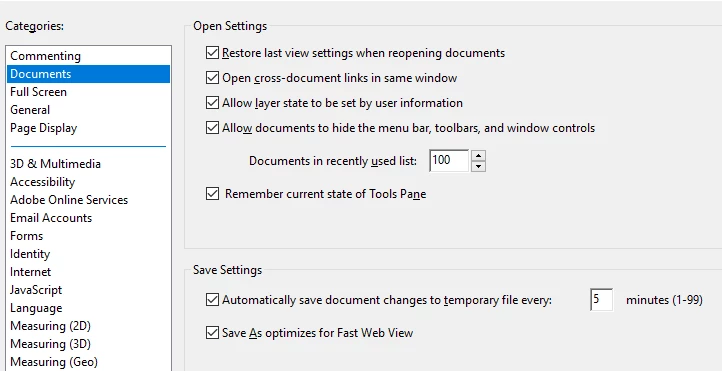
Adobe Reader DC does have auto-save feature, how exactly it works and applies for that you may read this article: Saving PDFs in Adobe Acrobat and Reader

As per Adobe Reader's preferences setting, it automatically save document changes to temporary file....

You can navigate to Reader>Edit>Documents

You can look for the backup files in your systems's temp folder: "%USERPROFILE%\AppData\Local\Temp its quite difficult to find the exact file there, but its worth giving a try.

Else, there isn't anything else that we can do about it.

You can also use this form to request new features or suggest modifications to existing features- Feature Request/Bug Report Form

Hope this helps!

Thanks,

Akanchha

2 replies

Participating Frequently
July 19, 2019

What is your operating system and Reader version?

On Windows, auto update does not start if application is in use.

longhorn steer
Participating Frequently
July 20, 2019

thank you, leo.

i received your suggestion, and info from another staff member.

i think i'm all set now going forward.

regards

AkanchhaS8194121
AkanchhaS8194121Correct answer
Legend
July 19, 2019

Hi there!

We regret for the inconvenience caused.

Adobe Reader DC does have auto-save feature, how exactly it works and applies for that you may read this article: Saving PDFs in Adobe Acrobat and Reader

As per Adobe Reader's preferences setting, it automatically save document changes to temporary file....

You can navigate to Reader>Edit>Documents

You can look for the backup files in your systems's temp folder: "%USERPROFILE%\AppData\Local\Temp its quite difficult to find the exact file there, but its worth giving a try.

Else, there isn't anything else that we can do about it.

You can also use this form to request new features or suggest modifications to existing features- Feature Request/Bug Report Form

Hope this helps!

Thanks,

Akanchha

longhorn steer
Participating Frequently
July 20, 2019

thank you. i've read the "saving" post you linked for me.
i also went to the temp folder.
later i will look at some of those files in re comments, but most if not all have been redone.
had (still having) some trouble with your reply link to "read conversation" - problem connecting?
but i will check my current document-saving setting to be sure.
yay for having staff answer lowly pleb. appreciate you taking time to answer so well.

regards.