

Participating Frequently
December 2, 2021
Question

Boxes and menu aren't visible

  • December 2, 2021
  • 2 replies
  • 1236 views

Unfortunately I'm having trouble with the visablity of Adobe Acrobat Reader.

This is what I get when I just downloaded it: 
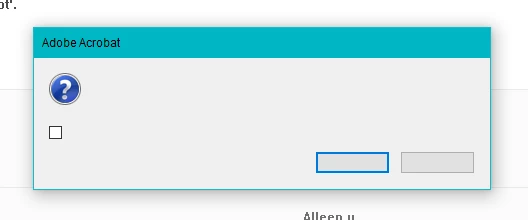
Can somebody tell me what to do? 

This topic has been closed for replies.

2 replies

jane-e
Community Expert
December 6, 2021

@Kelsey220496483fx7 wrote:

This is what I get when I just downloaded it: 


Hi

As I understand it, you just downloaded Adobe Acrobat Reader and it has never worked. Can you tell us your system information including version of Windows OS?

Jane


Participating Frequently
December 6, 2021

Hello Jane, 


Yes I'm working with Windows 10 Pro, version 20H2. 


Gr.

jane-e
Community Expert
December 6, 2021

Hi, 


I've tried what you suggested but unfortunately it didn't work. 

I can confirm you I've downloaded the application from this website https://get.adobe.com/reader/enterprise/


Gr.


Do you need Enterprise  or are you a single user?


"Both Acrobat Reader DC and the Acrobat Reader mobile app are free and available for volume distribution. A Distribution License Agreement is required for:
 

  • "Corporations and organizations that want to distribute Acrobat Reader or the Acrobat Reader mobile app on a company intranet site or local network.

  • "Commercial vendors that want to bundle Acrobat Reader or the Acrobat Reader mobile app on physical media such as a CD or DVD, on OEM hardware such as computers and mobile devices, or with OEM hardware such as scanners.


"Individuals interested in the software for personal use can download it free without applying for a Distribution License.
"

https://www.adobe.com/acrobat/pdf-reader/volume-distribution.html


Jane


Amal.
Community Manager
Community Manager
December 2, 2021

Hi Kelsey


Hope you are doing well and sorry for the trouble. As described, boxes and menu aren't visible


Please try to repair the installation form the help menu (Win only) and reboot the computer once and see if that helps.


You may also try to remove the appliction using the Acrobat Cleaner tool -https://www.adobe.com/devnet-docs/acrobatetk/tools/Labs/cleaner.html  reboot the computer and reinstall the application using the link https://get.adobe.com/reader/enterprise/


Regards

Amal

Participating Frequently
December 2, 2021

Hi Amal, 


Thank you for your tips, but it didn't work.. I have no idea where I need to search to get this problem fixt. 

I hope you have more tricks for me to try? 


Gr.

Amal.
Community Manager
Community Manager
December 3, 2021

Hi there


We are sorry to hear that. Have you tried to remove the application and then reinstall as described above.

Also, try to create a new test user profile with full admin rights or enable the root account in MAC and try using the application there and check.


Regards

Amal