


burgoo1
New Participant
September 19, 2018
Answered

Can Reader DC open files by title instead of size?

  • September 19, 2018
  • 1 reply
  • 741 views

Hello everyone,

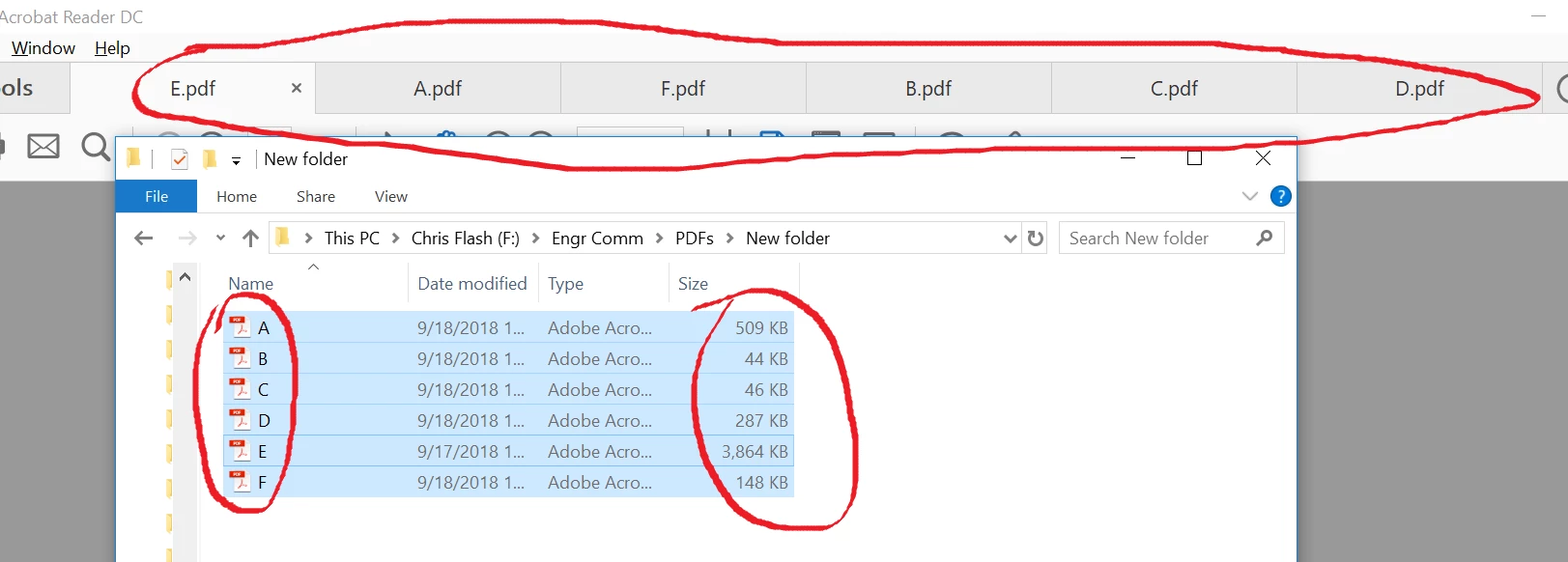
I've found a slightly annoying thing in Reader DC that I can't find a setting for. I have several PDFs that are named in the order I want them to appear (when I do presentations on a projected screen). However, when I'm in their folder and select all the files at once and click "Open all with Reader DC," they open in order of file size rather than by title. The image illustrates what I'm talking about.

Is there a way to change this so they open in alphabetical or numerical order according to the file name?

Thanks!
This topic has been closed for replies.
Correct answer Bernd Alheit

When you use File > Open in Acrobat Reader the files will be opened in the selected order.

1 reply

Bernd Alheit
Community Expert
September 19, 2018

You can select the tabs and move them.

burgoo1
burgoo1Author
New Participant
September 19, 2018

Yes, I realize I can move them individually, but if I have, say, 15 files that I open at once, I don't want to be standing there moving files around before I start my presentation. My question is if Acrobat will open all of them [as tabs] in alphabetical or numerical order on its own.

Bernd Alheit
Bernd AlheitCorrect answer
Community Expert
September 20, 2018

When you use File > Open in Acrobat Reader the files will be opened in the selected order.