Participant
May 16, 2014
Answered

can't open pdfs; can't save pdfs on my MAC Computer

  • May 16, 2014
  • 7 replies
  • 35829 views

Hi   I have problems with my Adobe Reader on my MAC computer…Mac OSX version 10.7.5.  It began when I did update my current Adobe Reader.  Eversince, I always get a window saying "Adobe Reader could not open "_______" because it is either not a supported file type or because the file has been damaged (for example, it was sent as an email attachment and was not correctly decoded."

I couldn't open any pdf file on my desktop.  I also couldn't save a paper as a pdf form but it looks like a notebook file on my desktop…not the normal red pdf file.

I am not sure how I can correct the problem.
This topic has been closed for replies.
Correct answer shashi.kant

Hi jcs174,

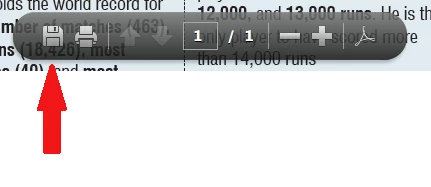
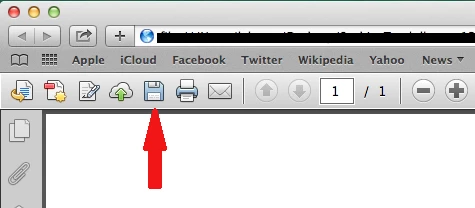
If you just want to save a pdf opened in Safari to your machine use the save as option from within the Reader window. Just click on any of the buttons highlighted in below screenshots to Save a pdf at any location on your machine.

or

To summarize the issue, if you had opened an Internet PDF in a browser plug-in, you must use the save feature in the plug-in, not the Safari File > PDF Export, or File > Save As...

Please let us know if this solution works for you and you are able to save and view PDFs files locally.

Regards,

Shashi

7 replies

Participant
August 11, 2014

Solved my problem as well.  Thank you!

Melinda

shashi.kant
Adobe Employee
Adobe Employee
May 21, 2014

Hi Deaf Donna,

If the issue has been resolved for you, can you please close this thread by marking it as Answered.

Thanks,

Shashi

a__rick
Participant
August 15, 2014

The solutions above don't work.  There is no PDF specific menu line in Safari, and the save on hover menu didn't work.

However, using Chrome did work, even using the chrome print "export as PDF".

I guess this means, if your PDF reader is working, don't let Adobe update your browsers.

Participant
September 15, 2014

I have same problem. I have tried all steps, still same problem.

Please help me.

Thanks.

[ link removed by moderator ]

shashi.kant
Adobe Employee
Adobe Employee
May 20, 2014

Hi Donna,

Can you please try the solution that I've provided to jcs174 above and let us know if it resolves the issue that you are facing.

Regards,

Shashi

Participant
May 19, 2014

I have exact same problem; am using adobe reader 11.0.07

Participant
May 19, 2014

I have a similar problem.  I have OS10.9.3 and Reader  11.0.07  I can open historic PDFs but not recent ones.  If I go to a site which adobe blocks and I get the black box, I click on the arrow to 'allow' the site.  I can view a page on screen.  I can 'save as' and it stays on the screen.  If I try to print it, the preview box only shows a black image and the page prints as a black sheet.  If I close the pdf and then try to reopen it I get the same message as Deaf Donna (above).  When I check 'about this file'  I find it has no content.

Where now?

shashi.kant
Adobe Employee
Adobe Employee
May 20, 2014

Hi cjb27d,

Can you please try the solution that I've provided to jcs174 above and let us know if it resolves the issue that you are facing.

Regards,

Shashi

Participant
May 22, 2014

That seems to have solved my problem.  Many thanks.

shashi.kant
Adobe Employee
Adobe Employee
May 19, 2014

Hi Donna,

Can you please go through the following KB article and let us know if that is the exact problem that you are facing: Cannot open PDF file in Acrobat created from InDesign or Illustrator (Mac, InDesign and Illustrator).

Can you try with several other PDF files and see if you get the same error message with every file or are there some particular files with which you get this error.

Will it be possible for you to share such files with which you are getting an error message wit hus. The instructions to do so are mentioned here: How can I upload a document or other file attachment

Regards,

Shashi

MichaelKazlow
Legend
May 17, 2014

Uninstall and re-install from http://get.adobe.com/reader/enterprise/

Participant
May 19, 2014

I updated my iMac to 10.9.3 and followed MichaelKazlow's advice re: uninstall/reinstall Reader.  Got same message but clicked on the arrow and full pdf came up but; I tried to print, first directly and second time after opening as a pdf and got only blank sheets both times.  I then "saved as" a pdf but cannot open the file as a message says unsupported file type or damaged.

shashi.kant
Adobe Employee
shashi.kantCorrect answer
Adobe Employee
May 20, 2014

Hi jcs174,

If you just want to save a pdf opened in Safari to your machine use the save as option from within the Reader window. Just click on any of the buttons highlighted in below screenshots to Save a pdf at any location on your machine.

or

To summarize the issue, if you had opened an Internet PDF in a browser plug-in, you must use the save feature in the plug-in, not the Safari File > PDF Export, or File > Save As...

Please let us know if this solution works for you and you are able to save and view PDFs files locally.

Regards,

Shashi