


Participant
May 14, 2025
Answered

Can't timestamp using a TSA server

  • May 14, 2025
  • 1 reply
  • 1349 views

Hello,

I have been trying to timestamp a document using a tsa but can't due to this error SigValue is 729 bytes than exepected.

Here are some details about the TSA Responder Certificate:

It's using a key length of 3072 RSA

The private keys are generated in a hardware security module
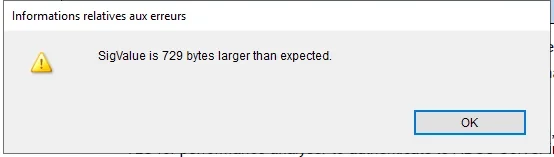


Has someone experieced this issue before? 


The issue at hand is the way Adobe parses the responses because on the server side, i can see that a timestamping token was generated.

Correct answer MikelKlink

The timestamp embedded in that PDF looks ok.

BUT it has a size of nearly 7000 bytes. Probably this is larger than Acrobat expects timestamps to be. And as Acrobat has to reserve space for embedding the timestamp before requesting it, a larger than expected time stamp results in a timestamping error.

According to the Preference Reference for Acrobat and Acrobat Reader section "Security", subsection "TimestampServer: Default", entry "iSize" (last entry) it should be possible to change this expected timestamp size by adding/changing a registry entry (if you're using Windows, that is).

The full path for the iSize value should be something like

HKEY_CURRENT_USER\Software\Adobe\(product name)\(version)\Security\cASPKI\cAdobe_TSPProvider

with (product name) and (version) matching your setup.

A value of 7000 decimally should currently suffice for the timestamps you receive.

1 reply

MikelKlink
Participating Frequently
May 14, 2025
quote

on the server side, i can see that a timestamping token was generated.

Can you share an example timestamp as generated on that server?

Participant
May 14, 2025

Hello here is an example of a file that i was able to sign on another tool.

MikelKlink
MikelKlinkCorrect answer
Participating Frequently
May 15, 2025

The timestamp embedded in that PDF looks ok.

BUT it has a size of nearly 7000 bytes. Probably this is larger than Acrobat expects timestamps to be. And as Acrobat has to reserve space for embedding the timestamp before requesting it, a larger than expected time stamp results in a timestamping error.

According to the Preference Reference for Acrobat and Acrobat Reader section "Security", subsection "TimestampServer: Default", entry "iSize" (last entry) it should be possible to change this expected timestamp size by adding/changing a registry entry (if you're using Windows, that is).

The full path for the iSize value should be something like

HKEY_CURRENT_USER\Software\Adobe\(product name)\(version)\Security\cASPKI\cAdobe_TSPProvider

with (product name) and (version) matching your setup.

A value of 7000 decimally should currently suffice for the timestamps you receive.