

paulv40315617
Participant
July 7, 2017
Answered

Certain colors not showing up in pdf when being preveiwed
  • July 7, 2017
  • 6 replies
  • 30393 views

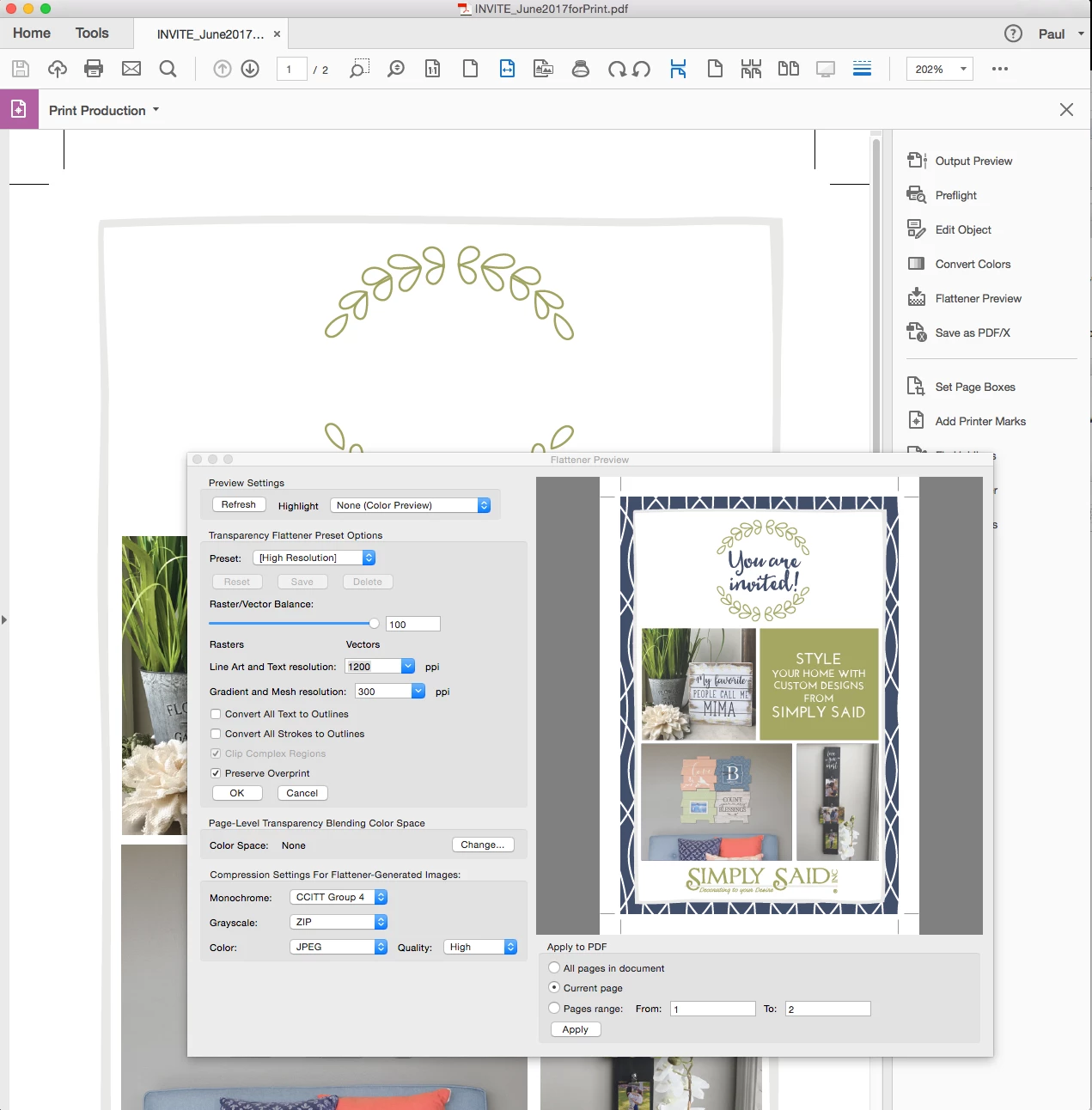
I have a problem with certain colors not previewing in pdfs only in Pro DC...older acrobat views same file correctly? Reinstalling didn't help. Has anyone else had this problem?

    This topic has been closed for replies.
    Correct answer Bhannon81

    So, BH VCD and BGC, you see what you expect only in the Flattener Preview window, and certain black text is missing in the main window? Or is this a different problem?


    POSSIBLE FIX - Under Preferences I had "Replace Document Colors" Checked. I unchecked that and seems to have fixed the problem.

    6 replies

    Participant
    June 6, 2021

    Just uncheck the option of "Replace Document Colors".

    That is goto Edit=>Preferences=> Accessibility. Cheers !!

    Participant
    September 15, 2020

    It did not solve the problem for me.

    In my Chrome, it shows the following page, whereas adobe reader is not showing it.

    You can check many of my lecture slides. It shows in a similar way.


    Participant
    March 25, 2020

    I was investigating this same anomoly. I had thought it something more complex to fix, now that I'm using AMD chipset instead of Intel. This had never been an issue for me while using INTEL.


    When i came across your post, I'd went and done what you said. Unchecked "Replace Document Colors" under accessibility and it fixed the problem. Thanks once again for the post it was very helpful.

    anis zakaria
    Participant
    February 13, 2020

    it solved my problem, thank you!

    BGCGAC
    Participant
    January 21, 2019

    Has anyone found a solution to this problem? It happens a lot to my PDFs and one that have been sent to me.

    Inspiring
    January 30, 2019

    This has happened to me twice in the last couple of weeks and is very frustrating. We primarily print using PDF and will be a HUGE problem if this continues to happen.

    Any fixes yet?

    Legend
    January 30, 2019

    So, BH VCD and BGC, you see what you expect only in the Flattener Preview window, and certain black text is missing in the main window? Or is this a different problem?

    Community Manager
    July 24, 2017

    Hi Paulv,

    I recommend: After changing settings in the Flattener Preview dialog, click Refresh to see the results.

    If the results are not correct after clicking the Refresh button, would it be possible for you to provide a sample PDF How to share a document for investigation?

    If you are already have found a solution to this issue, please update this thread with your findings that may help others.

    -Tariq Dar

    paulv40315617
    Participant
    July 28, 2017

    Shared Files - Acrobat.com in the screen shot of the same file opened in Acrobat X of right and Acrobat Pro-DC on left

    Community Manager
    July 31, 2017

    Hi Paulv,

    Thank you for sharing the screenshots and file with us.

    Were you able to test whether clicking the Refresh button allowed all colours to show?  If you enter new values, the affected colours/artwork are not shown until you hit refresh and the new settings are rendered.

    Will be waiting for your response.

    -Tariq dar