


New Participant
February 5, 2019
Answered

Changing Text Color/Background

  • February 5, 2019
  • 3 replies
  • 834 views

My client has a vision disability that makes reading black text on white background difficult so he prefers yellow text on a black background. I am wondering if Adobe Reader allows setting default settings so that every time he opens a pdf it can come up with yellow text on a black background, so I don’t have to change it manually every time?
    This topic has been closed for replies.
    Correct answer ~graffiti

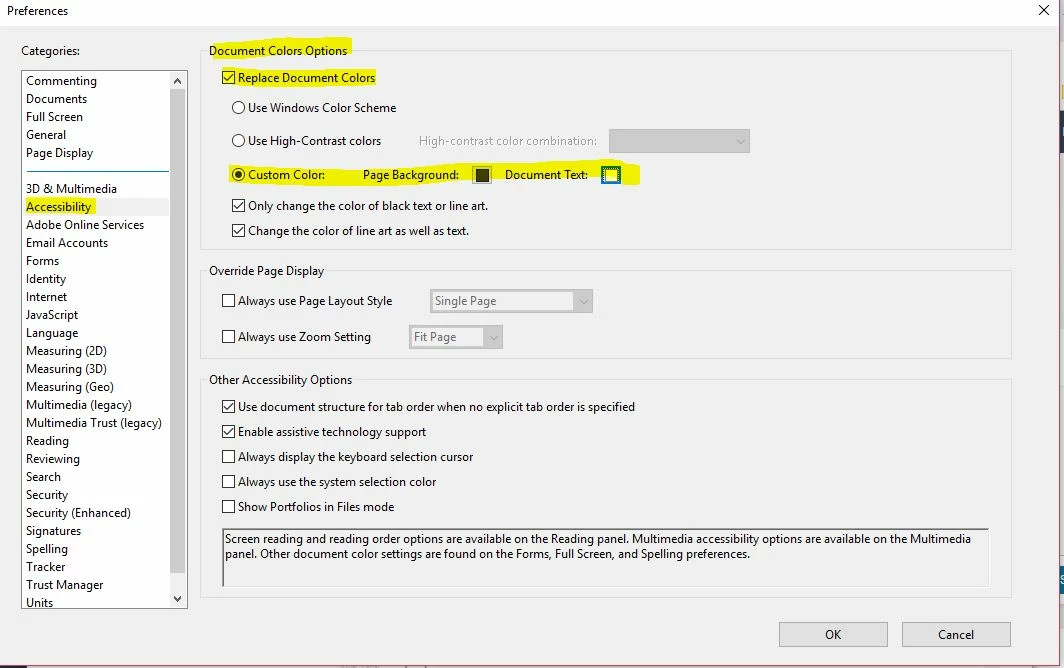
    In the clients version of Reader, have them go to Edit>Preferences and make these changes.

    3 replies

    New Participant
    December 7, 2021

    Hi,

    Dec. 7, '21.  The "go to Edit, Preferences" in Adobe DC has no impact.

    I have an old map. It is in .pdf format. The text is white. The background is not white. 

    I would like to have the text black and background white. 

    I also trying the "print to PDF" after setting Advanced settings as suggested in this thread.


    Any other ideas?

    ~graffiti
    ~graffitiCorrect answer
    Braniac
    February 5, 2019

    In the clients version of Reader, have them go to Edit>Preferences and make these changes.

    Braniac
    February 5, 2019

    Are you changing the Acessibility Preferences?