New Participant
July 13, 2021
Answered

Changing the font in the fill and sign function

  • July 13, 2021
  • 6 replies
  • 8339 views

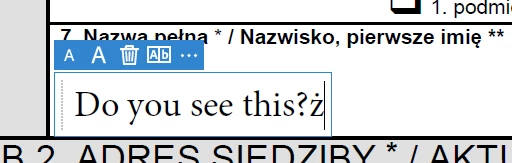
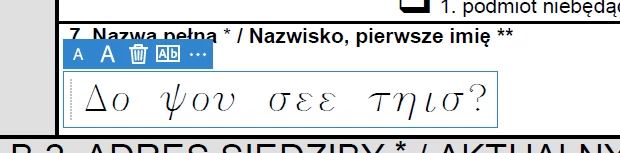
When filling in the document, the program uses a font with the Greek alphabet, only when I use a Polish diacritic mark, the font changes to the correct one. Please help me because I have already searched half of the internet. 
 

Adobe Reader DC 2021.005.20048

Windows 10 x64


Correct answer Amal.

Hi Michalowr


Hope you are doing well and sorry for the trouble.


This issue has been fixed in the optional update version 21.05.20054. Please download the patch manually from the link https://www.adobe.com/devnet-docs/acrobatetk/tools/ReleaseNotesDC/index.html and reboot the computer once after updating the application and check.


Regards

Amal

6 replies

New Participant
July 26, 2025

I have a similar situation with the Russian language.
Different fonts are used for Russian and English input languages.
When entering a Russian character, the font changes throughout the text field.
Attached a screen recording.

Community Manager
July 28, 2025

Hi @Hallow Fan


Sorry for the troubled experience. 
I have seen your other post and I have requested the information that we need before discussing this internally with our product team.


Best regards,
Tariq | Adobe Community Team

New Participant
February 19, 2024

Such a simple problem and its still not fixed...

Participating Frequently
February 19, 2024

True, new look & feel, but fill & sign tool still not fixed.

Amal.
Community Manager
Community Manager
February 19, 2024

Hi there


Hope you are doing well.


Have you started experiencing this issue recently?


What is the version of the OS and  Acrobat DC you are using?

To check the version go to Help > About Acrobat and make sure you have the recent version 23.08.20533 installed. Go to Help > Check for updates and reboot the computer once.

Also try to repair the installation from the help menu (Win Only) and see if that works.


If it still doesn't work , Would you mind collecting the Adobe CC logs https://helpx.adobe.com/creative-cloud/kb/cc-log-collector.html  , Procmon logs (Win Only) https://www.adobe.com/devnet-docs/acrobatetk/tools/Labs/acromonitor.html and share them via any cloud storage of your choice. Just upload the log file to the cloud and generate the link and share that link with us for further investigation.

Regards
Amal

Participating Frequently
June 30, 2023

That update doesn't allow you to change the font within the fill & sign tool, best I can tell no way to do this and if you use the fill & sign tool you will be stuck with the font they built in for the tool. 

New Participant
June 16, 2022

Same here using Hungarian special characters like 'ő' and 'ű'. Default font is sans-serif, then it switches to serif when I type a Hungarian character. Also, font size is randomized for each field. My forms look like they were filled by a child who can't use the computer at all.

Amal.
Community Manager
Community Manager
June 16, 2022

Hi there


Hope you are doing well and sorry to hear that.


Would you mind sharing the version of the Acrobat DC you are using? To check the version go to Help > About Acrobat and make sure you have the recent version 22.1.20142 installed. Go to Help > Check for updates and reboot the computer once.


Regards

Amal

michalowrAuthor
New Participant
August 26, 2022

In the 2022.002.20191 x64 version, the problem still exists. Are you planning to fix it?


Regards

michalowr

Participating Frequently
November 8, 2021

Similar but not such "spectacular" effect can still be reproduced in current Reader version (2021.007.20099).

The sans-serif font (Arial?) is used by default.

But when I insert Polish special character (e.g. ąćęłńóśśżź) the font changes to serif (Times?)

Since there is no option to change the font-face of filled fields the form looks weird with some fields with sans-serif and some fields with serif fonts.

Amal.
Community Manager
Community Manager
November 8, 2021

Hi there


Hope you are doing well and sorry to hear that.


Would you mind sharing the Version of the OS you are using? Also please share the small video recording of the issue so that we can check it at our end.


You may also try to create a new test user profile with full admin rights in Windows or enable the root account in Mac and try using the application there and check.


Regards

Amal

Amal.
Community Manager
Community Manager
November 23, 2021

Hi,


Please find attached sample PDF file.

In my opinion it is not file dependent. I've checked different files and different compyters with the same result.


Regards, TNO.


Hi there


Thanks for sharing the PDF.


We will keep you updated.


Regards

Amal

Amal.
Community Manager
Amal.Community ManagerCorrect answer
Community Manager
July 14, 2021

Hi Michalowr


Hope you are doing well and sorry for the trouble.


This issue has been fixed in the optional update version 21.05.20054. Please download the patch manually from the link https://www.adobe.com/devnet-docs/acrobatetk/tools/ReleaseNotesDC/index.html and reboot the computer once after updating the application and check.


Regards

Amal

michalowrAuthor
New Participant
July 14, 2021

Thank You very much, installing the update solved the problem.