


New Participant
May 17, 2019
Answered

Clearing the last session

  • May 17, 2019
  • 2 replies
  • 4422 views

Every time I open Adobe a message about "Reopen closed PDFs" pops up.  I click restore and nothing comes up.  Close Adobe Acrobat Reader, and re-open, and the message pops back up again. 

Is there a way to clear this message?, maybe a folder/file or registry key, that can be deleted?
    This topic has been closed for replies.
    Correct answer Meenakshi Negi

    Hi All,

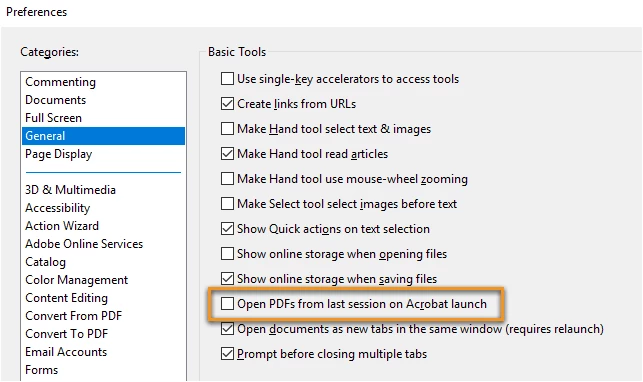
    We have released an update today for Adobe Acrobat 2015, Acrobat 2017 and Acrobat DC in which a new preference is added to enable or disable this capability. By default, the preference is disabled.

    Please update the applicaiton latest version released for the application.

    You may refer to the following link to check the latest versions available. Release Notes | Adobe Acrobat, Reader

    For more details on the new update, please refer to the following help document What's new in Adobe Acrobat DC

    Let us know if you have any questions.

    Regards,

    Meenakshi

    2 replies

    Ayush__Jain
    Adobe Employee
    Adobe Employee
    May 20, 2019

    Hi,

    Could you please try by doing the below steps and share your findings with us:

    1) Close Adobe Reader DC.

    2) Open Run -> Regedit.exe (Registory Editor)

    3) Navigate to path : HKEY_CURRENT_USER\Software\Adobe\Acrobat Reader\DC\SessionManagement

    4) Right Click on the "SessionManagement" key and Delete it

    5) Relaunch Reader and observe

    Try for all further sessions of Reader and let me know if deleting this key works for you for all further sessions ?

    Thanks

    Ayush Jain

    Inspiring
    August 1, 2019

    This works, but the problem just comes back right away.

    Meenakshi Negi
    Community Manager
    Meenakshi NegiCommunity ManagerCorrect answer
    Community Manager
    August 13, 2019

    Hi All,

    We have released an update today for Adobe Acrobat 2015, Acrobat 2017 and Acrobat DC in which a new preference is added to enable or disable this capability. By default, the preference is disabled.

    Please update the applicaiton latest version released for the application.

    You may refer to the following link to check the latest versions available. Release Notes | Adobe Acrobat, Reader

    For more details on the new update, please refer to the following help document What's new in Adobe Acrobat DC

    Let us know if you have any questions.

    Regards,

    Meenakshi

    AnandSri
    Community Manager
    Community Manager
    May 17, 2019

    Hello Alex,

    I am sorry for the trouble, would you mind posting a screenshot of the message you are getting? To post a screenshot, take help from the article How to share screenshot

    What is the version of Adobe Reader installed? To identify, please refer to Identify the product and its version for Acrobat and Reader DC

    We're here to help, just need more info.

    Thanks,

    Anand Sri.

    New Participant
    May 17, 2019

    Adobe Acrobat Reader DC version 2019.012.20034