


New Participant
April 22, 2025
Question

Comments not showing fully in comment box or in sidebar.

  • April 22, 2025
  • 2 replies
  • 837 views

Hi there, I'm having an issue since the last update that now when I go to enter comments to a PDF, the comment entry box only shows the last line typed; this is the same after posting the comment and I click to open the comment in the main PDF window as well as in the sidebar; only the last line typed shows up. However if I hover over the comment, you can view the comment fully, and if I open the PDF in Acrobat online it will show the full comment when the comment is opened in the PDF or in the sidebar. It appears to be a glitch in the desktop version.
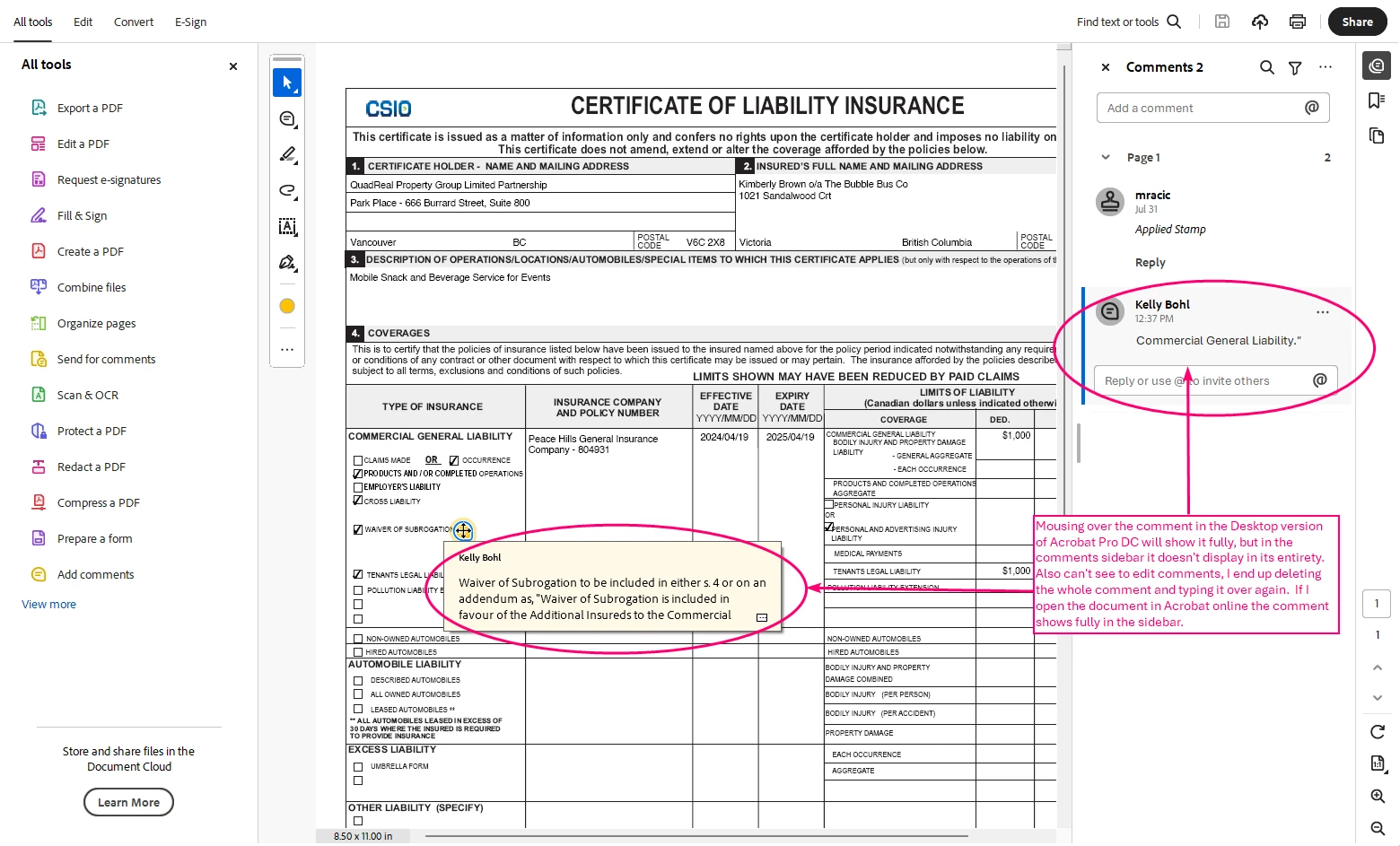
 

Thanks for any help anyone can provide.

2 replies

New Participant
July 1, 2025

have the same exact problem. please fix

creative explorer
Community Expert
July 2, 2025

@smooth_customer5526 @KellyBohl  Many users have reported that the "new" UI introduced in recent Acrobat versions is buggy, and reverting to the classic interface resolves numerous display issues, including this one. 

  • PC: Look for a "Hamburger Menu" (three horizontal lines) in the top left corner, then select "Disable New Acrobat."

  • Mac: Go to the "View" menu at the top of your screen, then select "Disable New Acrobat."

Restart Acrobat. Test if the comment display is fixed. You can usually re-enable the new UI later if a future update fixes the issue, but for now, the old UI seems more stable for commenting.


m
Amal.
Community Manager
Community Manager
July 2, 2025

Hi there 


++ Adding to the discussion


Have you started experiencing this issue recently or were you experiencing this earlier as well?


What is the version of the Acrobat Reader you are using? Go to Help > About Acrobat and make sure its updated to the latest version 25.01.205XX Go to Help > Check for updates and reboot the computer once. 


Also, try to repair the installation from the help menu (Windows Only) and see if that works


If it still doesn't work, please try to reset the Acrobat preferences as described here https://adobe.ly/44v8p4Y 


Let us know how it goes.


creative explorer
Community Expert
April 22, 2025

@KellyBohl if the previous version worked better, would it better to roll it back a version for this to work better for you?


m
KellyBohlAuthor
New Participant
April 22, 2025

I can't, my company manages our software. I'll just submit a ticket to my IT team and make it their problem 😉