


August 23, 2021
Question

Digitally Sign fonts messed up

  • August 23, 2021
  • 2 replies
  • 7118 views

When some people at my work attempt to sign documents in adobe acrobat reader DC their names is unreadable. I think I have tracked down the problem to a font but I'm not sure how to fix it. 

 

It seems the problem computers do not embed the font into the PDF when signing but the working computers do. No matter how much I search I have not had any luck finding out how to fix this. I have even reinstalled a few times.
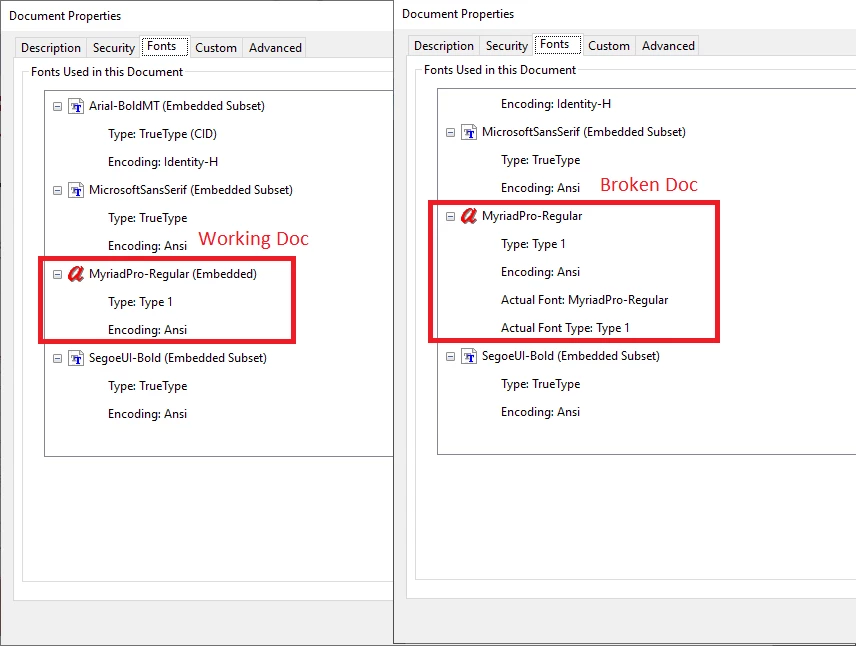
 

Has anyone seen this before?


Thank you

This topic has been closed for replies.

2 replies

New Participant
April 19, 2023

Same problem here, although we now have 2023.

Known Participant
June 6, 2023

same here!!! lost 1 hour filling a form only to have it messed up and having to do it again

Meenakshi Negi
Community Manager
Community Manager
June 7, 2023

Hi Anthony Lemay,


Thank you for reaching out.


Please let us know what happens when you try to add a signature to the PDF.

Confirm if you are using the Acrobat Reader or the Acrobat application. Check if you have the required fonts available on the machine. 

It would be helpful if you could share the screenshot for better understanding.

Share the Acrobat and OS versions used on the machine.

For information on Digital IDs, refer to the following help document: https://helpx.adobe.com/acrobat/using/digital-ids.html


Thanks,

Meenakshi

Amal.
Community Manager
Community Manager
August 24, 2021

Hi Zack


Hope you are doing well and sorry for the trouble. As described the digitally sign fonts are messed up.


The signature will be shown correct when the Fonts is embedded in the Source Document. Would you mind sharing how the document was created?


Please check the steps shared in the correct answer marked in the similar discussion https://community.adobe.com/t5/acrobat-reader/error-in-the-appearance-of-the-digital-signature/m-p/11004824/thread-id/64406#M75181 and see if that works for you.


Regards

Amal

August 24, 2021

It does not matter how the document is created. We have made PDFs with CAD software, With Microsoft PDF printer, and I have also tested lots of other random PDFs from all over.


The problem starts when the users in question digitally signs and adobe reader saves off a new copy of the document. For some people the font gets embedded during that process and everything works perfect. For other people it’s not embedded and it fails. Like in the screen shot above.


Both working and broken adobe acrobat readers DC installs are of the same version on all the computers as well. "2021.005.20060"


I have also confirmed that the exact same steps are being followed to sign the document. (Edit > Manage Tools > Certificates > Open > Digitally Sign > Highlight area and click sign)


So I’m at a loss. I can’t find anything that is different.


An interesting notes: If someone with a working install signs a document first then the people with the non-working installs can sign just fine because at that point the font has already been embedded.

Amal.
Community Manager
Community Manager
August 25, 2021

Hi there


We are sorry to hear that. As correctly said, The signature will be shown correct when the Fonts is embedded in the Source Document.


Have you tried the steps shared in the correct answer marked in the similar discussion shared earlier?


Regards

Amal