


EricDube14
Participant
July 11, 2019
Question

Erreur ouverture fichier PDF

  • July 11, 2019
  • 1 reply
  • 839 views

Bonjour,

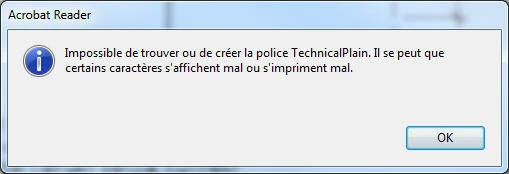
Lorsque j'ouvre un fichier, j'obtiens un message d'erreur (voir printscreen)

J'ai seulement ce message d'erreur avec Adobe Reader DC (dernière version), si j'utilise mon navigateur web j'ai aucun problème !

Il s'agit d'un PDF qui a été créé à partir d'Autocad 2020 via "DWG to PDF"

Merci de votre aide, bonne journée !
    This topic has been closed for replies.

    1 reply

    EricDube14
    Participant
    July 11, 2019

    Here is an english version...

    Hello,

    When I open a file, I get an error message (see printscreen)

    I only have this error message with Adobe Reader DC (latest version), if I use my web browser I have no problem!

    This is a PDF that was created from Autocad 2020 via "DWG to PDF"

    Thank you for your help, have a nice day !

    AkanchhaS8194121
    Legend
    July 16, 2019

    Hey EricDube,

    I do not see any screenshot attached to your second response. However, I tried translating the first one. I see there's some trouble displaying the fonts while opening the PDF within Adobe Reader DC.

    Which means, when file was exported to PDF, fonts are not embedded to it.

    • Ensure the desired font(s) are properly installed on the source computer (see OS help for this).
    • Ensure PDF creator (in your case Autocad 2020) actually has the ability to embed fonts / font sub-sets.

    Try this-

    Navigate to Adobe Reader>Edit>Preferences>Page Display>uncheck "Use local fonts"

    Hope this helps!

    Thanks,

    Akanchha

    EricDube14
    Participant
    August 15, 2019

    Thanks Akanchha for your suggestion, that helped me to find the solution !

    In the PC3 files of "DWG TO PDF" by changing the value in the printscreen below, that do the trick !

    The message still appear at the opening of the PDF, but the fonts are ok...