


New Participant
June 7, 2020
Question

Exporting PDF bank statement to Excel results in messy Excel file...

  • June 7, 2020
  • 5 replies
  • 8832 views

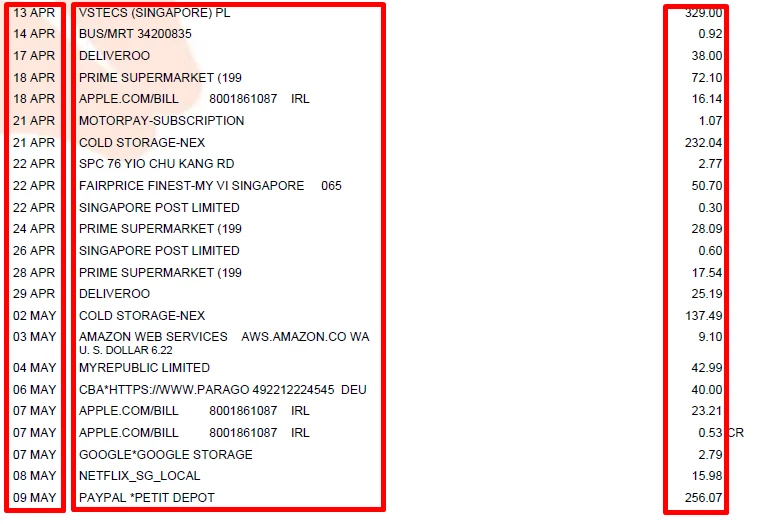
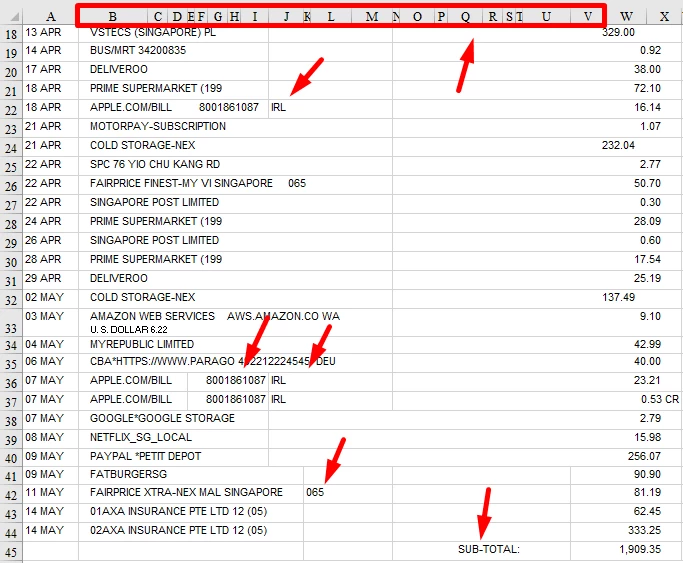
I am trying to export a PDF (bank statement) to Excel but the results are far from being good... Acrobat creates all sorts of multiple columns (20+ columns) and merges when there is only a need for 3 columns : date, description and amount (see screenshot)...


Is there a smart way to get around this? Is there a tool that allows for telling Acrobat where I would like to get my columns delimited?


This topic has been closed for replies.

5 replies

New Participant
January 13, 2022

Hi, have you find a solution? I'm with the same issue... it's incredible that some other online convertersworks better at this than Adobe! the creators of PDF...

try67
Community Expert
Community Expert
January 14, 2022

Use those other convertors, then. No single tool can handle all possible PDF files. Some will work better with one type, others with another. If you found something that works for you, stick with it.

New Participant
December 1, 2021

A workaround I've found is to crop the PDF pages so that each page is only the transactions, not any of the bank/balance info usually above them. And then delete any pages without transactions, and export.

Adobe Employee
July 7, 2020

 Hi,


Thank you for reporting the issue, it will help us in finding more areas of improvements.We are continuously working on improving the export to excel experience. Can you please provide us the details of the following:


  1. Acrobat Version

Go to help -> About Acrobat 

  1. Operating system (Mac/Win)
  2. Input PDF Files and its exported output if possible


Regards,

Akanksha Garg

Software Engineer II

Adobe Acrobat Team

New Participant
March 5, 2021

I went through this same mess a few months ago with my BofA acct.  Today I wanted to start dealing with my 2020 tax stuff and I couldn't see going through the same nonsense.  On my BofA acct, I could only see the pdf version.  But I got some help and it might be transferrable to other banks.  In statements there are several columns with one being amount.  When I click on download which is a button above the amount, I get a new window that gives transaction dates and type of download.  I got the excel spreadsheet and it gave me just the information we need for the work we want to do - 3 columns and nothing more.  It makes me very happy to save a mountain of time.  I hope this gets you what you want even if it is past the time you need it.  Be well.

JR Boulay
Community Expert
Community Expert
June 7, 2020

You should try to tag (manually or automatically) the PDF before exporting as XLS.

Acrobate du PDF, InDesigner et Photoshopographe
New Participant
June 8, 2020

Cool, is there some resources I could look up on this topic? I google pdf tagging but returned a lot of results, perhaps I should be more specific...

JR Boulay
Community Expert
Community Expert
January 14, 2022

Acrobate du PDF, InDesigner et Photoshopographe
try67
Community Expert
Community Expert
June 7, 2020

It might be possible to do that with a custom-made script.

If you're interested I'd be happy to have a look at a sample file and let you know if I think it's doable, and if so for how much.

You can email it to me via [try6767 at gmail.com] to discuss it further.

New Participant
June 8, 2020

Thanks for your offer let me consider. Since it's for personal use I would rather find a way to do this by myself... If there is a good tutorial or resource on this topic, appreciate if you can share it.