Exit
  • Global community
    • Language:
      • Deutsch
      • English
      • Español
      • Français
      • Português
  • 日本語コミュニティ
  • 한국 커뮤니티
0

Faulting application name: RdrCEF.exe, version: 17.9.20044.25828

New Here ,
Apr 12, 2017 Apr 12, 2017

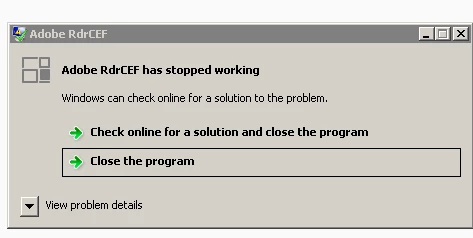
we are having error on TS - Win Ser. 2008 R2 ver.

Faulting application name: RdrCEF.exe, version: 17.9.20044.25828, time stamp: 0x58e42d98

Faulting module name: libcef.dll, version: 3.3029.1594.0, time stamp: 0x58d83138

Exception code: 0xc0000005

Fault offset: 0x0072aa0a

Faulting process id: 0x8778

Faulting application start time: 0x01d2b381985d95f8

Faulting application path: C:\Program Files (x86)\Adobe\Acrobat Reader DC\Reader\AcroCEF\RdrCEF.exe

Faulting module path: C:\Program Files (x86)\Adobe\Acrobat Reader DC\Reader\AcroCEF\libcef.dll

Report Id: d61c58e8-1f74-11e7-8af5-0010185b9aca

all of the 20 users are experiencing same error.

VERSION WE HAVE :

C:\Program Files (x86)\Adobe\Acrobat Reader DC\Reader\plug_ins\Accessibility.api

    Version: 17.9.20044.222436

    Creation Date: 2017/04/05

    Creation Time: 01:38:18

C:\Program Files (x86)\Adobe\Acrobat Reader DC\Reader\plug_ins\IA32.api

    Version: 17.9.20044.222436

    Creation Date: 2017/04/05

    Creation Time: 01:38:18

C:\Program Files (x86)\Adobe\Acrobat Reader DC\Reader\plug_ins\Updater.api

    Version: 17.9.20044.222436

    Creation Date: 2017/04/05

    Creation Time: 01:38:18
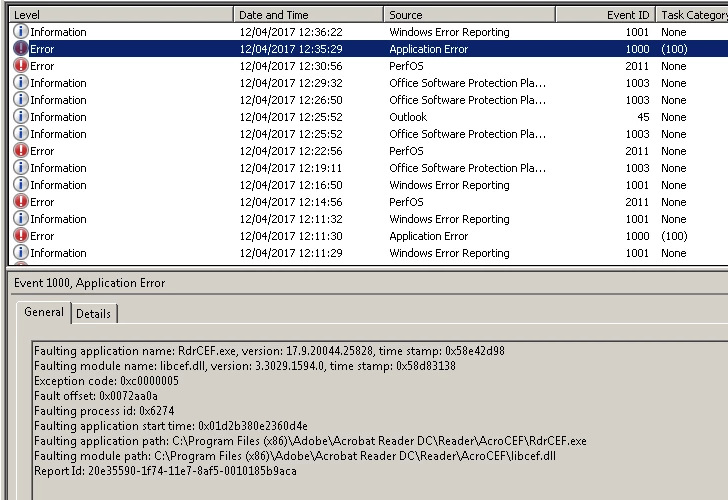
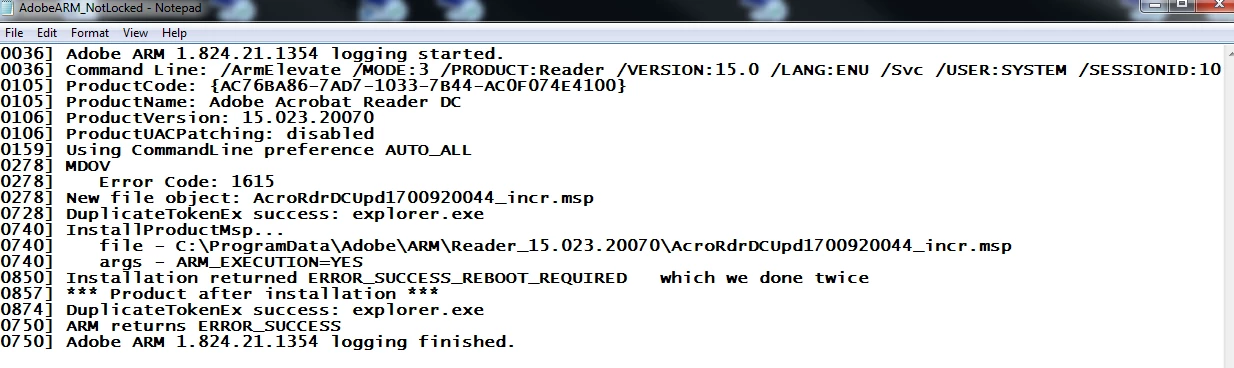
event view error.PNGservices.PNGerror1.PNGerror2.PNG

Since we are not able to re-install this during the working hours is it possible to fix this rather then removing it.

5.1K
Translate
Report
Community guidelines
Be kind and respectful, give credit to the original source of content, and search for duplicates before posting. Learn more
community guidelines

correct answers 1 Correct answer

Adobe Employee , Apr 12, 2017 Apr 12, 2017

Hi jakeg18255837,

Before following up steps provided above, Please just restart your server.

Let us know if that resolve the issue.

-Thanks

Sunil Soni

Translate
Adobe Employee ,
Apr 12, 2017 Apr 12, 2017

Hi jakeg18255837,

Please try repairing Adobe Acrobat Reader DC.

For that, navigate to Help menu > Repair installation and restart your server.

Let us know how it goes.

Regards,

Meenakshi

Translate
Report
Community guidelines
Be kind and respectful, give credit to the original source of content, and search for duplicates before posting. Learn more
community guidelines
Adobe Employee ,
Apr 12, 2017 Apr 12, 2017

Hi jakeg18255837,

Before following up steps provided above, Please just restart your server.

Let us know if that resolve the issue.

-Thanks

Sunil Soni

Translate
Report
Community guidelines
Be kind and respectful, give credit to the original source of content, and search for duplicates before posting. Learn more
community guidelines
Adobe Employee ,
Apr 12, 2017 Apr 12, 2017

jakeg18255837​,

Please share AdobeARM log of which you have posted screenshot, that would be very helpful. you can mail it to susoni@adobe.com

-Thanks

Sunil Soni

Translate
Report
Community guidelines
Be kind and respectful, give credit to the original source of content, and search for duplicates before posting. Learn more
community guidelines
New Here ,
Apr 13, 2017 Apr 13, 2017

found in Adobe crash dump log "software update require restart"..all done now

thx 

Translate
Report
Community guidelines
Be kind and respectful, give credit to the original source of content, and search for duplicates before posting. Learn more
community guidelines
Adobe Employee ,
May 03, 2017 May 03, 2017
LATEST

Please mark the post answered for other users to help.

-Thanks

Sunil Soni

Translate
Report
Community guidelines
Be kind and respectful, give credit to the original source of content, and search for duplicates before posting. Learn more
community guidelines