


Participant
November 8, 2019
Answered

Help with error: "Adobe Acrobat does not allow connection to:"

  • November 8, 2019
  • 1 reply
  • 43589 views

I have both Adobe Acrobat DC Pro and Adobe Reader DC installed on my laptop. It is necessary because I am slowly learning that what works in the one does not always work in the other, especially when developing forms and interactive PDF's.


At the moment, the error message: "Adobe Acrobat does not allow connection to:" is driving me nuts. I build a a document sveral times a month with hyperlinks to servers on our local network. The hyperlinks work perfectly in Adobe Acrobat Pro DC, but not in Adobe Reader DC. I have checked the "Preferences" settings, and they are identical.


Foxit Reader and Nuance PowerPDF also allow the hyperlinks to work perfectly. Any advice or solutions would be appreciated. I need the hyperlinks to work, and if Adobe Reader doesn't do it then I must recommend that my organisation switch to a different solution.
Correct answer Prasanth_IRPA_Dev

Thanks Amal,

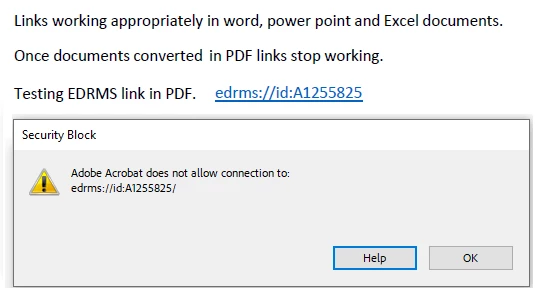
I reset the Acrobat preferences using the 'Manual' method from that link, tried again and get the below error:

-----------------
Security Block
Adobe Acrobat does not allow connection to:
<URL> 

-----------------

I then closed Adobe, ran the 'repair' option and tried again and had the same error.

Regards,
Dougal


Hello Team, I've faced the same ERROR. Here you go Edit > Preferences > Trust Manager > Click on Change Settings, Over there you can see the Web sites that are blocked, Just remove the blocked ones

Thanks

Prasanth

1 reply

Amal.
Community Manager
Community Manager
November 12, 2019

Hi there,


We are sorry for the trouble. As described above, you are getting the error 'Adobe Acrobat does not allow connection to' while opening the PDF in Adobe Acrobat Reader DC.


Would you mind sharing some more details for a better understanding:


Make sure you have the latest version 19.21.20049 of Adobe Acrobat/Reader DC. Go to Help > Check for Updates. For more details you may please refer to the link- https://www.adobe.com/devnet-docs/acrobatetk/tools/ReleaseNotesDC/index.html


For testing purpose, please try to turn off the protected view. Go to Edit > Preferences > Enhanced Security > Turn Off the protected view and Uncheck the Enhanced security > Click OK and restart the application and check.

Note: Please turn On the security after testing, irrespective of the result as it may cause security risks.

If it works, please refer to the help article (https://helpx.adobe.com/acrobat/kb/protected-mode-troubleshooting-reader.html)


You may also try the steps provided in the help article: https://helpx.adobe.com/in/acrobat/using/allow-or-block-links-internet.html


Let us know how it goes


Regards

Amal

gbotesAuthor
Participant
November 18, 2019

Thank you for your help. It seems that soething was preventing Adobe Acrobat from updating. Once I forced a manual update, the issue was corrected, so the problem was an outdated version of the application.

Amal.
Community Manager
Community Manager
November 20, 2019

Hi there,


We are glad to hear that the issue got resolved.


Feel free to contact us for any further assistance required in the future.


Regards

Amal