


jenk7230
New Participant
October 2, 2017
Answered

How can I enlarge font size in comments or sticky notes? (Mac OS)

  • October 2, 2017
  • 1 reply
  • 7323 views

I have read all the forums but still could not get the right answer.

I am using a Mac OS, and I haven't had this kind of problem when I was using Windows.
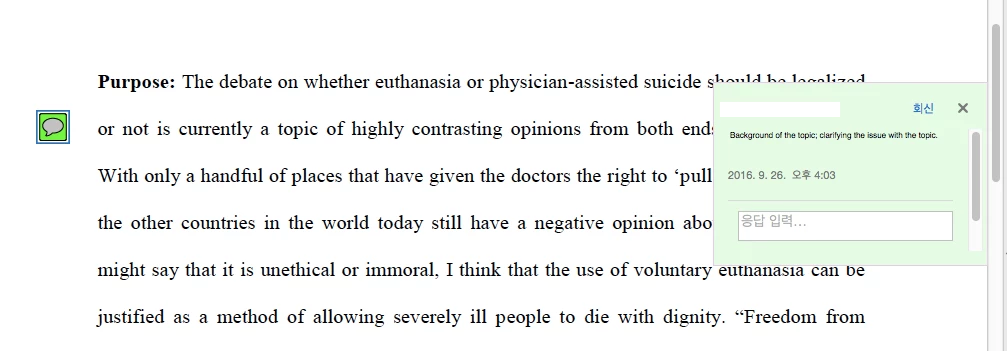
Even if I enlarge the font of the original text, the font size of the comment (or sticky note) does not get bigger.

Also, ctrl+shift+ "+" does not work.

There is no menu to change the size of the font of sticky notes.

I want to know how to change them. Thank you.

    This topic has been closed for replies.
    Correct answer AkanchhaS8194121

    Hi Jenk,

    You can adjust the font size of comments or sticky notes.

    As per the description given above, have you also tried changing the fonts through the commenting preferences? If not, then you may follow the instructions mentioned in the help document- Use annotation and drawing markup tools to add comments in PDFs, Adobe Acrobat and Acrobat Reader under "Commenting Preferences"

    In Mac you can select only Large, Medium, or Small settings for the font.

    Hope this works for you.

    Regards,

    Akanchha

    1 reply

    AkanchhaS8194121
    AkanchhaS8194121Correct answer
    Brainiac
    October 3, 2017

    Hi Jenk,

    You can adjust the font size of comments or sticky notes.

    As per the description given above, have you also tried changing the fonts through the commenting preferences? If not, then you may follow the instructions mentioned in the help document- Use annotation and drawing markup tools to add comments in PDFs, Adobe Acrobat and Acrobat Reader under "Commenting Preferences"

    In Mac you can select only Large, Medium, or Small settings for the font.

    Hope this works for you.

    Regards,

    Akanchha

    jenk7230
    jenk7230Author
    New Participant
    October 3, 2017

    Thank you! I got the problem solved thanks to your help! Have a nice day

    AkanchhaS8194121
    Brainiac
    October 4, 2017

    You'er welcome!

    Let us know if there is any further assistance is required.

    Regards,

    Akanchha