ptika1
Participant
July 19, 2018
Answered

How can you edit the size of the dragging squares in a comment text box?

  • July 19, 2018
  • 2 replies
  • 921 views

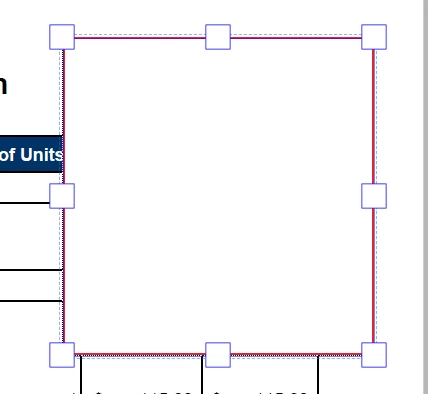
I am using Adobe Reader DC and the size of the squares that you can click on to edit the size of the comment text box are obnoxiously big. See attached picture.

Is there any way to change the size of these boxes? Perhaps in the registry?
This topic has been closed for replies.
Correct answer jane-e

ptika1  wrote

I am using Adobe Reader DC and the size of the squares that you can click on to edit the size of the comment text box are obnoxiously big.

Those white squares are called anchor points. You can change the size of the anchor points in Adobe Illustrator, but not in Adobe Acrobat. What a great idea, though! It is a recent feature for Illustrator. Put in a feature request to the Acrobat engineers here:

Adobe Acrobat Reader - Feature Request/Bug Report Form

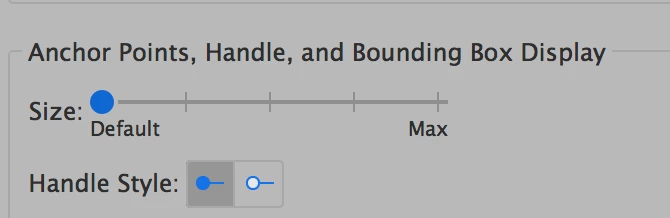
In Illustrator, you set the size and style in Preferences:

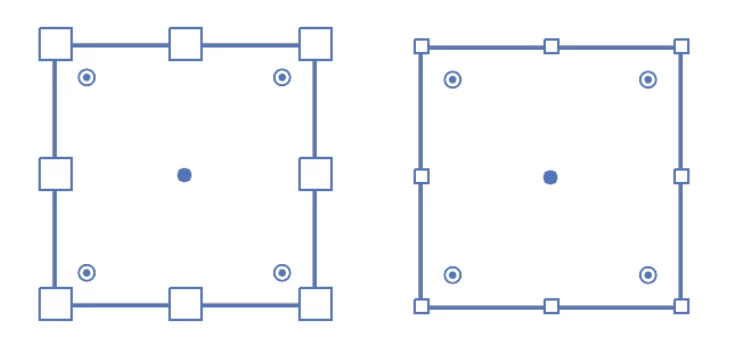
Here they are at their largest and smallest sizes in Illustrator:

2 replies

jane-e
Community Expert
jane-eCommunity ExpertCorrect answer
Community Expert
July 19, 2018

ptika1  wrote

I am using Adobe Reader DC and the size of the squares that you can click on to edit the size of the comment text box are obnoxiously big.

Those white squares are called anchor points. You can change the size of the anchor points in Adobe Illustrator, but not in Adobe Acrobat. What a great idea, though! It is a recent feature for Illustrator. Put in a feature request to the Acrobat engineers here:

Adobe Acrobat Reader - Feature Request/Bug Report Form

In Illustrator, you set the size and style in Preferences:

Here they are at their largest and smallest sizes in Illustrator:

AnandSri
Community Manager
Community Manager
July 19, 2018

Hello Ptika,

As per the description above, you want to change the size of the square boxes of 'Add test box' in comment tools, Is that correct?

You can make changes in the size by dragging the small square box you have in all the corners to resize it, but there are no other changes possible in the size using the registry or other methods as they are designed behavior of the text boxes.

You can share your idea using the Adobe Wish form to request a new feature or modification in the existing feature Feature Request/Bug Report Form

To know more about the Comments and it's feature and properties, you can refer to Adobe article Use annotation and drawing markup tools to add comments in PDFs, Adobe Acrobat and Acrobat Reader

Feel free to update this discussion for any further assistance.

Thanks,

Anand Sri.