


New Participant
May 3, 2023
Question

How disable Acrobat Reader startup prompts?

  • May 3, 2023
  • 1 reply
  • 782 views

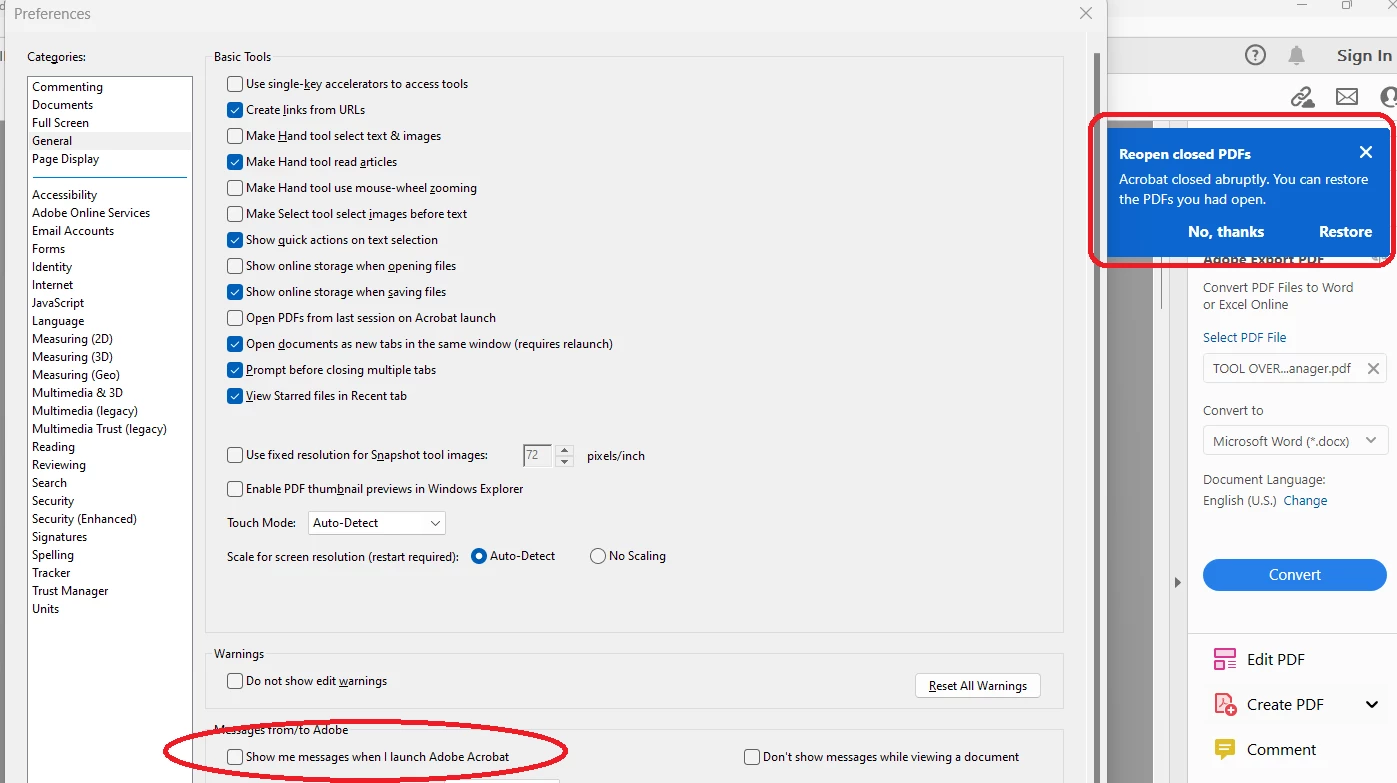
Whenever I launch Acrobat Reader it keeps giving me distracting startup prompts that I have not asked for. I have disabled the preference about startup messages but it has no effect on these prompts. Below is an example of such a prompt alongside the abovementioned setting.
This topic has been closed for replies.

1 reply

Meenakshi Negi
Community Manager
Community Manager
May 30, 2023

Hi MichaelBrooks_FC,


Thank you for reaching out.


The option appears when the application closes abruptly the last time you were using the application. By default, there is no option to disable this feature. 

However, if you still wish to remove this pop-up permanently, we will check with the team if it can be done.


Thanks,

Meenakshi

New Participant
June 5, 2023

Thanks Meenaksi. Apologies for my delayed response - I was on vacation.

I had been under the impression that the message shown was merely one example of the range of messages that I might receive upon opening Acrobat Reader, but having just tested it again it appears that I was incorrect - I just opened Reader and I was not given any such message (unlike prior to disabling the "Show me messages..." option, when I received a variety of messages).

I am happy for this specific message to ignore the setting - this message adds a lot more value than the typical startup message. Do please feel free to close this support request.