


reddyr56449728
Participant
December 28, 2017
Answered

How to add the signature to the PDF?

  • December 28, 2017
  • 1 reply
  • 9916 views

I need to add my signature to the PDF, below are my steps:

1.Click Fill&Sign Tab, then choose drag new signature ,
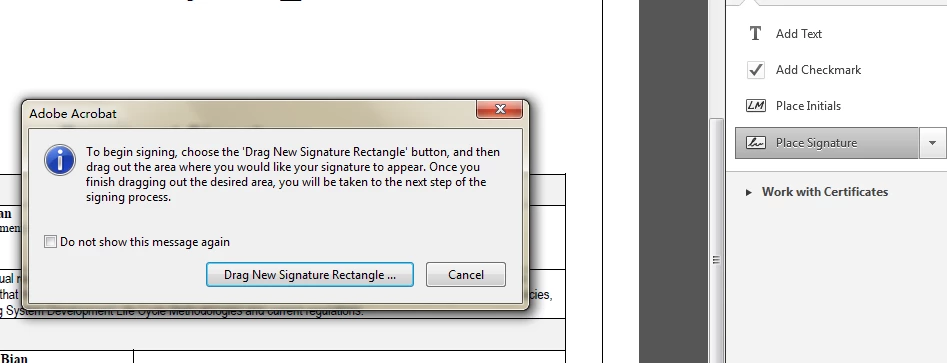
2. It jumps below window: And I can't choose the third one, when I choose the first option,there is no file in the default folder.
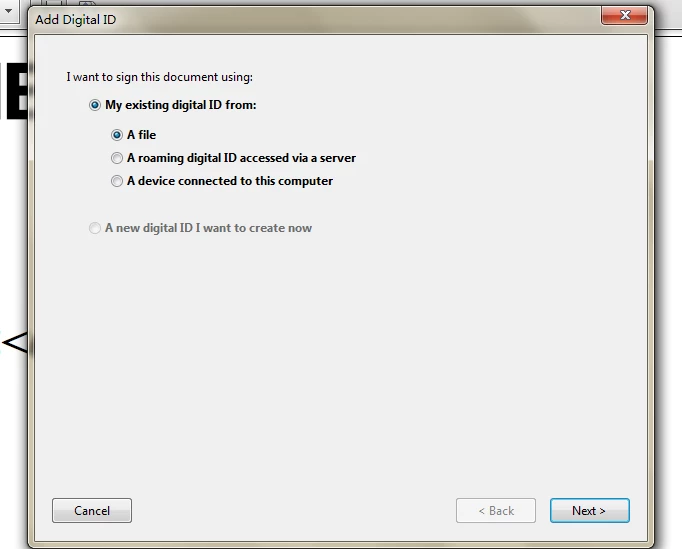
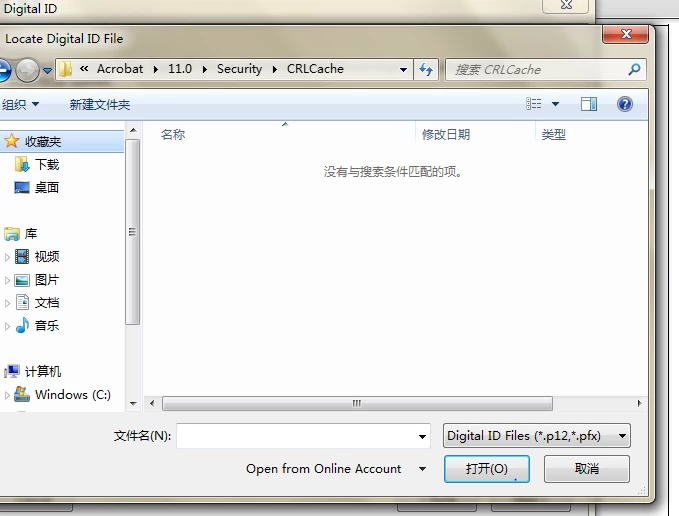
3.when I click Edit--Preferences--Signatures--Identities&Trusted Certificates -- more,I can see my signature

    This topic has been closed for replies.
    Correct answer AnandSri

    Hello reddyr56449728

    Sorry for the delay in response to your query and apologize for the inconvenience caused. As per the description above, you want to know how to sign a PDF document, Is that correct?

    Please refer to the following KB docs to know how to sign a PDF file Signing PDFs in Adobe Acrobat

    You may also refer to About certificate signatures in Adobe Acrobat

    If you are facing any issue or you have a different query, feel free to update this discussion.

    Regards,

    Anand Sri.

    1 reply

    AnandSri
    Community Manager
    AnandSriCommunity ManagerCorrect answer
    Community Manager
    January 10, 2018

    Hello reddyr56449728

    Sorry for the delay in response to your query and apologize for the inconvenience caused. As per the description above, you want to know how to sign a PDF document, Is that correct?

    Please refer to the following KB docs to know how to sign a PDF file Signing PDFs in Adobe Acrobat

    You may also refer to About certificate signatures in Adobe Acrobat

    If you are facing any issue or you have a different query, feel free to update this discussion.

    Regards,

    Anand Sri.