



Ahmed142
Participant
September 15, 2024
Answered

How to automatically choose the last tab I used when I click in the window that has multiple tabs?

  • September 15, 2024
  • 2 replies
  • 878 views

Hello everyone,

If I'm using Acrobat Reader then I went to other program then I decided to go back Acrobat Reader, then if I have multiple tabs in that window, then I have to choose one of them to determine a specific one while if I click in the window it will not open any tab, but I have to choose from the displayed tabs. While in Google Chrome, if I have multiple tabs, then if I changed the chrome to go to other program, then If I decided to go back to the window of Google Chrome that has multiple tabs by clicking in the window, of Google Chrome, then it will automatically opens the last tab I used in the window of Google Chrome, so how can I do that in Acrobat Reader.


Therefore, the question is that How to automatically choose the last tab I used when I click in the window that has multiple tabs in Acrobat Reader?


The system that I use is Windows 10
Correct answer Shashank Jain

Hi @Ahmed142 thanks for putting across this feedback.
There is one way you can do that currently. For that you need to follow these steps:
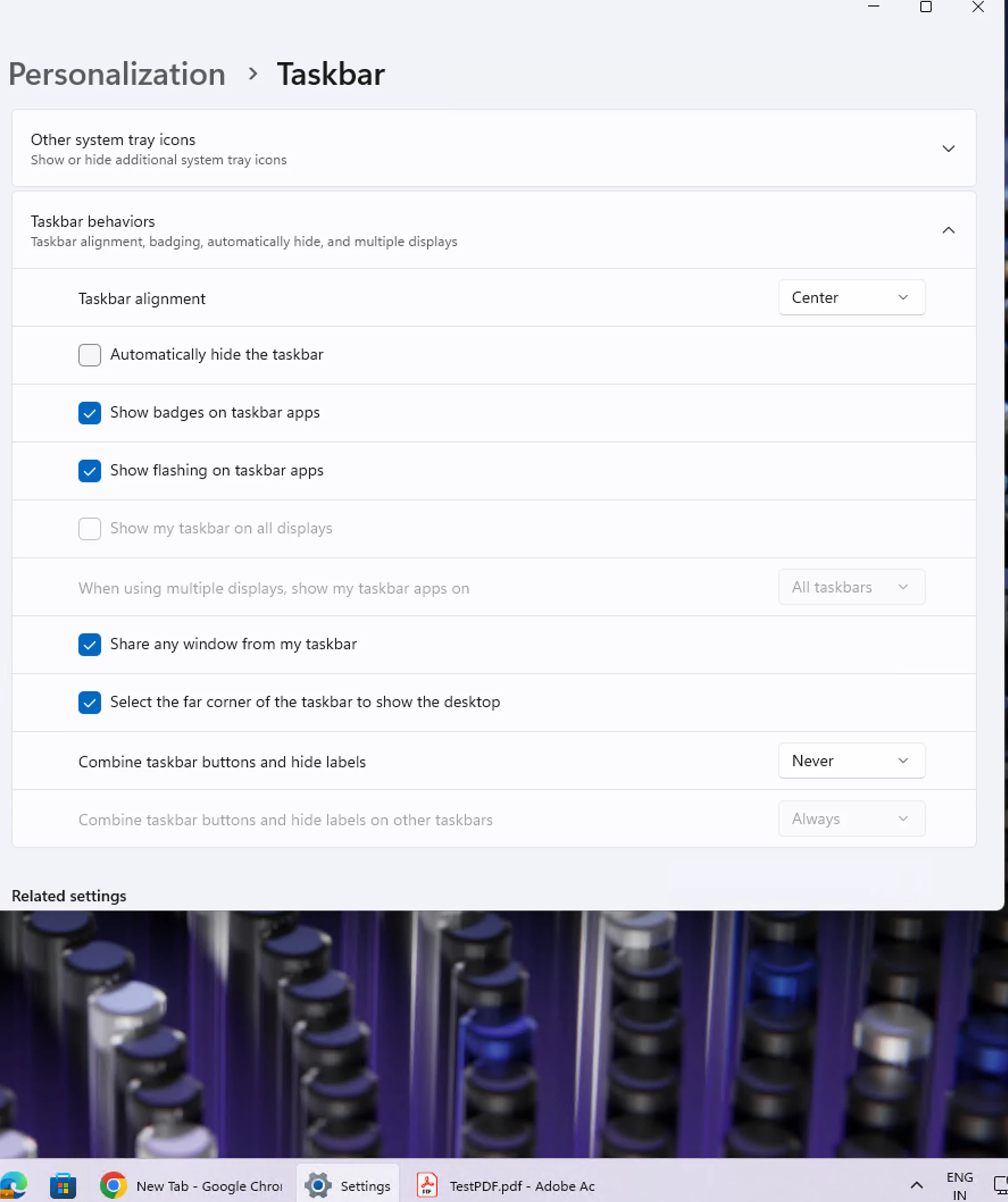
Go to Taskbar settings, choose "Never" in "Combine taskbar buttons and hide label" under Taskbar behaviors of Taskbar settings. (refer the below screenshot)
In this way, whenever you click always the last opened pdf will be opened. 


However, I understand with current settings of there is a disparity between Acrobat & Chrome's behavior as you've mentioned is correct and unfortunately is not supported as of now for Acrobat . I will also pass on this feedback of yours internally in the team as well.

2 replies

Shashank JainCorrect answer
Adobe Employee
September 17, 2024

Hi @Ahmed142 thanks for putting across this feedback.
There is one way you can do that currently. For that you need to follow these steps:
Go to Taskbar settings, choose "Never" in "Combine taskbar buttons and hide label" under Taskbar behaviors of Taskbar settings. (refer the below screenshot)
In this way, whenever you click always the last opened pdf will be opened. 


However, I understand with current settings of there is a disparity between Acrobat & Chrome's behavior as you've mentioned is correct and unfortunately is not supported as of now for Acrobat . I will also pass on this feedback of yours internally in the team as well.

Ahmed142
Ahmed142Author
Participant
September 29, 2024

Hi Shashank Jain,

Thank you so much for your answer and thank you for taking care with this case.

Meenakshi Negi
Community Manager
Community Manager
September 16, 2024

Hi Ahmed142,


Thank you for reaching out. 


As we understand, when you decide to go back to the Acrobat Reader application after moving to another program, it does not reopen the same tab. Instead, you have to select one of the opened tabs to open the application using the minimized application icon at the bottom.

I am afraid there is no option to change that. This is the designed behavior. The only workaround is not to minimize the Acrobat Reader when moving to another application. So, when you minimize another application, the default tab in the Acrobat Reader will still open in the background.  


Let us know if you are referring to something else or have any questions. 


Thanks,

Meenakshi