


Known Participant
February 13, 2023
Question

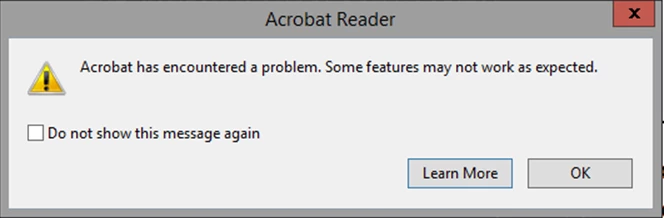
How to disable adobe error message popup in the registry

  • February 13, 2023
  • 3 replies
  • 15251 views

Hi 


I get this popup error message and i want to know what key in the registry do i need to add to disable this popup the same way as if i click on the "do not show this message again"

as i can't find this info online 


This topic has been closed for replies.

3 replies

Participant
February 1, 2024

A bit late to the party on this one but ticking the "Do not show this message again" box creates the following DWORD reg entry with a value of 1:

HKCU\Software\Adobe\Adobe Acrobat\DC\AVAlert\cCheckbox\iDisableCEFErrorDialog


Thom Parker
Community Expert
Community Expert
February 13, 2023

So do you get a lot of problem PDFs?  Perhaps you need to look into that?


Thom Parker - Software Developer at PDFScriptingUse the Acrobat JavaScript Reference early and often
TamirBAuthor
Known Participant
February 13, 2023

Yes I have a lot of problem with Adobe and PDF but as i work in a hospital this is how it is 

and this is way i need a way to close this popup

ls_rbls
Community Expert
Community Expert
February 19, 2023

I update to the latest version and still i have the same problem . so this didn't help


You may not agree with my suggestion, but if you are on Microsoft Windows 10 (64-bit), and Adobe Reader (64-bit), try reverting to the 32-bit version of Adobe Reader.


Needless to say, that suppressing Acrobat JavaScript alerts and messages from the registry doesn't resolve this issue.


But to answer your original inquiry, you need the Acrobat Preferences Reference and see if the desired registry key(s) preference or subfeature that you need to edit are lockable or not.


JR Boulay
Community Expert
Community Expert
February 13, 2023

[MOVED TO THE ACROBAT READER DISCUSSIONS]

Acrobate du PDF, InDesigner et Photoshopographe