


Known Participant
February 13, 2023
Question

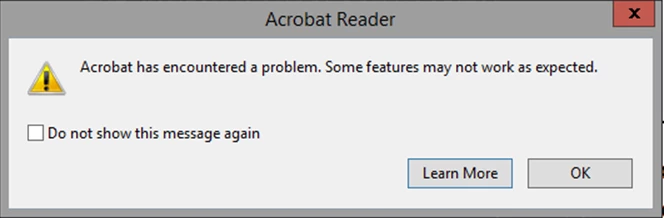
How to disable adobe error message popup in the registry

  • February 13, 2023
  • 3 replies
  • 15251 views

Hi 


I get this popup error message and i want to know what key in the registry do i need to add to disable this popup the same way as if i click on the "do not show this message again"

as i can't find this info online 


This topic has been closed for replies.

3 replies

New Participant
February 1, 2024

A bit late to the party on this one but ticking the "Do not show this message again" box creates the following DWORD reg entry with a value of 1:

HKCU\Software\Adobe\Adobe Acrobat\DC\AVAlert\cCheckbox\iDisableCEFErrorDialog


Thom Parker
Community Expert
February 13, 2023

So do you get a lot of problem PDFs?  Perhaps you need to look into that?


Thom Parker - Software Developer at PDFScriptingUse the Acrobat JavaScript Reference early and often
TamirBAuthor
Known Participant
February 13, 2023

Yes I have a lot of problem with Adobe and PDF but as i work in a hospital this is how it is 

and this is way i need a way to close this popup

ls_rbls
Community Expert
February 20, 2023


1. Adobe is installed on Server 2012 R2, and for that Os, the only version that I can download from Adobe is 32bit as there is no 64bit.
2. I know that this is not a fix, but as Adobe say, with every update, this problem is fixed, but it is not, so this is the best I can do for now
3. you send me a link to all the keys that Adobe has, and i know this link, but how can I find the key that I need
This is the same as sending me to read an article and saying you may find what you are looking in this article
but this doesn't help at all, as I need to know what I need to change in the registry,


I can give more info as I have found that I get to all the errors after iexplore.exe get to 1.2gb or ram. At this point, the Adobe crash


Well, I'm sorry I am just helping here as a voluntary contributor outside of my real job hours. You talk to me like I know the answers to everything or as if I owe you any answers.


I am an Adobe Acrobat customer like many other people here and I don't work for Adobe.


Reading and doing the legwork for other people is what I already do; speciallly for those who don't want to read. I do that legwork for free in these public forums.


But now that I think about it, I should start charging money.


Anyway, I don't work for your organization and they don't pay me to figure out what could be wrong or how to deploy Acrobat in those  Microsoft Servers.


That is your job  (or the IT Managers above you). So, if you are already familiarized with the Acrobat Registry Preference Reference then you have some serious reading to do.


If it helps, the Preferences Reference is combined with the Acrobat Desktop Configuration Administrator Guide:


In particular, all of the registry preferences that you're inquiring about are listed in the first link below. The second link provides more extensive preferences that shouldn't be ignored.


Last, you may also need to use the Acrobat Customization Wizard. The guides linked  below provide checklists to aid you in reviewing and assessing services configuration scenarios and how to customize administrative templates for your desktop users :


JR Boulay
Community Expert
February 13, 2023

[MOVED TO THE ACROBAT READER DISCUSSIONS]

Acrobate du PDF, InDesigner et Photoshopographe