


Known Participant
February 13, 2023
Question

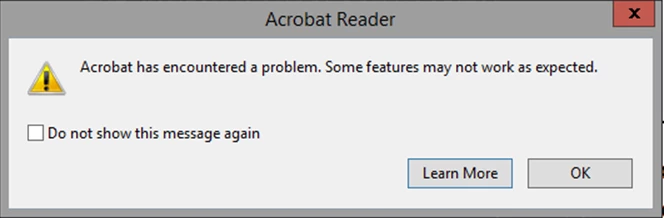
How to disable adobe error message popup in the registry

  • February 13, 2023
  • 3 replies
  • 15251 views

Hi 


I get this popup error message and i want to know what key in the registry do i need to add to disable this popup the same way as if i click on the "do not show this message again"

as i can't find this info online 


This topic has been closed for replies.

3 replies

New Participant
February 1, 2024

A bit late to the party on this one but ticking the "Do not show this message again" box creates the following DWORD reg entry with a value of 1:

HKCU\Software\Adobe\Adobe Acrobat\DC\AVAlert\cCheckbox\iDisableCEFErrorDialog


Thom Parker
Community Expert
February 13, 2023

So do you get a lot of problem PDFs?  Perhaps you need to look into that?


Thom Parker - Software Developer at PDFScriptingUse the Acrobat JavaScript Reference early and often
TamirBAuthor
Known Participant
February 13, 2023

Yes I have a lot of problem with Adobe and PDF but as i work in a hospital this is how it is 

and this is way i need a way to close this popup

ls_rbls
Community Expert
February 27, 2023

Hi
First, I am sorry if what I have written sounds as if I attacked you. This was not my intention.
I want to say thanks a lot for trying to help me and taking the time to do so, even as you are not getting paid for that.
I do wish that Adobe would take the time to add one of their employees to help, also a guy for the dev team that can say, all you need to do is add this key, and you are done with it
from all that I can find, there is no mention of any key that controls the error message popup windows, at list, not one that I can find in their info
so this is still a mystery.


@TamirB ,


No worries, it took me a little while to get back  with an more solid answer, but I think this information may help.


The message alert is still unclear unless you can  provide more details of the type of work that was taking place in Adobe Reader.


However, because the alert is related to a feature that appears as not available, it looks to me more like a particular service is being blocked at work (a security restriction).


OR,


If some or all of the PDFs that are sent to you (or shared with you) were produced with a paid-for version of Acrobat (i.e. a different license track), it is possible that such documents may have document-level preferences that are restrained when opened or viewed with Adobe Reader; therefore, maybe such features can only be  unlocked with a paid version of Adobe Acrobat Pro.


Prime example, since you've mentioned that you work at a hospital, it would make sense to me that some of the electronic medical records and electronic health records digital file types, to include patients'  medical billing and patients' insurance records are probably ditributed and shared  digitally accross many doctors and nurse practitioners computers.


And if that would be true, then it makes sense to me that Adobe Reader doesn't have the capability of importing an electronic medical chart (to name another example... a .csv file dataset that is  being pulled from an ECG database).


If that would be the case, then the problem could be related to file export/import to PDF (just guessing in the blind here), to include  copying and pasting text from one program to a text form field in a PDF,  accessing a PDF that is shared with other users via mapped network drives or folder, or trying to printing or Save As.


In any case, it would help if you can confirm what type of work was done with any file type that needed to be converted to a PDF document before it was viewed with Adobe Reader.


Sharing any type of error logs (if you are able to ) or even  a screenshot of the Windows Event Viewer ==> Microsoft Office Service alerts  (with no sensitive data , of course) may also help to get to the bottom of this.


JR Boulay
Community Expert
February 13, 2023

[MOVED TO THE ACROBAT READER DISCUSSIONS]

Acrobate du PDF, InDesigner et Photoshopographe