


Known Participant
February 13, 2023
Question

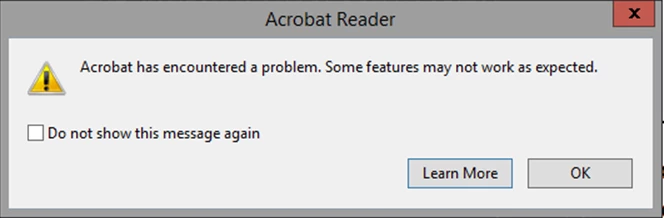
How to disable adobe error message popup in the registry

  • February 13, 2023
  • 3 replies
  • 15251 views

Hi 


I get this popup error message and i want to know what key in the registry do i need to add to disable this popup the same way as if i click on the "do not show this message again"

as i can't find this info online 


This topic has been closed for replies.

3 replies

New Participant
February 1, 2024

A bit late to the party on this one but ticking the "Do not show this message again" box creates the following DWORD reg entry with a value of 1:

HKCU\Software\Adobe\Adobe Acrobat\DC\AVAlert\cCheckbox\iDisableCEFErrorDialog


Thom Parker
Community Expert
February 13, 2023

So do you get a lot of problem PDFs?  Perhaps you need to look into that?


Thom Parker - Software Developer at PDFScriptingUse the Acrobat JavaScript Reference early and often
TamirBAuthor
Known Participant
February 13, 2023

Yes I have a lot of problem with Adobe and PDF but as i work in a hospital this is how it is 

and this is way i need a way to close this popup

ls_rbls
Community Expert
February 28, 2023

After a bit more work, I have found out that the main problem comes from iexplore.exe as the opening of the pdf file is down by iexplore.exe, and with every file that you open, the iexplore.exe use more Ram, so all works fine up to the point that iexplore.exe get to 750 MB or Ram use and at that point Adobe crash or start to give error message.

Just for the test, I have installed Foxit, and I get the same problem 

Foxit didn't give me any error, but it crashed at the same point, so I know I have two issues. One is with the iexplore.exe and Ram use, and the second one is an error from the adobe app even before we get to the limit of the Ram with iexplore.exe, and this is only an Adobe problem.

As for your idea, this is not the case as all the pdf files are made here with a plug-in from Adobe, and none of them have any security or limit as for sign doc or license. 


As a side note, I get the same error with iexplore.exe  with a web app, so if you know of any software that can limit the Ram use of iexplore.exe it may help. I have tried all the free apps I can find, but none work.


And don't tell me to move to Microsoft Edge, as I can't. The web app we use only works with iexplore.exe, and in any case, if I work in Edeg in IE mode, I can get to 1.2Gb or Ram, and then it also crashes so this is not helping 


Which version of Windows are your  clients on?


You also mention that PDFs are created using a web app, which web app? Please be very specific about all of your sofrware.


You mentioned that Acrobat is installed on a Microsoft Windows Server 2012?


Or did you mean  to say that the server is used as a file server to share PDF files ro Windows 7 or Windows 10 clients ?  Please be specific.


And what exact  version of Adobe Acrobat are you on?


Is this a virtual machine environment?


The limitations of physical RAM tells me that you are not using real desktop computers, unless they are super old computers (which it doesn't make sense having Microsoft Edge in such old computers).


Sorry about all these questions, I am just trying to find the relationship of iexplore.exe and PDFs documents. Maybe by using a web app you are referring to the Adobe Acrobat PDF extension or plug-in installed on Internet Explorer.


Which confuses me because if you are using Adobe Acrobat 32bit  then what  is Internet Explorer: 32 bit or 64 bit?

JR Boulay
Community Expert
February 13, 2023

[MOVED TO THE ACROBAT READER DISCUSSIONS]

Acrobate du PDF, InDesigner et Photoshopographe