


Known Participant
February 13, 2023
Question

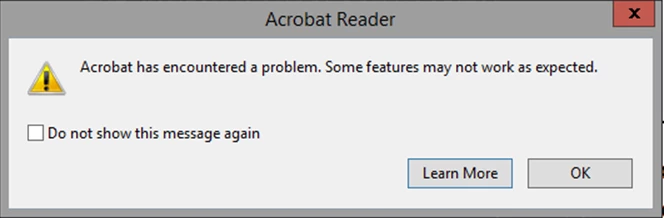
How to disable adobe error message popup in the registry

  • February 13, 2023
  • 3 replies
  • 15281 views

Hi 


I get this popup error message and i want to know what key in the registry do i need to add to disable this popup the same way as if i click on the "do not show this message again"

as i can't find this info online 


This topic has been closed for replies.

3 replies

Participant
February 1, 2024

A bit late to the party on this one but ticking the "Do not show this message again" box creates the following DWORD reg entry with a value of 1:

HKCU\Software\Adobe\Adobe Acrobat\DC\AVAlert\cCheckbox\iDisableCEFErrorDialog


Thom Parker
Community Expert
Community Expert
February 13, 2023

So do you get a lot of problem PDFs?  Perhaps you need to look into that?


Thom Parker - Software Developer at PDFScriptingUse the Acrobat JavaScript Reference early and often
TamirBAuthor
Known Participant
February 13, 2023

Yes I have a lot of problem with Adobe and PDF but as i work in a hospital this is how it is 

and this is way i need a way to close this popup

Participant
October 10, 2023

Hi @TamirB 


Sorry to hear about your frustrating experience. 

If you continue to receive the same error message when launching the application, please share the following details to investigate this further.

1- Current version of Acrobat Reader installed on your machine. Open Acrobat Reader>help>about Reader

2- Navigate to Acrobat Reader>Edit>Preferences (Ctrl+K)>General> Uncheck "Show me messages when I launch Acrobat Reader">OK


Let us know if you continue to experience the same error. 


Thanks,

Akanchha 


My issue is somewhat similiar, 

[removed]

JR Boulay
Community Expert
Community Expert
February 13, 2023

[MOVED TO THE ACROBAT READER DISCUSSIONS]

Acrobate du PDF, InDesigner et Photoshopographe