New Participant
April 10, 2017
Answered

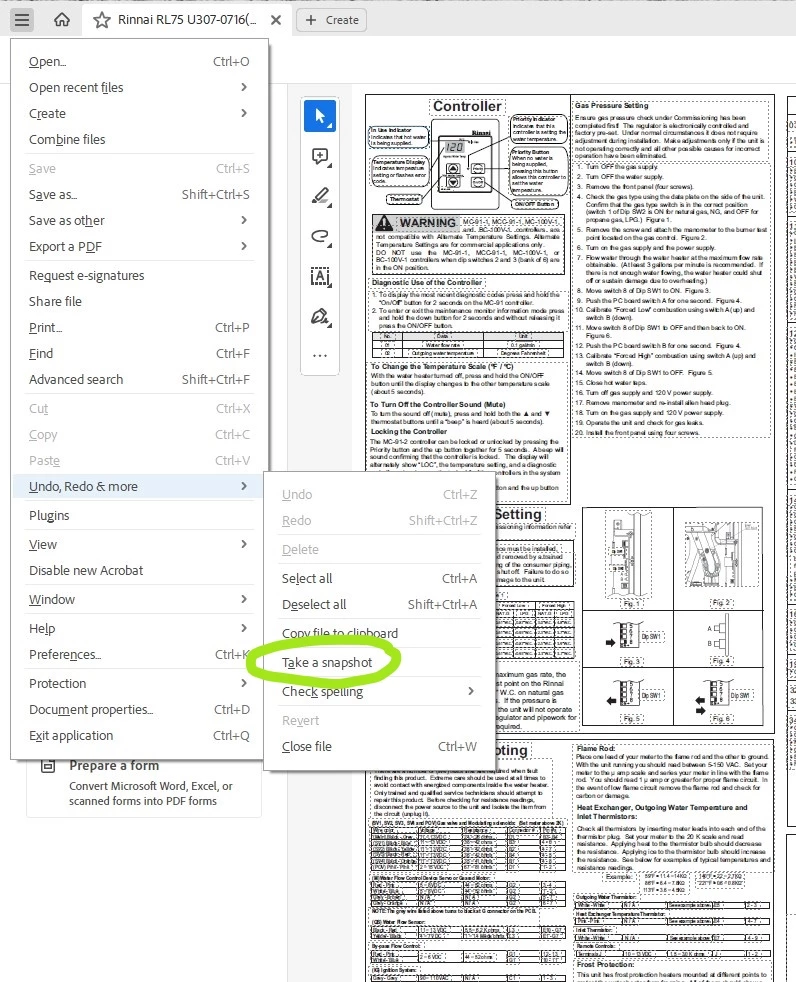
Snapshot/camera tool in Adobe Reader DC is missing

  • April 10, 2017
  • 7 replies
  • 168263 views

Adobe Reader DC - does anyone know how to get the snap shot / camera tool back into the tool menu?

Correct answer Bernd Alheit

7 replies

New Participant
June 24, 2023

Cant Access the tool with the new updated version, usually it was under EDIT and click more- but now i dont know where it was moved. 


Bernd Alheit
Bernd AlheitCorrect answer
Community Expert
June 24, 2023

New Participant
June 24, 2023

Thank you so much! I literally spent 30 minutes looking all over, and getting frustrated! So i appreciated your  help!

New Participant
August 16, 2022

I have adobe acrobat pro dc.  I have attached the snapshot icon to my tool bar(small camera) it brings up the cross hairs but it will not let me drag a rectangle around my target.  If i right click it says select all/deselect all or print.  What is going on?

YesIAmDwight
Inspiring
August 8, 2022

Why are you guys (Adobe) going out of your way to keep hiding this incredibly useful tool deeper and deeper where people have to dig? Just put it back out front where you found it and leave it alone!

New Participant
September 24, 2022

I agree, why was this moved? Much harder to clip screen shots now. Was that their intent? Is there a way to move the camera back to the tool bar above? 


try67
Community Expert
September 25, 2022

Yes, see above.

New Participant
May 21, 2022

Hello, why the  snap shot button moved from Direct EDIT  tab to More tab.  It is easy to accesss from EDIT tab.  Please keep it in EDIT tab only.

Thank you,

Janjanam Siva Rama Krishna.

New Participant
April 23, 2022

I can't get the edit function to enable me to get snapshot


Bernd Alheit
Community Expert
April 24, 2022

What edit function does you mean?

New Participant
March 31, 2022

how do i do this on a Mac?
Jeff


Adorobat
Community Manager
Community Manager
April 14, 2017

Hi JennyMMD,

1- Try right-clicking on the Toolbar.

2- Under "Show Edit tools" select Take Snapshot.

Below is the screenshot:

Let me know if you have further questions.

Thanks!

Shivam

JennyMMDAuthor
New Participant
April 15, 2017

Thank you very much

KR Jenny

Adorobat
Community Manager
Community Manager
April 15, 2017

You're Welcome.