


How to not copy numeration of listings package - LaTeX
Context
I use Acrobat Reader DC on my PC to display documents made with LaTeX code. Sometimes I need to write and display code, so I use a package called listings.
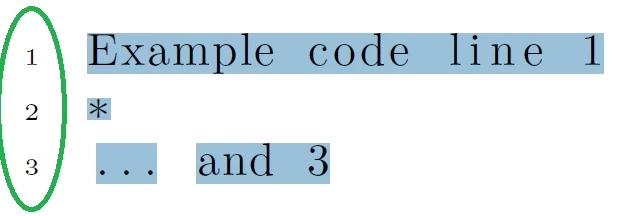
That package has an option for add numeration to the code displayed in the document. For example this is a PDF output:
Example code line 1- *
- ... and 3
The numbers (1, 2 and 3) will not be copied if I use this command (inside LaTeX code):
numberstyle=\noncopynumber,
because if we copy a complete program made with, for example, C++ from that PDF output (always using listings) will generate errors, because the enumeration should not be copied.
Describing the problem
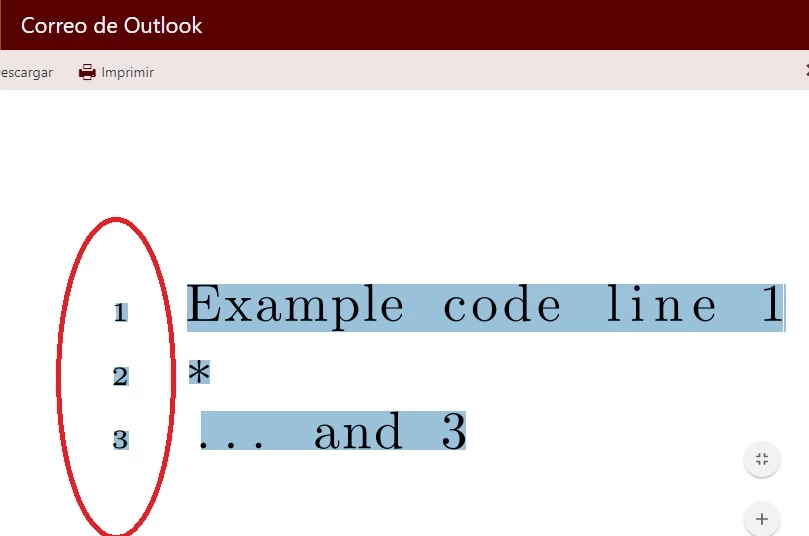
This non-copy-numbers works for me as long as the document stay in my computer, using Acrobat. But it does not work anymore if I upload the same document in a email of Outlook, for example. The enumeration is copied too, generating problems in a C++ program.
I contacted the maintainer of the listings package and he told me that it is probably a problem with the Adobe viewer. So I want to know how to solve this problem, because in "offline" mode the PDF works fine, but in "online" mode it does not.
Also I created a question in the TeX.StackExchange forum and they told me the same thing that the maintainer. You can see the post here and a GIF that I uploaded in Imgur to describe the problem visually (compiling in my computer -> seeing the PDF output with Adobe -> comparing it with the same document uploaded in Outlook).
You can test the PDF output with code of the listings package using this code given in that forum and pasting it in Overleaf:
\documentclass{article}

\usepackage{enumitem}

\usepackage{listings}

\usepackage{accsupp}
\newcommand{\noncopynumber}[1]{%
   \BeginAccSupp{method=escape,ActualText={}}%
  #1%
   \EndAccSupp{}%
}

\lstset {%
  numbers = left,%
  numberstyle=\tiny\noncopynumber
}

\begin{document}

\begin{lstlisting}
Example code line 1
*
... and 3
\end{lstlisting}

\end{document}
You must download the PDF to try to copy the text inside the document.
If you need more information please let me know.
Thanks!
Examples
PDF output in my PC
The same PDF uploaded in Outlook
Technical Information
Acrobat Reader
Continuous Release: 2018.011.20058
File Version: 18.011.20058.33888
AGM Version: 4.030.00078
CoolType Version: 5.014.00033
Core Version: 18.2816
JP2K Version: 1.002.00002.41223
Browser
Google Chrome, version 68.0.3440.106 (Official Build) (64 bits)
OS
Microsoft Windows 10 Home Single Language, version 10.0.17134 compilation 17134
 AdChoices