


Participant
October 15, 2018
Question

How to not have adobe reader home page stay open after closing PDF file

  • October 15, 2018
  • 13 replies
  • 23219 views

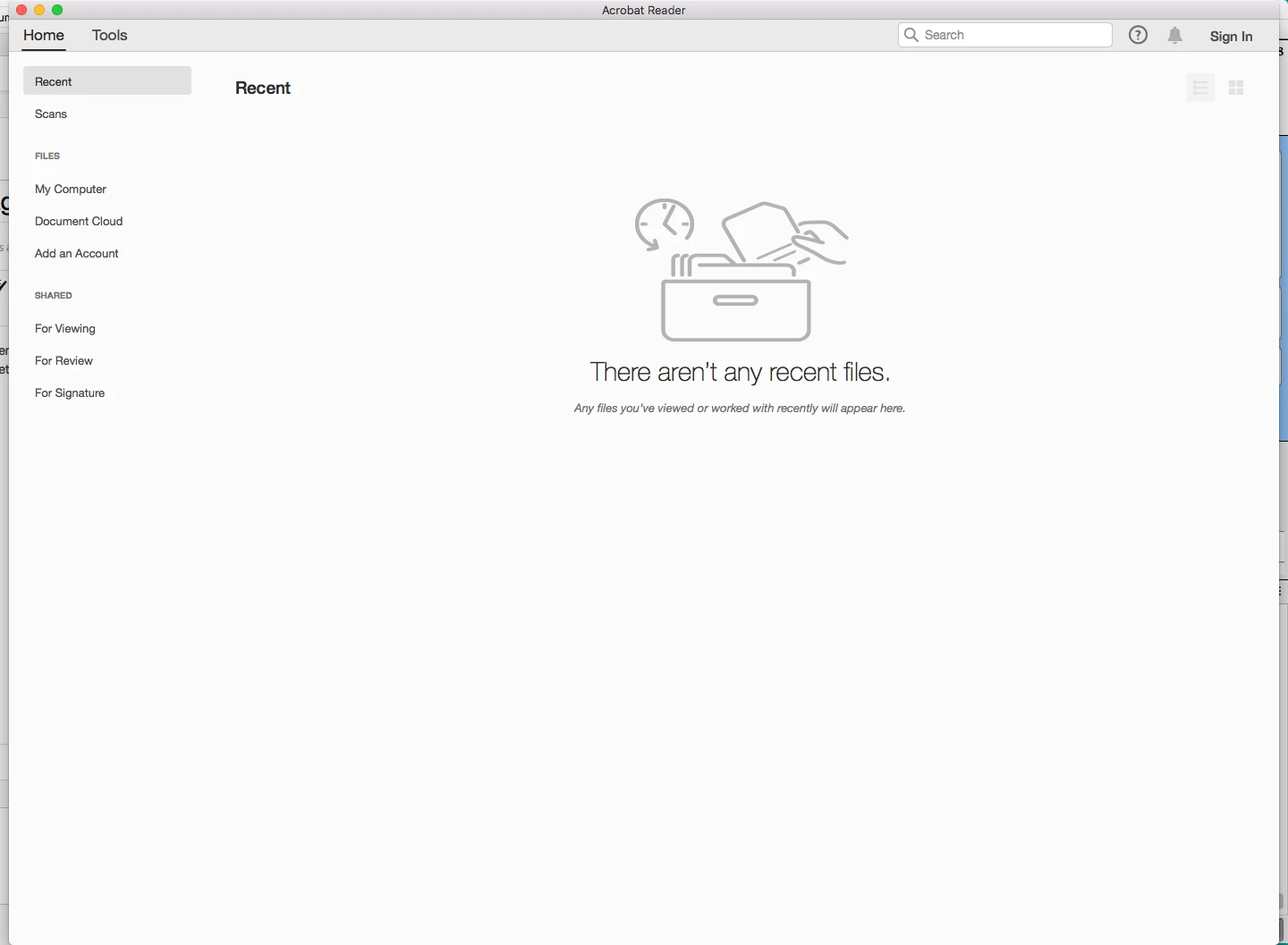
Hi, I noticed with update every time I close a PDF file I'm looking at it keeps open this page with showing 'home' , 'tools' at the top and a list of all the previously opened PDF files etc.  Any way to NOT have that page always remain open.  Getting annoying having to close it every time I don't looking at a PDF. Page showing below after closing any PDF file.  Thanks.
    13 replies

    Inspiring
    March 31, 2023

    It looks like the 2023 Mac version no longer has the option to disable this. Does anyone have a way of getting the previous 2022 version? I had to go back to Acrobat 2020 as that is the most recent previous version that the download links still work. I also had to lock the Acrobat folder and disable it's startup helper to prevent it from auto-updating to 2023.

    Known Participant
    December 9, 2022

    I use a Mac so it may be different for Windoes, but is it not as simple as unchecking this box...


    Participating Frequently
    December 11, 2022

    Hi David,

                  Yes unfortunately I think it is just an unwanted "Feature" from our friends at Adobe.

    I just find it annoying as did the OP in 2018.

    Thanks for your input.

    Regards

    Philip


    Participant
    December 6, 2022

    In Windows, I found a solution.  In the top menu, choose Edit, Preferences.  In the General category, uncheck "Open documents as new tabs in the same window (requires restart)."


    Participating Frequently
    December 7, 2022

    Hi Donald,

       This does not work for me unfortunately.

    Every time I clik it off it is on when I relaunch.

    I dont know why.

    Any ideas?

    Thanks for your input.

    Regards

    Philip


    Participant
    December 7, 2022

    I'm not sure, but if you are using a computer at a school or business, perhaps the Adobe Acrobat settings are locked so that Preference changes are not saved when the program closes?  If this is your situation, then perhaps IT staff could fix this issue.

    Participant
    May 20, 2021

    I am having the same problem.  I cannot find a setting for it anywhere.  I would like to see the solution if one is offered.  Thanks!  

    Participant
    March 28, 2022

    Until they get a fix for Windows, I just hit Ctrl+Q to end the program. Works out the same.

    Participating Frequently
    April 1, 2022

    Hi Joe,

       Well it is one solution but I still cant understand why the normal Windows close does not do this - I like to use my mouse wherever possible - just speeds things up.

    Thanks for you help anyway.


    Regards

    Philip

    Legend
    April 9, 2019

    bigmike, what is your exact version of Acrobat or Acrobat Reader? (Not "up to date", please, looking for a number like 2016.123.43433). And do you have the free Acrobat Reader or the paid-for Acrobat?

    Rick314
    Participating Frequently
    July 17, 2019

    Adobe Acrobat Reader DC v2019.012.20035 for Windows (the latest version) does not have the "Show home screen when all documents are closed" option available under Preferences, General.  I want it there, in working condition, so I can uncheck it.  I want the app to exit when I close the last open PDF file.  This is what I think others in this thread and other related threads want too.

    Participant
    September 1, 2020

    Yes, exactly 🙂

    Legend
    October 17, 2018

    I understand, that's more the Mac way of working.

    Legend
    October 17, 2018

    Sorry, missed that you were on a Mac, I should have seen it. How about Command+Q?

    October 17, 2018

    Command Q is just going to quit the application. I prefer to keep Acrobat open, but hidden, as I have to open PDF files throughout the day at work.

    Legend
    October 17, 2018

    Certainly preferences ought to work, but for now I was trying to make sure you can at least get what you wanted.

    Are we definitely on the same page? If you're looking at the last document you click the X and the whole app is gone, no Home screen. I just can't see it as even a minor inconvenience, but your mileage may vary.

    October 17, 2018

    No. If I'm looking at a PDF document and then close it either by clicking on the red x button at the top left or Command W (Using a Mac), the PDF document closes, but then the Home/Tools window stays open. Of course, now that I've tried turning on/off that preference option and quit/relaunched Acrobat a few time, it seems that upon closing the PDF file, the Home/Tools screen now closes like it should. However when launching Acrobat the Home/Tools screen opens or if I close the Home/Tools screen and Hide acrobat, and then click on Acrobat to unhide it, the window shows up again. I would think with the preference unchecked, that window shouldn't appear if no documents are opened. Annoying? Yes, Inconvenient...well I can live with it but I have no use for the Home/Tools window 99.99% of the time so would prefer not to see it.

    Legend
    October 17, 2018

    I don't understand your problem with closing the last document as suggested?

    October 17, 2018

    I don't have a problem closing the last document or closing the Home/Tools screen, but I'd prefer the Home/Tools screen to automatically close when the last document is closed. And since there is a setting in the Preferences/General to have it do so it'd be nice if that worked. It worked just fine until the latest update if I'm not mistaken. It's just a preference I and many other have to not manually click on the red box or command W to close the Home/Tool screen after the last PDF document is closed.

    Participating Frequently
    October 15, 2020

    Hi Johnny,

           I know this is two years old - did you ever get a satisfactory answer?

    Reding through the replies above you must have been very frustrated.

    I only noticed this behaviour recently and came across this thread - I know it is only a minore inconvenience but if you have to click X every time 20 times a day it is driving me crazy!


    I am a Windows user.


    Regards

    Philip

    Ayush__Jain
    Adobe Employee
    Adobe Employee
    October 16, 2018

    Hi,

    If you do not wish to see the Home view on closing all documents on Mac, You can always go to Preferences -> General and Un-select this preference.

    Once you set this checkbox to false, you will no longer see the Application Window on closing all documents.

    Let me know if that solves your concern.

    Image result for Show Home Screen when all Documents are closed.”

    Let me know f that solves your concern.

    -Ayush Jain

    October 17, 2018

    I have that unchecked in Preference, General, but the Home/Tools screen still stays open when all documents are closed.